
CyberDrive DM126D DVD-ROM
1. Introduction
Introduction:
 is
a relatively unknown hardware manufacturer. Most people only know some CD-ROM
models, which were fitted on "sold-as-is" PC systems assembled by
various companies all over the world. Cyberdrive CD-ROMs are known as cheap
devices which perform quite well and are ideal for the needs of common users.
is
a relatively unknown hardware manufacturer. Most people only know some CD-ROM
models, which were fitted on "sold-as-is" PC systems assembled by
various companies all over the world. Cyberdrive CD-ROMs are known as cheap
devices which perform quite well and are ideal for the needs of common users.
Lately the company decided to take a step into the DVD market and try to take on the competition. So they introduced the DM126D model, which is a 12x DVD / 40x CD-ROM drive. The manufacturer claims the following:
"With the beginning of the year Cyber Drive presents their new DVD-ROM drive DM126D. The device reaches a data transfer rate of 16.200 KB/s in the DVD mode and so guarantees a smooth DVD playback. The drive supports all common formats like DVD-ROM, DVD-R, CD-DA, CD-ROM, CD-ROM/XA, Photo-CD, Video-CD, CD-Plus, CD-Extra, bootable CD as well as CD-R and CD-RW. The internal IDE/ATAPI drive is equipped with a 512 KB cache buffer."
- Package :
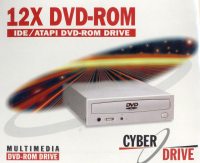 The
package we received was the full Retail version, which included the drive, an
audio connection cable, an IDE cable, 4 screws and an instruction booklet. We
were a bit dissapointed because we didn't find any enclosed DVD player programs,
but since we had PowerDVD 3.0 we had no problems playing DVDs.
The
package we received was the full Retail version, which included the drive, an
audio connection cable, an IDE cable, 4 screws and an instruction booklet. We
were a bit dissapointed because we didn't find any enclosed DVD player programs,
but since we had PowerDVD 3.0 we had no problems playing DVDs.
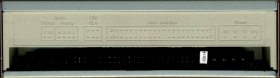 Here
we see the back side of the drive. We have receptables for the IDE connector
cable, the Power connector, three jumpers for setting the drive as master/slave/cable
select, and finally two audio outputs, a digital and an analog one.
Here
we see the back side of the drive. We have receptables for the IDE connector
cable, the Power connector, three jumpers for setting the drive as master/slave/cable
select, and finally two audio outputs, a digital and an analog one.
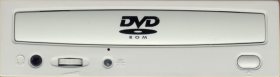 No
surprises on the front side of the drive either. The DVD logo is printed on
the tray face in black. There is one LED, one sound potentiometer and a headphone
jack. And finally, the eject button. What we didn't like about the eject button
was its rubberish feel, which will puzzle many users about whether they have
actually pressed it or not.
No
surprises on the front side of the drive either. The DVD logo is printed on
the tray face in black. There is one LED, one sound potentiometer and a headphone
jack. And finally, the eject button. What we didn't like about the eject button
was its rubberish feel, which will puzzle many users about whether they have
actually pressed it or not.
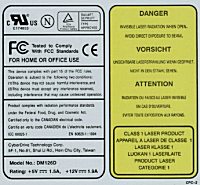 Finally,
we have the yellow stamp on the top side of the drive. The model is clearly
marked as "DM126D" manufactured in Hsin Chu City, Taiwan by Cyber
Drive Technology Corporation. We opened the drive for a sneek peek inside. No
complaints about the quality of the materials used or the soldering. Points
should be deducted for the load/eject mechanism motor, because the rubber band
is so close to the tray opening that you can actually touch it.
Finally,
we have the yellow stamp on the top side of the drive. The model is clearly
marked as "DM126D" manufactured in Hsin Chu City, Taiwan by Cyber
Drive Technology Corporation. We opened the drive for a sneek peek inside. No
complaints about the quality of the materials used or the soldering. Points
should be deducted for the load/eject mechanism motor, because the rubber band
is so close to the tray opening that you can actually touch it.
- Installation :
We installed the drive as slave on the secondary IDE bus. The drive identified
itself as DVD DM126D from both the BIOS and Windows. It came with firmware revision
v1.3c. We enabled DMA under Windows 2000 for the secondary IDE and after that
we were ready to start the tests. We also installed the latest PowerDVD version
(3.0) for measuring the DVD performance.
The drive performed quite well, playing all DVD movies we tried. We didn't have to worry about region selection, because it was already preset for our country. Unfortunately, when we started doing some serious tests on the drive, we were very dissapointed and puzzled.
Nero DVD Speed which we used for all tests failed to complete itself for 4 out of the 5 DVD disks we used. We kept getting 'code 000000' errors. This also happened when we tried measuring DAE and EAC. Feurio! finally gave us a report about the drive not being able to rip audio tracks sufficiently. We were ready to throw the drive in the trashcan and write a very bad review about it, until we disconnected it and placed it as a slave on the primary IDE.
Strange as it may seem, all the above problems were solved. The DM126D has lots of potential, but it will not be able to show it unless you place it on the primary IDE. It is kinda funny, but that is what our tests have shown. It couldn't perform OK on the secondary IDE even as the SINGLE drive of the system. Maybe a future firmware revision will be able to fix this problem, but for now we kept the drive as a primary slave and went on.
To end this rather large introduction, we must say that there is no way of changing the region settings of the drive yet, and you are limited to 5 of them, according to RPC2.
Test Machine :
WinMe OS
Soyo 7VCA
Celeron II 566 over clocked to 850 MHz
128MB SDRAM PC 133
WD 18GB UDMA 66
Quantum Fireball EX 6.4 GB UDMA 33
DAWI 2975 - PCI (ULTRA) SCSI Host Adapter
ATI AIW 128





