Windows 7 RC
8. IExplorer 8, Windows Media Center 6.1 and WMP 12
Review Pages
2. Vista problems and Windows 7 solutions
3. Windows Vista & 7 installation and compatibility
4. UAC problems, visual and other smaller issues
5. Memory management
6. Control panel
7. New and updated Accessories
8. IExplorer 8, Windows Media Center 6.1 and WMP 12
9. Final words
10. New Features in Windows 7 - Taskbar
11. Start Menu, Gadgets and Explorer
12. Libraries and New Aero Effects
13. Network
Libraries:
Windows 7 Libraries is a new addition that reminds Virtual folders or Searches on Windows Vista, a feature that was used in order to find for example all of your documents with just one click. Microsoft thought that it was too complex and that's why in Vista searches are located in the User profile folder and not anywhere else. Libraries has a better way of working. Instead of making a search, libraries are a set of folders that are shown as one of them. So, for example, if you have music files in 3 different folders, you can add those 3 folders in the Music library and then you will have all of your songs in one place. A Library can have as many folders as you want.

Libraries, there are 4 available, documents, pictures, music and videos - more libraries can be added here
Another reason why libraries works better is that you can select a folder to be the default one for copying files in the library. This was troubling in Vista because people would confuse searches with folders and try to add files in them. Except from the default view of libraries as folders, for every library there are some more "arrange by" options that can help group our files better. For example on the music library we can Arrange our files by Album, Artist, Song, Genre and Rating.

Ssorting music by album. Every arrange view has its own settings

Arranging music by Genre
New Aero effects:
Windows 7 has some new aero effects in order to support multi touch better and to expand windows experience.
Aero Snap: With Aero Snap when you drag an open program in the top of the page, it will maximize. If you drag it again it will restore to it's previous size. Also if you drag it on the left side of the screen, it will resize to cover the left half of it. The same happens if you drag it to the right side. Aero Snap is mostly important for the touch features of Windows 7.
  |
Aero Snap used to maximize a windows in the left side of the screen.
Aero Shake: When you shake an open program in Windows 7, it will minimize every other running program, and, if you shake it again, it will restore all of them. This happens with the help of Aero Shake.This feature will mostly serve the multi-touch use of Windows 7.
Aero Peek - Aero Peek help us see the selected program or folder by hiding any other program or folder. In order to fully understand that check the image below. We can find Aero Peek when we are searching our running programs through Alt+Tab, while hovering over the thumbnail of a taskbar icon. Aero Peek also refers to the "Show desktop" button to the far right of the new taskbar.

Showing the Desktop with the help of Aero Peek. This also happens when you are using Alt+Tab to browse your open programs or while hovering your mouse pointer over a thumbnail.
Some other Aero changes are the Touch support and the fact that maximized windows remain glassy instead of becoming opaque.

Windows remain glassy in full screen
When hovering over the taskbar button of a running program, the button glows the dominant RGB color of its icon. Also, a shiny effect follows the mouse in the taskbar as it is moved across the icons of running programs.
 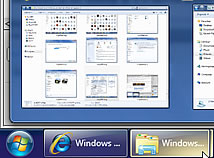 |
A shiny effect in the taskbar
Review Pages
2. Vista problems and Windows 7 solutions
3. Windows Vista & 7 installation and compatibility
4. UAC problems, visual and other smaller issues
5. Memory management
6. Control panel
7. New and updated Accessories
8. IExplorer 8, Windows Media Center 6.1 and WMP 12
9. Final words
10. New Features in Windows 7 - Taskbar
11. Start Menu, Gadgets and Explorer
12. Libraries and New Aero Effects
13. Network