Breaking News

Razer Unveils All-New Wolverine V4 Line ASUS Republic of Gamers Ships ROG Rapture GT-BN98 Router GMK Unveils TriggerKey, a New Mechanical Key System for Greater Precision and Comfort Akasa Unveils Euler MX2, Fanless Mini-ITX Case for Unattended Commercial and Industrial Computing Air Power G10 PC Case Now Available at Newegg with Three Tilting Front Fans

logo

  • Share Us
    • Facebook
    • Twitter
  • Home
  • Home
  • News
  • Reviews
  • Essays
  • About
    • Submit News

    • Contact Us
    • Privacy

    • Promotion
    • Advertise

    • RSS Feed

Search form

Terramaster TD2 Thunderbolt 3

Aug 22,2021 0

2. Retail Package


Review Pages

1. Introduction
2. Retail Package
3. Installation
4. Conclusion


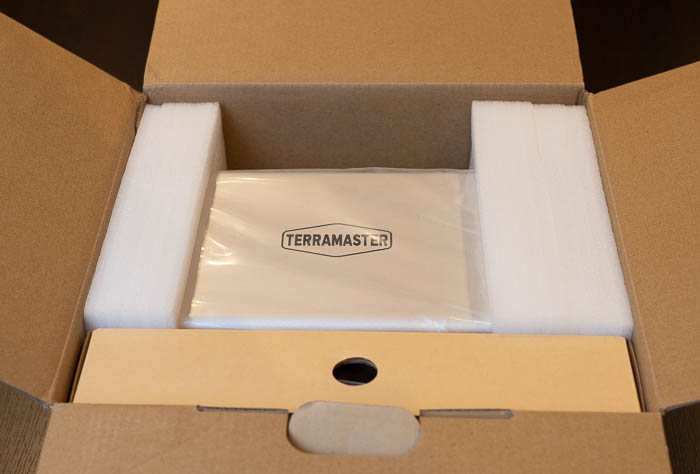
The Terramaster TD2 Thunderbolt 3 comes with a minimal design and the needed specs printed at a side sticker. The version we tested costs around 270 Euro as found over Amazon.com / Amazon.de / Newegg. Terramaster also offers another model, higher priced called TD2 Thunderbolt 3 Plus that costs around 320 Euro and offer in addition two USB3.1 hosts and 1Gbit LAN (network interface provides a network only for your computer – It cannot convert your hard drive into a network drive.). The box is medium sized and rather minimal:

At the side users will find product information and part number. The chassis is well protected and placed next to another cardboard box that includes the rest of the accessories. Opening the box, we will find the package contents:
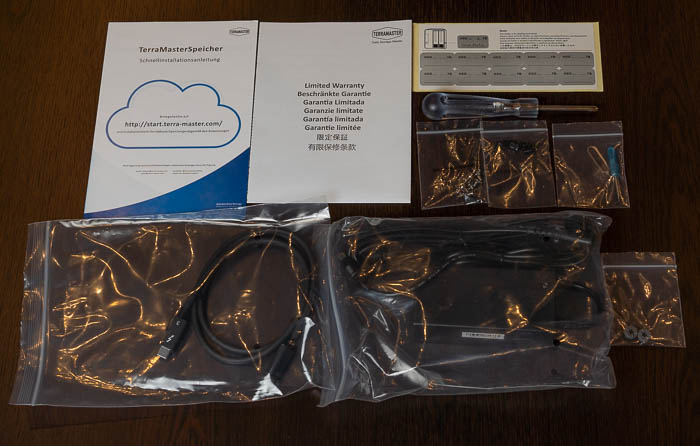
Unpacking the contents, users will find

  1. Host unit (x1)
  2. Power cord (x1)
  3. Thunderbolt 3 cable (40Gbps) * 1
  4. Quick Installation Guide (x1)
  5. Power adapter (x1)
  6. Screws (several)
  7. Limited Warranty Note x 1

In case you register your product with Terra-Master you get additional 6-month warranty (2 years + 6months). In order to get the NAS server running of course you need either 3.5" or 2.5" HDD/SSD drives. Terramaster lists several drives certified to work, users should visit this page to get more information. In short, Terramaster lists Seagate, Samsung, Sandisk and WD Red SSD drives, while for normal HDD, suggests Seagate Barracuda Pro, Exos, Skyhawk, Ironwolf/Ironwolf Pro and WD Red/Red Pro, Purple, Gold, Surveillance and Toshiba NAS N300 series. Of course other HDD may work, but make sure the used drive is built for NAS use, else your data may be in danger.

The product has small dimensions (227 x 119 x 173 mm) and weights around 1.40kg without any drives installed. The material used is aluminum and gives a good overall aesthetics and feel to the product. At the top there is a useful handle to carry your external case in case you need it.

At the front users will find two (2) slots for inserting HDDs. At the left area there is the power button and several led indicating how many drives have been installed and the operation of the system.

LED Operation
Hard drive tray Fix hard drive
Hard drive indicator Red: Faulty
Hard drive indicator Blinking green: Reading or writing
Hard drive indicator Orange: RAID synchronization
Hard drive indicator Off: No hard drive (or in sleep mode)
Power indicator On: Powered on
Power indicator Off: Powered off
Power button Short press to power on
Power button Press and hold for 3 seconds to power off

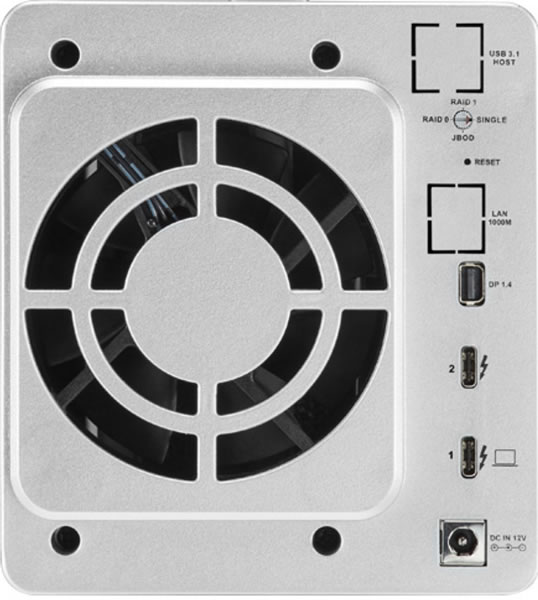
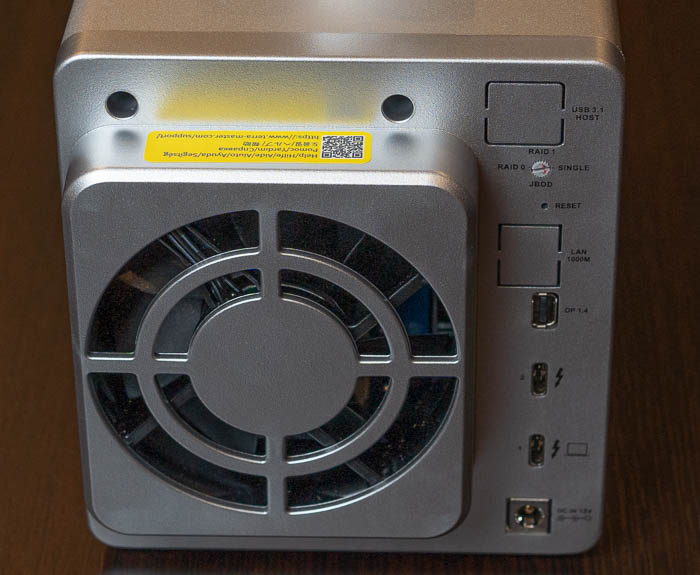
At the back, we will find one 80 mm x 25mm fan (rated 18.6dB(A) , along with various connection port

Power jack
DC 12V
Thunderbolt 3 interface 1
Interface for computer (compatible with USB) /charging
Thunderbolt 3 interface 2
Only for a daisy chain connection, not to connect to a computer!
DisplayPort 1.4
Connect to monitor, up to 8K
RAID switch
Rotate to switch RAID mode
Reset button
Press and hold for 5 seconds to let the newly-set RAID mode take effect

Before start using the drive, we recommend to read the online guide from Terra-Master that explains the install process and the general operation of the unit.


Review Pages

1. Introduction
2. Retail Package
3. Installation
4. Conclusion


Pages

  • « first
  • ‹ previous
  • 1
  • 2
  • 3
  • 4
  • next ›
  • last »

TerraMaster

Tags: TerraMaster
Previous Post
HLDS UD Station DVDRW (Preview)
Next Post
What is Better for Gaming – PC, Mobile, or Console?

Related Posts

  • TerraMaster Launches Storage Upgrade Season with Up to 30% Off During Prime Big Deal Days

  • TerraMaster Launches 725 Series Xeon Rackmount NAS

  • TerraMaster Rolls Out Official Storage Upgrade Program

  • TerraMaster Offers up to 25% Off on Selected NAS & DAS

  • TerraMaster F4-425 Pro features the world’s first AI-native TOS 7 NAS system

  • TerraMaster Prime Day 2026 Sale Offers Up to 25% Off

  • TerraMaster announces D1 SSD Rugged Enclosure

  • TerraMaster Spring Sale 2026 Upgraded Up To 30%

Latest Reviews

Fanxiang MP83 M.2 NVMe SSD Enclosure
Enterprise & IT

Fanxiang MP83 M.2 NVMe SSD Enclosure

Ugreen CM642 USB4.0 Enclosure
PC components

Ugreen CM642 USB4.0 Enclosure

be quiet! Dark Power 14 IO
PC components

be quiet! Dark Power 14 IO

SanDisk High Endurance 512GB microSDXC
Cameras

SanDisk High Endurance 512GB microSDXC

Samsung PRO Ultimate 512GB microSDXC
Cameras

Samsung PRO Ultimate 512GB microSDXC

Popular News

MSI’s Latest AMD X870E MAX & EVO Series Motherboards

MSI’s Latest AMD X870E MAX & EVO Series Motherboards

COLORFUL Launches iGame B850M ULTRA Series Micro-ATX Motherboards

COLORFUL Launches iGame B850M ULTRA Series Micro-ATX Motherboards

COLORFUL Presents Limited Edition Chitu MAG-60 Magnetic Keyboard Inspired by the Year of the Horse

COLORFUL Presents Limited Edition Chitu MAG-60 Magnetic Keyboard Inspired by the Year of the Horse

COLORFUL Launches iGame B850I MINI OC V14 Motherboard

COLORFUL Launches iGame B850I MINI OC V14 Motherboard

COLORFUL Presents iGame Z890 ULTRA-S W and iGame Z890M ULTRA Z Motherboards

COLORFUL Presents iGame Z890 ULTRA-S W and iGame Z890M ULTRA Z Motherboards

COLORFUL Launches the iGame X870E VULCAN W OC Motherboard

COLORFUL Launches the iGame X870E VULCAN W OC Motherboard

COLORFUL Expands B850 Motherboard Lineup with New CVN, Battle-Ax, and MEOW Models

COLORFUL Expands B850 Motherboard Lineup with New CVN, Battle-Ax, and MEOW Models

ASRock Adds Support for One Sub-Channel DRAM Module on Intel DDR5 Motherboards

ASRock Adds Support for One Sub-Channel DRAM Module on Intel DDR5 Motherboards

Main menu

  • Home
  • News
  • Reviews
  • Essays
  • About
    • Submit News

    • Contact Us
    • Privacy

    • Promotion
    • Advertise

    • RSS Feed
  • About
  • Privacy
  • Contact Us
  • Promotional Opportunities @ CdrInfo.com
  • Advertise on out site
  • Submit your News to our site
  • RSS Feed