Breaking News

Apple introduces iPhone 17e and new new iPad Air RayNeo Unveils RayNeo Air 4 Pro with Batman Edition at MWC 2026 ZTE Showcases Full-Stack AI Innovations at MWC Barcelona 2026, Creating an Intelligent Future Akasa Launches 1U Low-Profile Vapour Chamber CPU Cooler Xiaomi and Leica Camera AG Present the Xiaomi 17 Series

logo

  • Share Us
    • Facebook
    • Twitter
  • Home
  • Home
  • News
  • Reviews
  • Essays
  • Forum
  • Legacy
  • About
    • Submit News

    • Contact Us
    • Privacy

    • Promotion
    • Advertise

    • RSS Feed
    • Site Map

Search form

Spire Diamond Cool II

Mar 27,2006 0

2. Installation


Review Pages

1. Introduction
2. Installation
3. Performance
4. Conclusion


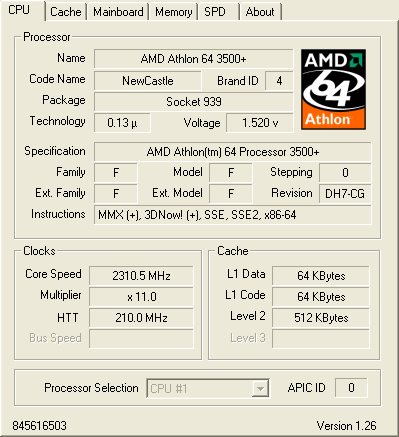
Installing the Diamond CoolII was easy, even though depending on the motherboard, some users may need to remove their stock backplate and install the bundled one. The procedure took 10mins, including the removal of the stock heatsink. The CPU used for this review was the AMD Athlon 64 3500+ on an ASUS A8N-SLI Deluxe motherboard.
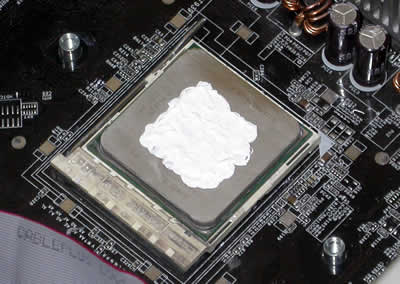
Make sure you clean any of the thermal compound left on the CPU from the previous installation.

make sure the CPU is clean of any thermal compound...

This time, there's no thermal pad as with previous releases. Instead, there's a small tube of thermal compound included in the retail package. We carefully applied the paste on the clean surface of our CPU, making sure than it is spread evenly over the entire top surface of the CPU to provide the best cooling efficiency.
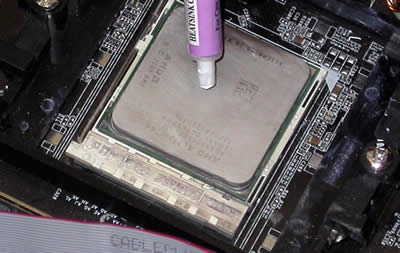
The Spire Tube of thermal paste...
spread the paste evenly over the entire surface before mounting the Spire CoolII

Next step is to install the cooler itself. We placed the cooler on the CPU (having removed the plastic brackets of course) and with a philips screwdriver, fastened the Cooler onto the motherboard.
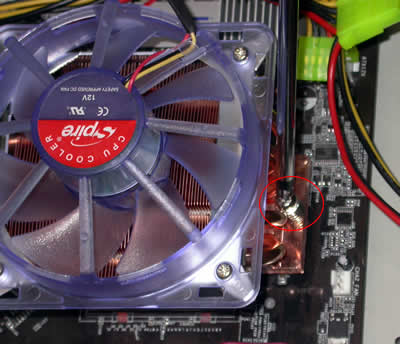
a process easier done than said in this case.

And for the last step, we attached the 3pin power cable to the appropriate power connector on the motherboard.
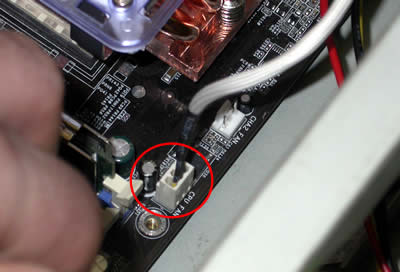
Plugging the power cable.

With the installation process out of the way, we move on to see how the CoolII performs compared with the stock AMD 3500+ CPU fansink. As already discussed, the installation was easy and should not occupy more than 10mins of your time...

 

Review Pages

1. Introduction
2. Installation
3. Performance
4. Conclusion


Pages

  • « first
  • ‹ previous
  • 1
  • 2
  • 3
  • 4
  • next ›
  • last »

Spire

Tags: Spire
Previous Post
Rikaline GPS-6033
Next Post
Plextor PX-760A

Related Posts

  • Spire launches UD50C White PC chassis

  • Spire Unveils Cutting-Edge ARGB Cooling Fan Set: A 25-Year Legacy of Excellence in PC Cooling

  • Introducing Spire’s New Ergonomic Workstations and Desk Peripherals

  • SPIRE PC announces EagleForce series 80PLUS certified

  • Spire Thermal Stone Keeps Your Hands Warm

  • Spire Thermal Eclipse II review

  • Spire Previews Coolers For The Upcoming Intel 1156 Core i5 Platform

  • Spire PowerFuse

Latest Reviews

Why Streaming Live Casino Games Demands Smarter Tech
Enterprise & IT

Why Streaming Live Casino Games Demands Smarter Tech

Kioxia Exceria Plus G3 512GB microSD
Cameras

Kioxia Exceria Plus G3 512GB microSD

SoundPeats Cove Pro
Consumer Electronics

SoundPeats Cove Pro

Asustor AS5404T 4-Bay NAS System
Enterprise & IT

Asustor AS5404T 4-Bay NAS System

be quiet! Pure Power 13M 1200W
PC components

be quiet! Pure Power 13M 1200W

Popular News

COLORFUL Introduces CVN B850I GAMING FROZEN Motherboard

COLORFUL Introduces CVN B850I GAMING FROZEN Motherboard

COLORFUL Presents CVN X870 ARK FROZEN Motherboard for AMD Ryzen 9000 CPUs

COLORFUL Presents CVN X870 ARK FROZEN Motherboard for AMD Ryzen 9000 CPUs

TEAMGROUP Launches EXPERT P34F Find My External SSD

TEAMGROUP Launches EXPERT P34F Find My External SSD

Samsung announces Galaxy Tab S11 and Galaxy S25 FE series

Samsung announces Galaxy Tab S11 and Galaxy S25 FE series

Viltrox Showcases Upcoming Lens Lineup and New TTL Flash at IBC 2025

Viltrox Showcases Upcoming Lens Lineup and New TTL Flash at IBC 2025

CORSAIR announces Vanguard Pro 96 and Vanguard 96 Gaming Keyboards

CORSAIR announces Vanguard Pro 96 and Vanguard 96 Gaming Keyboards

Panasonic Introduces the First Ultra-Telephoto Zoom Lens in the LUMIX S Series

Panasonic Introduces the First Ultra-Telephoto Zoom Lens in the LUMIX S Series

MSI Launches DATAMAG 40Gbps Magnetic Portable SSD

MSI Launches DATAMAG 40Gbps Magnetic Portable SSD

Main menu

  • Home
  • News
  • Reviews
  • Essays
  • Forum
  • Legacy
  • About
    • Submit News

    • Contact Us
    • Privacy

    • Promotion
    • Advertise

    • RSS Feed
    • Site Map
  • About
  • Privacy
  • Contact Us
  • Promotional Opportunities @ CdrInfo.com
  • Advertise on out site
  • Submit your News to our site
  • RSS Feed