
Seiko CDP4000 CD Printer
2. Connections - Installing Ink Catridges
Review Pages
2. Connections - Installing Ink Catridges
3. Conclusion
4. Printing Performance
5. Installation - Printing Software
6. Introduction
Seiko Precision CDP-4000 CD-R Printer - Page 2
Connections - Installing Ink Catridges
 SEIKO
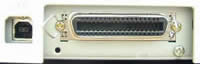
Precision CD Printer 4000 can be connected to the computer via parallel or USB
interface. We connected the printer through the USB port and powered with 220V
AC. The printer accepts colored and black ink cartridges. The cartridges are
equipped with IC chips. This chip accurately monitors the amount of ink used
by each cartridge, so even if a cartridge is removed and inserted again, all
of its ink can be used. To install the cartridges you firstly lower the output
tray.
SEIKO
Precision CD Printer 4000 can be connected to the computer via parallel or USB
interface. We connected the printer through the USB port and powered with 220V
AC. The printer accepts colored and black ink cartridges. The cartridges are
equipped with IC chips. This chip accurately monitors the amount of ink used
by each cartridge, so even if a cartridge is removed and inserted again, all
of its ink can be used. To install the cartridges you firstly lower the output
tray.
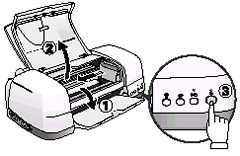 And
open the printer cover. Then you turn on the printer. The print head moves to
the left, which is the ink cartridge installation position. The power led flashes
and the error led comes on. Notice that you should not move the print head by
hand, something like that might damage the printer. Push back the release tabs
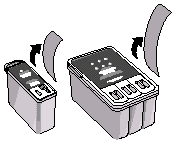
and lift up the ink cartridge clamps. Open the ink cartridge packages. Next,
remove only the yellow tape seals from each cartridge. These tapes should not
be removed from the cartridges before installation.
And
open the printer cover. Then you turn on the printer. The print head moves to
the left, which is the ink cartridge installation position. The power led flashes
and the error led comes on. Notice that you should not move the print head by
hand, something like that might damage the printer. Push back the release tabs
and lift up the ink cartridge clamps. Open the ink cartridge packages. Next,
remove only the yellow tape seals from each cartridge. These tapes should not
be removed from the cartridges before installation.
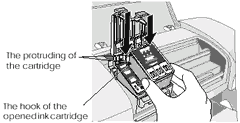
 Then,
place the protruding of the cartridge on the hook of the opened ink cartridge
clamps. Make sure that the protruding of the cartridge is not under the hook
of the opened ink cartridge clamps, as this can damage the clamps. Lower the
ink cartridge clamps until they lock into place, and press the ink cartridge
replacement button.
Then,
place the protruding of the cartridge on the hook of the opened ink cartridge
clamps. Make sure that the protruding of the cartridge is not under the hook
of the opened ink cartridge clamps, as this can damage the clamps. Lower the
ink cartridge clamps until they lock into place, and press the ink cartridge
replacement button.
 The
printer moves the printer head and begins charging the ink delivery system for
about half a minute. Notice that the printer cannot work unless you have installed
both cartridges. While the ink is charging, the power light flashes and the
printer produces a variety of mechanical sounds.
The
printer moves the printer head and begins charging the ink delivery system for
about half a minute. Notice that the printer cannot work unless you have installed
both cartridges. While the ink is charging, the power light flashes and the
printer produces a variety of mechanical sounds.
 These
sounds are normal. When the ink delivery system has been charged, the print
head returns to the far right position and the power light comes on. As for
the ink cartridges price, both color and black ink cartridges are sold at 20
pounds each.
These
sounds are normal. When the ink delivery system has been charged, the print
head returns to the far right position and the power light comes on. As for
the ink cartridges price, both color and black ink cartridges are sold at 20
pounds each.
Review Pages
2. Connections - Installing Ink Catridges
3. Conclusion
4. Printing Performance
5. Installation - Printing Software
6. Introduction





