Breaking News

Fanatec and Trak Racer showcase the future of simulation at SimRacing Expo Frankfurt 2026 Razer Unveils the Barracuda V2 Pro ASUS Republic of Gamers Announces Bulwark Dock DG310 Akasa Announces Fermi CM5 Fanless Case for Raspberry Pi Compute Module 5 LG Electronics Advances the LG Sound Suite Experience With New DTS

logo

  • Share Us
    • Facebook
    • Twitter
  • Home
  • Home
  • News
  • Reviews
  • Essays
  • About
    • Submit News

    • Contact Us
    • Privacy

    • Promotion
    • Advertise

    • RSS Feed

Search form

Samsung SH-W162

Aug 22,2005 0

24. Bitsetting - Magic Speed


Review Pages

1. Introduction
2. Transfer Rate Reading Tests
3. CD Error Correction Tests
4. DVD Error Correction Tests
5. Protected Disc Tests - Reading Tests
6. DAE Tests
7. Protected AudioCDs
8. CD Recording Tests
9. C1 / C2 Error Measurements
10. Writing Quality Tests - Clover System Tests
11. DVD Recording Tests
12. CDSpeed/PlexTools Scans - Page 1
13. CDSpeed/PlexTools Scans - Page 2
14. CDSpeed/PlexTools Scans - Page 3
15. CDSpeed/PlexTools Scans - Page 4
16. CDSpeed/PlexTools Scans - Page 5
17. Writing Quality Tests - Almedio AEC-1000
18. DVDR DL - Page 1
19. DVDR DL - Page 2
20. SH-W162 vs. SA300 - Page 1
21. SH-W162 vs. SA300 - Page 2
22. SH-W162 vs. SA300 - Page 3
23. SH-W162 vs. SA300 - Page 4
24. Bitsetting - Magic Speed
25. Conclusion


- Bitsetting

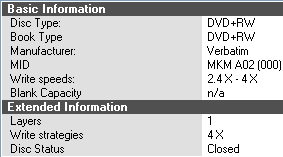
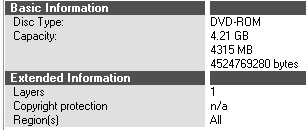
The Bitsetting feature allows the user to change all inserted DVD plus media to DVD-ROM to maximize compatibility with stand alone players. The Samsung SH-W162C is a Bitsetting enabled drive and all inserted media's booktype was changed to DVD-ROM through the automatic feature while burning with Nero. Thus, DVD+R,+RW,+R DL were all changed to DVD-ROM after burning. An issue occurred while using DVD+RW media, were the drive wouldn't recognize the booktype media change. The problem is outlined in the following two screenshots.

Verbatim media was identified as DVD+RW by the Samsung drive, even though the booktype change to DVD-ROM had been made successfully.
However, the same Verbatim DVD+RW media after the booktype change had been made, was identified as DVD-ROM by the LiteOn 167 DVD-ROM drive.
We inserted the same Verbatim DVD+RW disc in several other drives (all burners) and all reported DVD+RW booktype.

- Magic Speed

The Magic Speed Utility enables the user to set the reading speed of the drive in either of two modes. High speed and Silence mode. High speed enables reading as far up as 16X while the latter supports up to 4X reading speed as well as a more silent functioning of the drive. The procedure is quite easy and requires all of "two mouse clicks" to get you there.

Selecting the drive and checking silence mode, we press "Set" to get the work done.

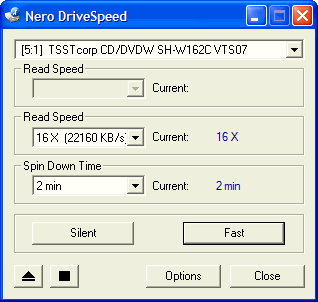
Nero DriveSpeed Utility confirms the speed changes.. We inserted a DVD-ROM disc to check the speed and we got the following...

And back to High Speed mode...
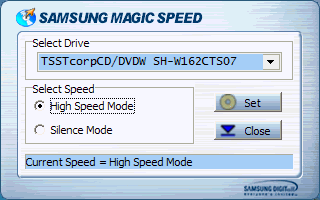
an easy to use and useful feature of the Samsung drive..

Again, with the same media we ran the Nero DriveSpeed Utility to confirm the changes...
That covers the expert features for the Samsung drive. Now let us move on to the last page, the conclusion.


Review Pages

1. Introduction
2. Transfer Rate Reading Tests
3. CD Error Correction Tests
4. DVD Error Correction Tests
5. Protected Disc Tests - Reading Tests
6. DAE Tests
7. Protected AudioCDs
8. CD Recording Tests
9. C1 / C2 Error Measurements
10. Writing Quality Tests - Clover System Tests
11. DVD Recording Tests
12. CDSpeed/PlexTools Scans - Page 1
13. CDSpeed/PlexTools Scans - Page 2
14. CDSpeed/PlexTools Scans - Page 3
15. CDSpeed/PlexTools Scans - Page 4
16. CDSpeed/PlexTools Scans - Page 5
17. Writing Quality Tests - Almedio AEC-1000
18. DVDR DL - Page 1
19. DVDR DL - Page 2
20. SH-W162 vs. SA300 - Page 1
21. SH-W162 vs. SA300 - Page 2
22. SH-W162 vs. SA300 - Page 3
23. SH-W162 vs. SA300 - Page 4
24. Bitsetting - Magic Speed
25. Conclusion


 

Pages

  • « first
  • ‹ previous
  • …
  • 17
  • 18
  • 19
  • 20
  • 21
  • 22
  • 23
  • 24
  • 25
  • next ›
  • last »

SAMSUNG

Tags: SAMSUNG
Previous Post
Corsair XMS TWINX1024-3200XL
Next Post
Windows Vista Public Beta 1 - Part 1

Related Posts

  • Samsung Unveils 115” 4K Smart Signage Display

  • Galaxy AI Is Coming to New Galaxy Watch for More Motivational Health

  • Samsung Introduces Galaxy A55 5G and Galaxy A35 5G

  • Samsung’s New AI PC, Galaxy Book4 Series, Available Globally Beginning February 26

  • Samsung and Google Cloud Join Forces to Bring Generative AI to Samsung Galaxy S24 Series

  • Samsung Galaxy S24 Ultra Creates New Standards of Durability and Visual Clarity With Corning® Gorilla® Armor

  • Samsung announces 2024 Neo QLED, MICRO LED, OLED

  • Samsung Electronics Expands Odyssey Gaming Monitor Lineup With New OLED Models at CES 2024

Latest Reviews

Fanxiang MP83 M.2 NVMe SSD Enclosure
Enterprise & IT

Fanxiang MP83 M.2 NVMe SSD Enclosure

Ugreen CM642 USB4.0 Enclosure
PC components

Ugreen CM642 USB4.0 Enclosure

be quiet! Dark Power 14 IO
PC components

be quiet! Dark Power 14 IO

SanDisk High Endurance 512GB microSDXC
Cameras

SanDisk High Endurance 512GB microSDXC

Samsung PRO Ultimate 512GB microSDXC
Cameras

Samsung PRO Ultimate 512GB microSDXC

Popular News

MSI’s Latest AMD X870E MAX & EVO Series Motherboards

MSI’s Latest AMD X870E MAX & EVO Series Motherboards

COLORFUL Launches iGame B850M ULTRA Series Micro-ATX Motherboards

COLORFUL Launches iGame B850M ULTRA Series Micro-ATX Motherboards

COLORFUL Presents Limited Edition Chitu MAG-60 Magnetic Keyboard Inspired by the Year of the Horse

COLORFUL Presents Limited Edition Chitu MAG-60 Magnetic Keyboard Inspired by the Year of the Horse

COLORFUL Launches iGame B850I MINI OC V14 Motherboard

COLORFUL Launches iGame B850I MINI OC V14 Motherboard

COLORFUL Launches the iGame X870E VULCAN W OC Motherboard

COLORFUL Launches the iGame X870E VULCAN W OC Motherboard

COLORFUL Presents iGame Z890 ULTRA-S W and iGame Z890M ULTRA Z Motherboards

COLORFUL Presents iGame Z890 ULTRA-S W and iGame Z890M ULTRA Z Motherboards

COLORFUL Expands B850 Motherboard Lineup with New CVN, Battle-Ax, and MEOW Models

COLORFUL Expands B850 Motherboard Lineup with New CVN, Battle-Ax, and MEOW Models

ASRock Adds Support for One Sub-Channel DRAM Module on Intel DDR5 Motherboards

ASRock Adds Support for One Sub-Channel DRAM Module on Intel DDR5 Motherboards

Main menu

  • Home
  • News
  • Reviews
  • Essays
  • About
    • Submit News

    • Contact Us
    • Privacy

    • Promotion
    • Advertise

    • RSS Feed
  • About
  • Privacy
  • Contact Us
  • Promotional Opportunities @ CdrInfo.com
  • Advertise on out site
  • Submit your News to our site
  • RSS Feed