
Breaking News

Sony Introduces WH-1000XM4C Wireless Noise Cancelling Headphones ASUS Announces WiFi 8 Router DJI Launches Osmo 360 II Razer introduces Clio X Wireless Speaker Head Cushion That Delivers THX Spatial Audio LiberNovo Showcases Ergonomic Innovation at IFA 2026 with Maxis Series for Big And Tall Users

logo

  • Share Us
    • Facebook
    • Twitter
  • Home
  • Home
  • News
  • Reviews
  • Essays
  • About
    • Submit News

    • Contact Us
    • Privacy

    • Promotion
    • Advertise

    • RSS Feed

Search form

Rikaline GPS-6033

Mar 29,2006 0

3. Installation


Review Pages

1. Introduction
2. Features
3. Installation
4. The Tests
5. Conclusion


Before you start using the device, you have to fully charge the battery. From our tests, it needs around 3 hours to fully charge.

It should fairly straightforward to connect to the Rikaline GPS with your PDA device, which in our case is a Dell Axim x50V with Windows Mobile 2003 SE. Start by accessing the Bluetooth manager and tap New->Connect.
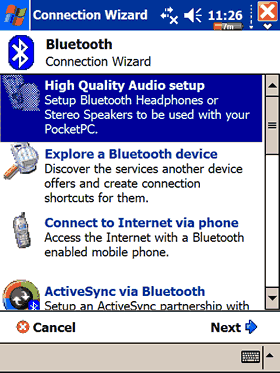
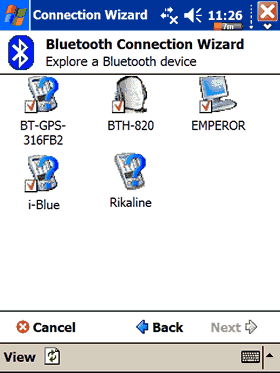
The GPS-6033 will show up as Rikaline:
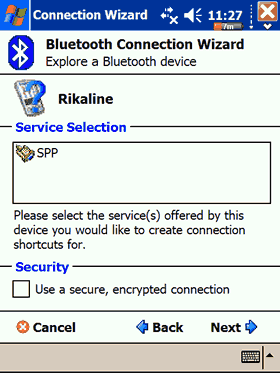
Press Next->Select GPS OUTPUT-> Next
Done!

After accessing the BT Manager, press right click->Connect
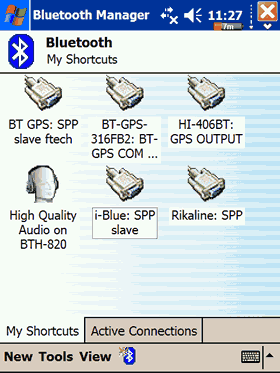
Finally, the device was connected to our Dell Axim x50V PDA and ready for use!
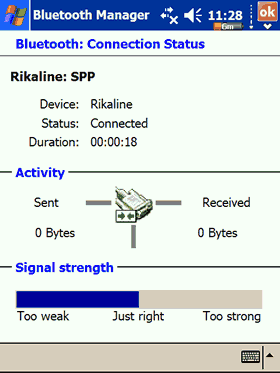
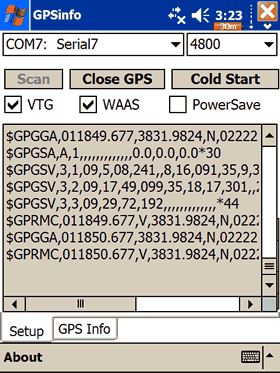
The device can be found at COM7 with 4800 communications speed. Press the "Scan GPS" and if all goes well, you will see a lot of numbers scrolling down.
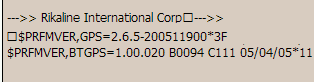
Unfortunately, all currently available software doesn't support the RFMD chipsets, therefore you cannot set any special settings (WASS, Static navigation). With GPSInfo, we were able to catch some reported info, which is probably the device's firmware revision (2.6.5):

 

Review Pages

1. Introduction
2. Features
3. Installation
4. The Tests
5. Conclusion


Pages

  • « first
  • ‹ previous
  • 1
  • 2
  • 3
  • 4
  • 5
  • next ›
  • last »

Rikaline

Tags: Rikaline
Previous Post
MobiTV
Next Post
Spire Diamond Cool II

Related Posts

Latest Reviews

Ugreen CM642 USB4.0 Enclosure
PC components

Ugreen CM642 USB4.0 Enclosure

be quiet! Dark Power 14 IO
PC components

be quiet! Dark Power 14 IO

SanDisk High Endurance 512GB microSDXC
Cameras

SanDisk High Endurance 512GB microSDXC

Samsung PRO Ultimate 512GB microSDXC
Cameras

Samsung PRO Ultimate 512GB microSDXC

be quiet! Light Mount TKL
Consumer Electronics

be quiet! Light Mount TKL

Popular News

CORSAIR announces Vanguard Pro 96 and Vanguard 96 Gaming Keyboards

CORSAIR announces Vanguard Pro 96 and Vanguard 96 Gaming Keyboards

MSI Launches FORGE GK600 TKL WIRELESS Special Edition Compact Mechanical Keyboard

MSI Launches FORGE GK600 TKL WIRELESS Special Edition Compact Mechanical Keyboard

Viltrox Showcases Upcoming Lens Lineup and New TTL Flash at IBC 2025

Viltrox Showcases Upcoming Lens Lineup and New TTL Flash at IBC 2025

Panasonic Introduces the First Ultra-Telephoto Zoom Lens in the LUMIX S Series

Panasonic Introduces the First Ultra-Telephoto Zoom Lens in the LUMIX S Series

MSI Launches DATAMAG 40Gbps Magnetic Portable SSD

MSI Launches DATAMAG 40Gbps Magnetic Portable SSD

MSI’s Latest AMD X870E MAX & EVO Series Motherboards

MSI’s Latest AMD X870E MAX & EVO Series Motherboards

COLORFUL Launches iGame B850M ULTRA Series Micro-ATX Motherboards

COLORFUL Launches iGame B850M ULTRA Series Micro-ATX Motherboards

COLORFUL Presents Limited Edition Chitu MAG-60 Magnetic Keyboard Inspired by the Year of the Horse

COLORFUL Presents Limited Edition Chitu MAG-60 Magnetic Keyboard Inspired by the Year of the Horse

Main menu

  • Home
  • News
  • Reviews
  • Essays
  • About
    • Submit News

    • Contact Us
    • Privacy

    • Promotion
    • Advertise

    • RSS Feed
  • About
  • Privacy
  • Contact Us
  • Promotional Opportunities @ CdrInfo.com
  • Advertise on out site
  • Submit your News to our site
  • RSS Feed