
Breaking News

G.SKILL Showcases DDR5-9200 1.1V 16GBx2 High-Speed CU-DIMM Memory Kit Sony Introduces BRAVIA 9 II and BRAVIA 7 II RGB TVs and the BRAVIA Theatre Trio Creative Announces Sound Blaster AE-X Acer Expands Gaming Portfolio With Predator Atlas 8 Handheld Powered by Intel COLORFUL Presents Limited Edition iGame GeForce RTX 5070 Ultra OC 12GB x 007 First Light Edition

logo

  • Share Us
    • Facebook
    • Twitter
  • Home
  • Home
  • News
  • Reviews
  • Essays
  • Forum
  • Legacy
  • About
    • Submit News

    • Contact Us
    • Privacy

    • Promotion
    • Advertise

    • RSS Feed
    • Site Map

Search form

Overclocking an ATI SVGA card

Apr 20,2004 0

2. Basic Information


Review Pages

1. Boost the GPU clock
2. Basic Information
3. Changing the Memory Frequency - I
4. Changing the Memory Frequency - II
5. FPS Benchmarks - Conclusion


Overclocking an ATI SVGA card - Page 2

- First Step

First of all, you will need an ATI SVGA card. In this guide we will be using an ATI 9600Pro card. In order to overclock ATI cards, you need some extra software that can raise the core and memory frequencies. While there is a range of software for overclocking ATI cards (RivaTuner , Rage3DTweak, RadLinker/RadClocker, and PowerStrip), for this guide we will use the ATI Tool v0.0.19. Download and install the software on your system. When you run the application, you may see a dialog box similar to the following:
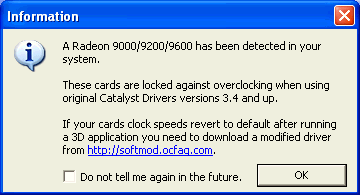
Hmm…Interesting! As the ATI Tool reports, the Radeon 9000/9200/9600 cards are locked from overclocking by software drivers. This means that you may have overclocked your card, but when starting a 3D application, the drivers will return the card to its default values (GPU, Video Card Memory). For this reason you must install “modified” drivers from http://softmod.ocfaq.com that bypass this particular problem.

After pressing “OK”, the main application screen appears, displaying the Core/Memory frequencies and several other options. By selecting the “Settings” button, you can access the software menus, and further tweak the scanning engine:
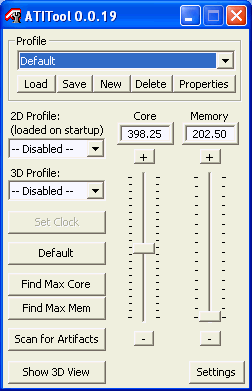
As we mentioned earlier, the methodology “imposes” us to first find the maximum Core limits and thereafter the maximum Video Memory frequencies. The ATI Tool reports that our 9600Pro card works at 398.25/202.50 frequencies. When pressing the “Find Max Core” button, an additional window will appear, displaying a 3D cube. You will also notice that the Core/Memory slide controls are disabled (grayed out) and in our case at least, the Core frequency rose to 399.94.

After several seconds, the software locked the Core speed at 403.07 MHz and started up the “Heat-Up Phase”, where it began to rotate the 3D Cube in order to stretch the GPU/Memory to its limits while at the same time looking for the so called “artifacts”. If the test passes without any artifacts, the Core frequencies will rise, etc…


Review Pages

1. Boost the GPU clock
2. Basic Information
3. Changing the Memory Frequency - I
4. Changing the Memory Frequency - II
5. FPS Benchmarks - Conclusion


Pages

  • « first
  • ‹ previous
  • 1
  • 2
  • 3
  • 4
  • 5
  • next ›
  • last »

Tags:
Previous Post
LiteOn SOWH-812S
Next Post
CyberDrive DX122D

Related Posts

Latest Reviews

Swit NP-FZ100 Battery
Cameras

Swit NP-FZ100 Battery

The Technology Stack Behind Modern Digital Gaming Platforms
Consumer Electronics

The Technology Stack Behind Modern Digital Gaming Platforms

be quiet! Dark Rock Pro 6
Cooling Systems

be quiet! Dark Rock Pro 6

How Online Casinos Use Encryption, Verification, and Risk Controls to Build User Trust
Enterprise & IT

How Online Casinos Use Encryption, Verification, and Risk Controls to Build User Trust

Why Low-Latency Infrastructure Matters More Than Raw Specs
Enterprise & IT

Why Low-Latency Infrastructure Matters More Than Raw Specs

Popular News

TEAMGROUP Launches EXPERT P34F Find My External SSD

TEAMGROUP Launches EXPERT P34F Find My External SSD

CORSAIR announces Vanguard Pro 96 and Vanguard 96 Gaming Keyboards

CORSAIR announces Vanguard Pro 96 and Vanguard 96 Gaming Keyboards

MSI Launches FORGE GK600 TKL WIRELESS Special Edition Compact Mechanical Keyboard

MSI Launches FORGE GK600 TKL WIRELESS Special Edition Compact Mechanical Keyboard

Samsung announces Galaxy Tab S11 and Galaxy S25 FE series

Samsung announces Galaxy Tab S11 and Galaxy S25 FE series

Viltrox Showcases Upcoming Lens Lineup and New TTL Flash at IBC 2025

Viltrox Showcases Upcoming Lens Lineup and New TTL Flash at IBC 2025

Panasonic Introduces the First Ultra-Telephoto Zoom Lens in the LUMIX S Series

Panasonic Introduces the First Ultra-Telephoto Zoom Lens in the LUMIX S Series

MSI Launches DATAMAG 40Gbps Magnetic Portable SSD

MSI Launches DATAMAG 40Gbps Magnetic Portable SSD

Viltrox Joins the L-Mount Alliance, Expanding Creative Possibilities

Viltrox Joins the L-Mount Alliance, Expanding Creative Possibilities

Main menu

  • Home
  • News
  • Reviews
  • Essays
  • Forum
  • Legacy
  • About
    • Submit News

    • Contact Us
    • Privacy

    • Promotion
    • Advertise

    • RSS Feed
    • Site Map
  • About
  • Privacy
  • Contact Us
  • Promotional Opportunities @ CdrInfo.com
  • Advertise on out site
  • Submit your News to our site
  • RSS Feed
