Breaking News

COLORFUL Launches Flagship iGame X870E VULCAN OC Motherboard Kioxia Introduces QLC UFS 4.1 Embedded Flash Memory Devices for High-Capacity Mobile Storage Sonos Introduces Amp Multi, a Professional-Grade Multi-Channel Streaming Amplifier Sony at BSC Expo 2026 Samsung Debuts 13-Inch Color E-Paper

logo

  • Share Us
    • Facebook
    • Twitter
  • Home
  • Home
  • News
  • Reviews
  • Essays
  • Forum
  • Legacy
  • About
    • Submit News

    • Contact Us
    • Privacy

    • Promotion
    • Advertise

    • RSS Feed
    • Site Map

Search form

Noctua NH-L9i review

Feb 25,2013 0

3. Measurements


Review Pages

1. Features
2. A closer look
3. Measurements
4. Final thoughts


We tested the Noctua cooler using an open air testbed with the following configuration:

  • CPU: Intel i5-2500K Retail
  • Case: Open Air testbed
  • Motherboard: Gigabyte Z77X-D3H
  • Memory: 2x2GB Crucial DDR3-2100
  • PSU: OCZ 720W
  • HDD: WD 500GB 7200rpm
  • VGA: Inno3D 210GT
  • Operating system Windows 7 x64 Ultimate Edition with SP2 and all the latest updates installed
  • Software: OCCT v4.4.x beta & the latest CoreTemp/RealTemp versions
  • RPM speed controllable via SmartFan BIOS or via external hardware controller
  • Ambient temperature ~ 22 degrees C

Using a 65watt CPU would be appropriate for this test but since we did not have one in our labs, we used the Intel i5-2500K (quad-core 3.3GHz, 95W TDP). The specific processor draws way much power than the Noctua NH-L9i can handle, so our tests just offer you an idea of the cooling performance of the cooler compared to Intel's stock cooling solution.

In order to get the CPU run at full load, we used the latest version of the OCCT software. As a note, our Gigabyte mother board we used in this test boosted the CPU clock from3.3GHz to 3.7GHz, posing a great challenge for the HTPC-optimized Noctua cooler.

As you ca see below, with the Intel stock cooler installed, our CPU temperature reached the 85 degrees C in just 45 seconds:

We ran the same test with the Noctua NH-L9i cooler installed. Noctua's product is much more efficient as you see below. This time it took 1:20 minutes for the CPU to reach the predefined 85 degree C temperature. This performance is miles better than a stock cooler, especially as they come from a very small form factor cooler:
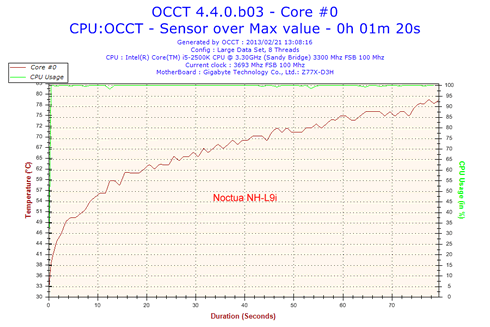
How are al these are translated to actual temperatures? Well, although Noctua clearly state that this cooler is not intended for overclocking or use with CPUs with TDP higher than 65W, we took some measurements with our system running at idle and then under some load. Compared to the Intel stock cooler, the Noctua NH-L9i improved on the performance of the Intel model both with and without the low noise adapter. Under load, Noctua's model was more than 10 degrees C cooler than the Intel stock cooler, while it also remained whisper quiet too.
 

Review Pages

1. Features
2. A closer look
3. Measurements
4. Final thoughts


Pages

  • « first
  • ‹ previous
  • 1
  • 2
  • 3
  • 4
  • next ›
  • last »

Noctua

Tags: Noctua
Previous Post
Noctua NF-A14 ULN, NF-A14 FLX and NF-A15 PWM Fan Review
Next Post
Kingston UltimateX 100X 32GB SDHC review

Related Posts

  • Noctua NH-D15 G2 Chromax.Black

  • Noctua NP-DM3 desk mat

  • Noctua presents chromax.black versions of its NH-D15 G2 and NF-A14x25 G2

  • Noctua celebrates 20-year anniversary with new website and desk mat

  • Noctua NF-A12x25 G2 fans

  • ASUS and Noctua announce ASUS GeForce RTX 5080 Noctua Edition graphics card

  • Noctua introduces NF-A12x25 G2 next-generation 120mm fan

  • Noctua at Computex 2025

Latest Reviews

be quiet! Power Zone 2 1200W
PC components

be quiet! Power Zone 2 1200W

The Difference Between American and European Stakes and Why It Changes How People Bet
Enterprise & IT

The Difference Between American and European Stakes and Why It Changes How People Bet

Endorfy Thock V2 Wireless Keyboard
PC components

Endorfy Thock V2 Wireless Keyboard

Noctua NH-D15 G2 Chromax.Black
Cooling Systems

Noctua NH-D15 G2 Chromax.Black

EnGenius ECW520 AP
Enterprise & IT

EnGenius ECW520 AP

Popular News

COLORFUL Introduces CVN B850I GAMING FROZEN Motherboard

COLORFUL Introduces CVN B850I GAMING FROZEN Motherboard

COLORFUL Presents CVN X870 ARK FROZEN Motherboard for AMD Ryzen 9000 CPUs

COLORFUL Presents CVN X870 ARK FROZEN Motherboard for AMD Ryzen 9000 CPUs

TEAMGROUP Launches EXPERT P34F Find My External SSD

TEAMGROUP Launches EXPERT P34F Find My External SSD

ASRock AM5 Motherboards Now Fully Support AMD Ryzen 9 9950X3D & 9900X3D Processors

ASRock AM5 Motherboards Now Fully Support AMD Ryzen 9 9950X3D & 9900X3D Processors

Samsung announces Galaxy Tab S11 and Galaxy S25 FE series

Samsung announces Galaxy Tab S11 and Galaxy S25 FE series

Viltrox Showcases Upcoming Lens Lineup and New TTL Flash at IBC 2025

Viltrox Showcases Upcoming Lens Lineup and New TTL Flash at IBC 2025

CORSAIR announces Vanguard Pro 96 and Vanguard 96 Gaming Keyboards

CORSAIR announces Vanguard Pro 96 and Vanguard 96 Gaming Keyboards

Panasonic Introduces the First Ultra-Telephoto Zoom Lens in the LUMIX S Series

Panasonic Introduces the First Ultra-Telephoto Zoom Lens in the LUMIX S Series

Main menu

  • Home
  • News
  • Reviews
  • Essays
  • Forum
  • Legacy
  • About
    • Submit News

    • Contact Us
    • Privacy

    • Promotion
    • Advertise

    • RSS Feed
    • Site Map
  • About
  • Privacy
  • Contact Us
  • Promotional Opportunities @ CdrInfo.com
  • Advertise on out site
  • Submit your News to our site
  • RSS Feed