
Breaking News

LG Display launches 24.5-inch 720Hz Gaming OLED Panel Razer Unveils the Mako Desktop Gaming Speakers TerraMaster Launches 725 Series Xeon Rackmount NAS Viltrox Brings Its Full-Frame Air Series to L-Mount with Four Compact Prime Lenses CORSAIR Deploys the WARTHOG Airflow Mid-Tower PC Case

logo

  • Share Us
    • Facebook
    • Twitter
  • Home
  • Home
  • News
  • Reviews
  • Essays
  • About
    • Submit News

    • Contact Us
    • Privacy

    • Promotion
    • Advertise

    • RSS Feed

Search form

Nero Recode 2

Dec 5,2003 0

3. DVD5 to MPEG4


Review Pages

1. Introduction
2. DVD9 to DVD5
3. DVD5 to MPEG4
4. Remake a DVD


Nero Recode 2 software - Page 03

DVD5 to MPEG4

Nero Digital can convert a 4.2 GB DVD-Video movie to an MPEG-4 video file of 692MB, which fits on a CD-R!

This time you should select the last option of the three as illustrates in the picture below:

Here is the main screen, almost the same as in the previous section.

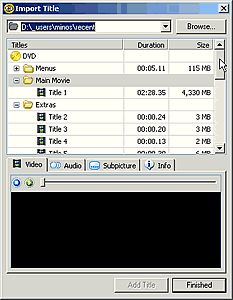
Next you should import the movie. Follow the same steps as in the previous description, "Import Titles", "Browse", analyzing etc. Notice that in this project you should import only titles, not all the folder. Choose the titles you want and press "Add Title" for each title and "Finished" for return to the main screen.
Below is what you will see after those steps. We selected only the "Title 1" from the main movie:
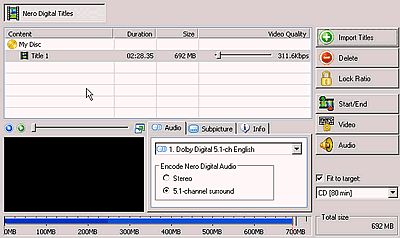
You can also define the start and the end of your movie by pressing the "Start/End" button. This means that the movie can be cut or changed (shortened) according to your personal taste For example, you are able to start your movie from chapter 4.

Set the starting and the finishing chapter and adjust the slide bars, if you want to remove some frames. When you finish press "OK". You will return to the previous screen. Select the audio and subtitles you want (as we have describe in the previous page) and press "Next".

User is able to select the size of the final MPEG-4 video to fit on a 74min CD-R, 80min CD-R, 4.7GB DVD recordable or any other custom capacity.

The basic quality settings are gathered in the following screenshot. The quality settings (profiles) can be set either by the user or the Nero Recode (default profiles). For example, you can assign the best quality for the main movie only, extras only or choose the even quality option, for a flat encoding bitrate:

More details about the MPEG-4 encoding capabilities of the software will be added in this section soon. Notice that the MPEG4 conversion will take much time, which is strongly related to your CPU power.

After encoding, we proceed to burning the video files to our CD-R/DVD discs, as we mentioned in the previous page.


 

Review Pages

1. Introduction
2. DVD9 to DVD5
3. DVD5 to MPEG4
4. Remake a DVD


Pages

  • « first
  • ‹ previous
  • 1
  • 2
  • 3
  • 4
  • next ›
  • last »

Tags:
Previous Post
Optorite DD0401 Dual DVD Recorder
Next Post
Cyberdrive DX082D DVD+RW

Related Posts

Latest Reviews

Fanxiang MP83 M.2 NVMe SSD Enclosure
Enterprise & IT

Fanxiang MP83 M.2 NVMe SSD Enclosure

Ugreen CM642 USB4.0 Enclosure
PC components

Ugreen CM642 USB4.0 Enclosure

be quiet! Dark Power 14 IO
PC components

be quiet! Dark Power 14 IO

SanDisk High Endurance 512GB microSDXC
Cameras

SanDisk High Endurance 512GB microSDXC

Samsung PRO Ultimate 512GB microSDXC
Cameras

Samsung PRO Ultimate 512GB microSDXC

Popular News

CORSAIR announces Vanguard Pro 96 and Vanguard 96 Gaming Keyboards

CORSAIR announces Vanguard Pro 96 and Vanguard 96 Gaming Keyboards

MSI’s Latest AMD X870E MAX & EVO Series Motherboards

MSI’s Latest AMD X870E MAX & EVO Series Motherboards

Panasonic Introduces the First Ultra-Telephoto Zoom Lens in the LUMIX S Series

Panasonic Introduces the First Ultra-Telephoto Zoom Lens in the LUMIX S Series

COLORFUL Launches iGame B850M ULTRA Series Micro-ATX Motherboards

COLORFUL Launches iGame B850M ULTRA Series Micro-ATX Motherboards

COLORFUL Presents Limited Edition Chitu MAG-60 Magnetic Keyboard Inspired by the Year of the Horse

COLORFUL Presents Limited Edition Chitu MAG-60 Magnetic Keyboard Inspired by the Year of the Horse

COLORFUL Presents iGame Z890 ULTRA-S W and iGame Z890M ULTRA Z Motherboards

COLORFUL Presents iGame Z890 ULTRA-S W and iGame Z890M ULTRA Z Motherboards

COLORFUL Launches iGame B850I MINI OC V14 Motherboard

COLORFUL Launches iGame B850I MINI OC V14 Motherboard

COLORFUL Expands B850 Motherboard Lineup with New CVN, Battle-Ax, and MEOW Models

COLORFUL Expands B850 Motherboard Lineup with New CVN, Battle-Ax, and MEOW Models

Main menu

  • Home
  • News
  • Reviews
  • Essays
  • About
    • Submit News

    • Contact Us
    • Privacy

    • Promotion
    • Advertise

    • RSS Feed
  • About
  • Privacy
  • Contact Us
  • Promotional Opportunities @ CdrInfo.com
  • Advertise on out site
  • Submit your News to our site
  • RSS Feed