NEON 4in1 128MB MP3 Player
3. Tests - Page 1
NEON 4in1 128MB MP3 Player - Page 3
The Neon 4 in 1 MP3 Player stores the audio/data files in flash memory. The sample that arrived in our labs had a capacity of 128MB, but there is also a 256MB model available. While 128MB might appear small to many of you, you can easily store about 2-3 hours of music (128Kbps MP3 format). This depends mostly on the bitrate of the stored music. The greater the bitrate (and hence quality) of the mp3 files you store, the less playback time will be available. But if you feel you have a greater need for storage space, you can go for the larger capacity model. Apart from the difference in storage space, all models in the series are identical. Bear in mind though, that this device can only playback music files encoded with the MP3 format.
The main advantage of players that use flash memory instead of a CDROM reader is completely flawless playback without skips. Since the player does not have any moving mechanical parts (like the optical pickup that a CDROM reader has), there is no need for skip protection mechanisms. Playback is smooth, and skipping between tracks is almost instantaneous. So you can use the player without annoying skips while jogging, or doing any activity that requires rapid movement.
There is another advantage as well, that stems from the lack of mechanical
parts. Power consumption is much less than a CDROM reader based player. This
is the case with the Neon 4 in 1 MP3 Player as well. It operates on a single
AAA size battery, which will give you many hours of playback time. In our tests
, we managed to get a little more than 13 hours of playback. Listening to FM
radio consumes even less power so you will get even more playback time than
previously mentioned.
The Neon 4 in 1 MP3 Player is controlled through two rows of small buttons/switches,
located lengthwise on either side of the device. All the Neon 4 in 1 MP3 Player's
functions are controlled from here. The 30 page user manual that is included,
will help you configure and use the Neon 4 in 1 MP3
Player without much hassle.

Bottom Side

Top Side
On the top side we can see (from left to right) the power on/off switch, the lock/unclock switch, the stop button, and the builtin microphone (holes under the "MIC" label). The lock unclock switch has two uses, depending whether you are listening to music or using it as a removable disc in your PC. In the former case, it locks the device's controls so that no button can be accidentally pressed. In the latter case, it serves as a write protect switch that prevents any modification to the data that exists on the device, operating in the same manner as the switch that exists on floppy discs.
On the bottom side, we can see (from left to right) the menu button, the skip forward button, the play/pause button, and the skip backwards button. Despite what the arrows show, the device does not offer a fast-forward function. This means that you have no way of skipping to the middle of a song for example. The skip forward/backwards buttons also serve as volume up/down buttons when pressed for more than 1 second.
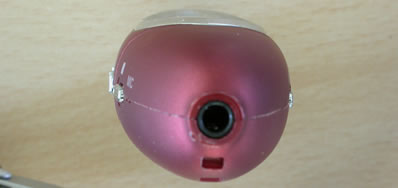

On the the left and right extremes of this oval shaped device, you will find the earphone jack and the USB connector, respectively. To expose the USB connector, you need to remove the cap. Because of the cap's small size, it can get easily lost/misplaced, so be extra careful.
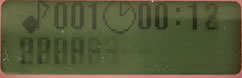
On the front side, there is the LCD screen, which is backlit with a neutral blue light. The device's LCD screen is quite readable under low light conditions. Below you can see snapshots from the Flash Recorder's menu functions: