
Breaking News

Thermal Grizzly and Noctua introduce WireView Pro II Noctua Edition GPU monitoring device Nikon releases the Z5IIC full-frame mirrorless camera Announcing the New ASUS Googlebook 14 Razer Unveils Kiyo V2 Pro 4K Webcam Transcend Launches 64GB DDR5-6400 Embedded DRAM Modules for High-Speed Performance and Enhanced System Stability

logo

  • Share Us
    • Facebook
    • Twitter
  • Home
  • Home
  • News
  • Reviews
  • Essays
  • About
    • Submit News

    • Contact Us
    • Privacy

    • Promotion
    • Advertise

    • RSS Feed

Search form

Making Professional DVD from Authoring to Replication

Jan 23,2006 0

6. Adding Sub-titles


Review Pages

1. Contents
2. Introduction - Basic DVD Concepts
3. The Workflow
4. The Roads to Rome
5. Examples
6. Adding Sub-titles
7. Medium Priced Commercial Products
8. Common DVD Authoring Mistakes
9. DVD Replication & Duplication


3.1.3 Adding Sub-titles

Many of the authoring tools in this section have the capability of adding subtitles. The theory behind subtitles is pretty simple -- You just need a script file telling the authoring tool the beginning and ending time and the text for a subtitle. You can pretty much do this without the help of any tools. All you need is just watch the movie and then record all the time intervals of conversation and then create a mapping file with the subtitle texts. For example,

1
00:00:00,790 --> 00:00:02,662
Bonjour! Monsieur.

2
00:00:24,523 --> 00:00:27,879
Bonjour! Madomoiselle.

3
00:00:55,516 --> 00:00:56,934
Ça va?

4
00:00:58,229 --> 00:01:01,316
Ça va!

But this will be a tedious effort. You should turn to subtitle tools unless you have too much time to waste. Subtitle Workshop is among one of the best free tools. You can use this tool to do your marking and subtitle editing and here is how.

Step 1: Download Subtitle Workshop 2.51 from http://www.urusoft.net/download.php?lang=1&id=sw, unzip the download file to a temporary directory and then run the program installer.

Step 2: Start Subtitle Workshop from [Start] > [Program] > [URUSoft] > [Subtitle Workshop] > [Subtitle Workshop].

Step 3: Go to [File] > [New subtitle...].

Subtitle Workshop New

Step 3: Go to [Movie] > [Open] to load the movie into the program.

Subtitle workshop load movie

Step 4: Once the movie is loaded, you can then play the move and mark the starting and ending points for a subtitle. You can stop the movie any time, make a slight backward or forward, and edit your subtitle as shown below. All the control buttons have tool tips. You just need to mouse-over the individual control the the tips will be shown. It's very straightforward.

Subtitle workshop edit subtitle

Step 5: When the whole subtitling task is done, you can save the file by going to [File] > [Save as..]. Subtitle Workshop allows you to save the subtitle for many authoring programs. Just choose the format that your authoring program will need and then provide a file name. This file will become one of the assets when you do the authoring.
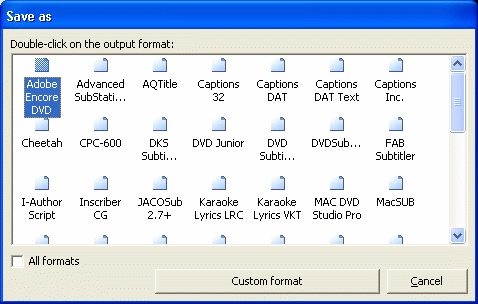

Subtitle formats


Review Pages

1. Contents
2. Introduction - Basic DVD Concepts
3. The Workflow
4. The Roads to Rome
5. Examples
6. Adding Sub-titles
7. Medium Priced Commercial Products
8. Common DVD Authoring Mistakes
9. DVD Replication & Duplication


Pages

  • « first
  • ‹ previous
  • 1
  • 2
  • 3
  • 4
  • 5
  • 6
  • 7
  • 8
  • 9
  • next ›
  • last »

Tags:
Previous Post
Samsung SE-W164C
Next Post
Thermaltake Hardcano 14

Related Posts

Latest Reviews

Fanxiang MP83 M.2 NVMe SSD Enclosure
Enterprise & IT

Fanxiang MP83 M.2 NVMe SSD Enclosure

Ugreen CM642 USB4.0 Enclosure
PC components

Ugreen CM642 USB4.0 Enclosure

be quiet! Dark Power 14 IO
PC components

be quiet! Dark Power 14 IO

SanDisk High Endurance 512GB microSDXC
Cameras

SanDisk High Endurance 512GB microSDXC

Samsung PRO Ultimate 512GB microSDXC
Cameras

Samsung PRO Ultimate 512GB microSDXC

Popular News

MSI’s Latest AMD X870E MAX & EVO Series Motherboards

MSI’s Latest AMD X870E MAX & EVO Series Motherboards

COLORFUL Launches iGame B850M ULTRA Series Micro-ATX Motherboards

COLORFUL Launches iGame B850M ULTRA Series Micro-ATX Motherboards

COLORFUL Presents Limited Edition Chitu MAG-60 Magnetic Keyboard Inspired by the Year of the Horse

COLORFUL Presents Limited Edition Chitu MAG-60 Magnetic Keyboard Inspired by the Year of the Horse

COLORFUL Presents iGame Z890 ULTRA-S W and iGame Z890M ULTRA Z Motherboards

COLORFUL Presents iGame Z890 ULTRA-S W and iGame Z890M ULTRA Z Motherboards

COLORFUL Launches iGame B850I MINI OC V14 Motherboard

COLORFUL Launches iGame B850I MINI OC V14 Motherboard

COLORFUL Expands B850 Motherboard Lineup with New CVN, Battle-Ax, and MEOW Models

COLORFUL Expands B850 Motherboard Lineup with New CVN, Battle-Ax, and MEOW Models

ASRock Adds Support for One Sub-Channel DRAM Module on Intel DDR5 Motherboards

ASRock Adds Support for One Sub-Channel DRAM Module on Intel DDR5 Motherboards

Exceed the Infinite with New ASRock X870E Taichi White Motherboard

Exceed the Infinite with New ASRock X870E Taichi White Motherboard

Main menu

  • Home
  • News
  • Reviews
  • Essays
  • About
    • Submit News

    • Contact Us
    • Privacy

    • Promotion
    • Advertise

    • RSS Feed
  • About
  • Privacy
  • Contact Us
  • Promotional Opportunities @ CdrInfo.com
  • Advertise on out site
  • Submit your News to our site
  • RSS Feed


