Kingston HyperX Cloud II Headset review
2. A closer look
Kingston's boxing is fancy and gives you the overall impression that you have to do with a serious set of headset here. As you see below, the front of the headset box highlights the main device as well as the 7.1 Surround Sound DSP controller and additional information about the basic features and what to expect from the device.
Kingston goes into more details at the back of the box - you can read about the 7.1 Surround Sound DSP Controller unit, the physical features of the headset and more.

The outer slipcover covers a shoebox style box you see below. Inside you find the components of the Cloud II headset. Everything is arranged and secured in place, and basically you could keep this box around in case you want store the headset or even take it with you in your next trip.

Besides the Cloud II headset, the box includes the 7.1 Surround Sound controller, microphone, 3.5mm combo plug adapter, velour earcups, and a padded carry pouch - very handy in order to take the headset in your LAN sessions and keep it dust-free when it's not in use.


The HyperX Cloud II headset has been obviously designed with simplicity in mind. Kingston has emphasized on the brushed aluminum hinges and earcups, stitched headband, and two-color design - gunmetal, pink, and red colors. Hopefully, there are not any fancy LEDs and RGB-lighting on the headset, as they do not exactly add anything to the overall experience during gaming, at least in our opinion.
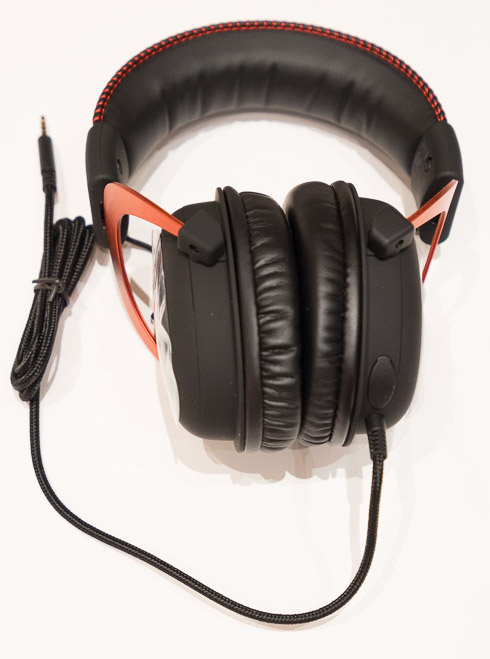
Kingston includes leatherette earpads on the HyperX Cloud II headphone, but these can be removed easily and replaced with the included soft velour earpads.
The earcups can be extended by simply pulling the sides down (aluminum arm) until they fit comfortably on your head and ears. However, they
do not rotate 90 degrees to make them flat if you like to rest the headset on your shoulders (Dj style) when not in use.
The HyperX logo can be found on the top of the headset:

As we previously mentioned, the Cloud II are has circumaural earcups with a 53mm neodynium speaker in each earcup.
The HyperX logo is on both earcups, which are brushed aluminum. The rest of the outside of the earcup is plastic with a soft coating.
Overall, the Cloud II looks sturdy and its colors and round design provide a professional look.


The HyperX Cloud II comes with a detachable microphone complete with a windscreen. The microphone should be attached to the microphone port which Kingston has hidden behind a rubber cover of the left earcup. Right next to the microphone port there is the hardwired audio cable with the 3.5mm plug.
The included microphone is long enough at 150mm.

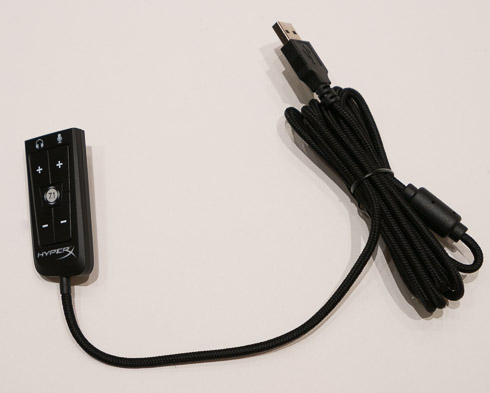
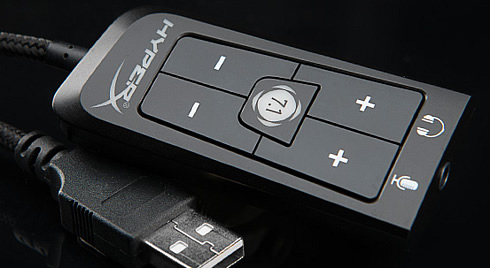
Below you see the USB audio control box, which includes a DSP (Digital Sound Processing) card to create virtual 7.1 surround sound.The sound card has built in volume and gain controls for the mic so there’s no need to fiddle with the settings on the computer. Although this is handy while gaming sessions, it could be also considered as a weak point of the headset, as hardcore gamers may want full control and customization options of the headset though their PC.
In addition, there is a switch on the side that mutes and unmutes the microphone. The HyperX logo glows red during operation, while the 7.1 button will glow red when the 7.1 feature is activated.
Last but not least, the length of the USB cable in enough to let you easily move around your desk. On the other hand, the non-detachable cable is 1 meter in length, if you are using it on your PC and are not going to use the included USB control box, you may have to get an extension cable.