
Breaking News

Xiaomi and Leica Camera AG Present the Xiaomi 17 Series Sandisk and SK hynix Begin Global Standardization of Next-Generation Memory Solution, High Bandwidth Flash (HBF) Samsung Brings Satellite Communication Support to Galaxy Smartphones Across the Globe vivo Announces MWC 2026 Attendance and sets to Showcase New Flagship X300 Ultra Razer Elevates Everyday Carry with the Laptop Sleeve 16” with Wireless Charging

logo

  • Share Us
    • Facebook
    • Twitter
  • Home
  • Home
  • News
  • Reviews
  • Essays
  • Forum
  • Legacy
  • About
    • Submit News

    • Contact Us
    • Privacy

    • Promotion
    • Advertise

    • RSS Feed
    • Site Map

Search form

Installation of SCSI HD

Jan 26,2002 0

4. Setting SCSI Adapter


Review Pages

1. Introduction
2. Power Tips
3. Cables
4. Setting SCSI Adapter
5. Partition/Format


Installing a SCSI HD - Page 4

Source: Maxtor

- Define the drive in the system's SCSI Host Adapter

A SCSI Host Adapter of recent build, with BIOS support for Logical Block Addressing (LBA) generally can detect the full physical capacity of today's large capacity hard drives (>8.4 GB). If you are unsure of your SCSI host adapter's ability to detect the drive or its full capacity, consult your PC manufacturer or SCSI host adapter documentation to determine if it supports of large capacity hard disk drives. A BIOS or ASPI driver update may be needed.

There are many ways to configure your SCSI device(s) and host adapter setting according to your needs. It is impossible to mention every variation. For the purposes of this section, we'll focus on installation of a hard drive in a PC compatible system with a DOS/ Windows 9x configuration. Your computer system or host adapter vendor is the best resource for the latest product information on device driver support, cable, and SCSI termination concerns.
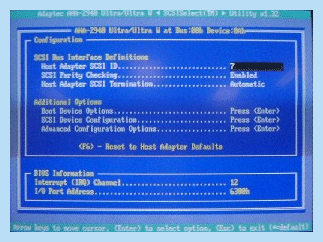

screen2a.gif - 56804 Bytes
SCSI Host Adapter BIOS


Review Pages

1. Introduction
2. Power Tips
3. Cables
4. Setting SCSI Adapter
5. Partition/Format


Pages

  • « first
  • ‹ previous
  • 1
  • 2
  • 3
  • 4
  • 5
  • next ›
  • last »

Tags:
Previous Post
Test Methodlogy
Next Post
40GB Roundup Vol.1

Related Posts

Latest Reviews

Kioxia Exceria Plus G3 512GB microSD
Cameras

Kioxia Exceria Plus G3 512GB microSD

SoundPeats Cove Pro
Consumer Electronics

SoundPeats Cove Pro

Asustor AS5404T 4-Bay NAS System
Enterprise & IT

Asustor AS5404T 4-Bay NAS System

be quiet! Pure Power 13M 1200W
PC components

be quiet! Pure Power 13M 1200W

Server-Side Gaming Why Canadian Online Casinos Are Abandoning Local Clients for HTML5 Clouds
Enterprise & IT

Server-Side Gaming Why Canadian Online Casinos Are Abandoning Local Clients for HTML5 Clouds

Popular News

COLORFUL Introduces CVN B850I GAMING FROZEN Motherboard

COLORFUL Introduces CVN B850I GAMING FROZEN Motherboard

COLORFUL Presents CVN X870 ARK FROZEN Motherboard for AMD Ryzen 9000 CPUs

COLORFUL Presents CVN X870 ARK FROZEN Motherboard for AMD Ryzen 9000 CPUs

TEAMGROUP Launches EXPERT P34F Find My External SSD

TEAMGROUP Launches EXPERT P34F Find My External SSD

Samsung announces Galaxy Tab S11 and Galaxy S25 FE series

Samsung announces Galaxy Tab S11 and Galaxy S25 FE series

Viltrox Showcases Upcoming Lens Lineup and New TTL Flash at IBC 2025

Viltrox Showcases Upcoming Lens Lineup and New TTL Flash at IBC 2025

CORSAIR announces Vanguard Pro 96 and Vanguard 96 Gaming Keyboards

CORSAIR announces Vanguard Pro 96 and Vanguard 96 Gaming Keyboards

Panasonic Introduces the First Ultra-Telephoto Zoom Lens in the LUMIX S Series

Panasonic Introduces the First Ultra-Telephoto Zoom Lens in the LUMIX S Series

MSI Launches DATAMAG 40Gbps Magnetic Portable SSD

MSI Launches DATAMAG 40Gbps Magnetic Portable SSD

Main menu

  • Home
  • News
  • Reviews
  • Essays
  • Forum
  • Legacy
  • About
    • Submit News

    • Contact Us
    • Privacy

    • Promotion
    • Advertise

    • RSS Feed
    • Site Map
  • About
  • Privacy
  • Contact Us
  • Promotional Opportunities @ CdrInfo.com
  • Advertise on out site
  • Submit your News to our site
  • RSS Feed


