Breaking News

ASUS Announces New 64GB Configuration of ASUS Ascent GX10 LIAN LI Announces Edge Platinum V2, Edge Gold V2, and GPU Cable Thermal Monitoring via Edge Hub ADV Razer Unveils the Huntsman V3 Pro Mini 8KHz ASRock DeskSlim Series Delivers RTX PRO Blackwell Performance in a Compact 5L Workstation Samsung Introduces Galaxy Tab S12 Series

logo

  • Share Us
    • Facebook
    • Twitter
  • Home
  • Home
  • News
  • Reviews
  • Essays
  • About
    • Submit News

    • Contact Us
    • Privacy

    • Promotion
    • Advertise

    • RSS Feed

Search form

G.Skill Trident RGB 3200 CL14

Jun 13,2021 0

3. Test Configuration / First Tests


Review Pages

1. Introduction
2. Retail Package
3. Test Configuration / First Tests
4. Overclocking...steps
5. Overclocking results
6. Overclocking comparison
7. Conclusion


In order to test G.Skill TridentZ RGB DDR4 with codename F4-3200C14D-32GTZR we used the following system:

  • CPU Cooler: AMD AM4 stock cpu cooler
  • CPU: AMD Ryzen 5 5600X @ 3700MHz LOCKED
  • Motherboard: Asus X570 E-Gaming with 3801 beta bios
  • VGA: Asus GeForce GTX1060 6GB Dual
  • HDD: Crucial MX500 SSD
  • Operating system: Windows 10 x64 with all latest updates installed

For testing the performance/stability we used the following software at their latest builds:

  • AIDA64 Software
  • CPU-Z
  • Thaiphoon Burner
  • PassMark MemTest86
  • CineBench R23
  • DRAM Calculator for Ryzen
  • ZenTimings

While all the above software may sound complicated, we will help you also tune up your DRAM installation, at least with the AMD AM4 platform.

Installing the memory modules isn't hard at all. Just read the manual of your motherboard or simply look at videos over YouTube. After the initial boot process, it advised to get into your motherboard BIOS and check the memory timing. In our case in start the memory recognized only at 2133MHz (SPD) and you have to use at the Ai Tweaker -> Ai Overclocker Tuner -> D.O.C.P. to enable the XMS profile and therefor get the best possible performance. For comparison reasons we will also list performance of the 2133MHz. So let’s start our tests:

- 2133MHz (Default SPD)

Not so great performance from the stock 2133MHz, but wait we didn’t get such high performance DDR4 memory to run only at 2133MHz? Of course not, lets enable XMS profile...

- 3200MHz (XMS profile)

The Asus motherboard read the XMS profile and set the memory at CL14-14-14-14-34 and also set the memory voltage at 1.35V.
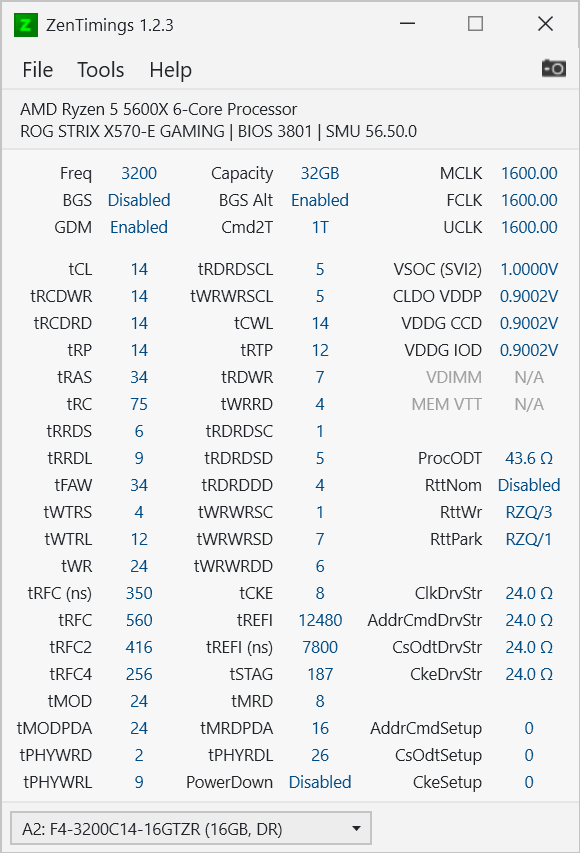
The performance now is very good reaching up to 46078MB/sec reading and 25598MB/sec writing performance with 67.1ms latency....

Is this the best from this memory kit we can get? or we could also get "better" aka tighter timings from this memory kit?


Review Pages

1. Introduction
2. Retail Package
3. Test Configuration / First Tests
4. Overclocking...steps
5. Overclocking results
6. Overclocking comparison
7. Conclusion


Pages

  • « first
  • ‹ previous
  • 1
  • 2
  • 3
  • 4
  • 5
  • 6
  • 7
  • next ›
  • last »

G.SKILL

Tags: G.SKILL
Previous Post
be quiet! dark rock pro 4
Next Post
Top 3 Graphic Designing Software of 2021

Related Posts

  • G.SKILL Launches Trident Z5 Royal NeoX Series DDR5 Memory with AMD EXPO Technology

  • G.SKILL Launches Flare X5X Series with AMD EXPO Ultra Low Latency

  • G.SKILL Demos Trident Z5 NeoX RGB Series DDR5 with AMD EXPOT Technology

  • G.SKILL Demos Overclocked DDR5-10000 512GB (64GBx8) R-DIMM and other products at Computex 2026

  • G.SKILL Showcases DDR5-9200 1.1V 16GBx2 High-Speed CU-DIMM Memory Kit

  • G.SKILL Demo New Memory Solutions for Gaming, Server, AI, Workstation Applications at Computex 2026

  • G.SKILL DDR5 Memory Kits Confirmed as Intel XMP 3.0 'Ready' for Intel Core Ultra 200S Plus Series Processors

  • G.SKILL Officially Commences World Cup 2026 Overclocking Competition with $40,000 USD Total Prize Pool

Latest Reviews

Fanxiang MP83 M.2 NVMe SSD Enclosure
Enterprise & IT

Fanxiang MP83 M.2 NVMe SSD Enclosure

Ugreen CM642 USB4.0 Enclosure
PC components

Ugreen CM642 USB4.0 Enclosure

be quiet! Dark Power 14 IO
PC components

be quiet! Dark Power 14 IO

SanDisk High Endurance 512GB microSDXC
Cameras

SanDisk High Endurance 512GB microSDXC

Samsung PRO Ultimate 512GB microSDXC
Cameras

Samsung PRO Ultimate 512GB microSDXC

Popular News

MSI’s Latest AMD X870E MAX & EVO Series Motherboards

MSI’s Latest AMD X870E MAX & EVO Series Motherboards

COLORFUL Launches iGame B850M ULTRA Series Micro-ATX Motherboards

COLORFUL Launches iGame B850M ULTRA Series Micro-ATX Motherboards

COLORFUL Presents Limited Edition Chitu MAG-60 Magnetic Keyboard Inspired by the Year of the Horse

COLORFUL Presents Limited Edition Chitu MAG-60 Magnetic Keyboard Inspired by the Year of the Horse

COLORFUL Launches iGame B850I MINI OC V14 Motherboard

COLORFUL Launches iGame B850I MINI OC V14 Motherboard

COLORFUL Presents iGame Z890 ULTRA-S W and iGame Z890M ULTRA Z Motherboards

COLORFUL Presents iGame Z890 ULTRA-S W and iGame Z890M ULTRA Z Motherboards

COLORFUL Expands B850 Motherboard Lineup with New CVN, Battle-Ax, and MEOW Models

COLORFUL Expands B850 Motherboard Lineup with New CVN, Battle-Ax, and MEOW Models

COLORFUL Launches the iGame X870E VULCAN W OC Motherboard

COLORFUL Launches the iGame X870E VULCAN W OC Motherboard

ASRock Adds Support for One Sub-Channel DRAM Module on Intel DDR5 Motherboards

ASRock Adds Support for One Sub-Channel DRAM Module on Intel DDR5 Motherboards

Main menu

  • Home
  • News
  • Reviews
  • Essays
  • About
    • Submit News

    • Contact Us
    • Privacy

    • Promotion
    • Advertise

    • RSS Feed
  • About
  • Privacy
  • Contact Us
  • Promotional Opportunities @ CdrInfo.com
  • Advertise on out site
  • Submit your News to our site
  • RSS Feed