Breaking News

Why has G.SKILL DRAM memory prices increased so much recently (since 2025 Q4) Samsung Expands Premium Micro RGB TV Lineup for 2026 with New Sizes and Advanced Features Viltrox AF 35mm F1.2 LAB Z Launch Ends Year With a Milestone Arctic announces MX-7 – ULTIMATE Performance Thermal Paste Akasa introduces Euler TX3 Fanless Thin Mini‑ITX Case

logo

  • Share Us
    • Facebook
    • Twitter
  • Home
  • Home
  • News
  • Reviews
  • Essays
  • Forum
  • Legacy
  • About
    • Submit News

    • Contact Us
    • Privacy

    • Promotion
    • Advertise

    • RSS Feed
    • Site Map

Search form

Facebook Introduces Messenger for Kids

Facebook Introduces Messenger for Kids

Enterprise & IT Dec 4,2017 0

Facebook is rolling in the United States a preview of Messenger Kids, a new app that makes it easier for kids to video chat and message with family and friends.

The standalone app lives on kids' tablets or smartphones but can be controlled from a parent's Facebook account. This preview is available on the App Store for iPad, iPod touch, and iPhone.

Messenger Kids is full of features for kids. Once their account is set up by a parent, kids can start a one-on-one or group video chat with parent-approved contacts. The home screen shows them at a glance who they are approved to talk to, and when those contacts are online.

In addition to video chat, kids can send photos, videos or text messages to their parent-approved friends and adult relatives, who will receive the messages via their regular Messenger app.
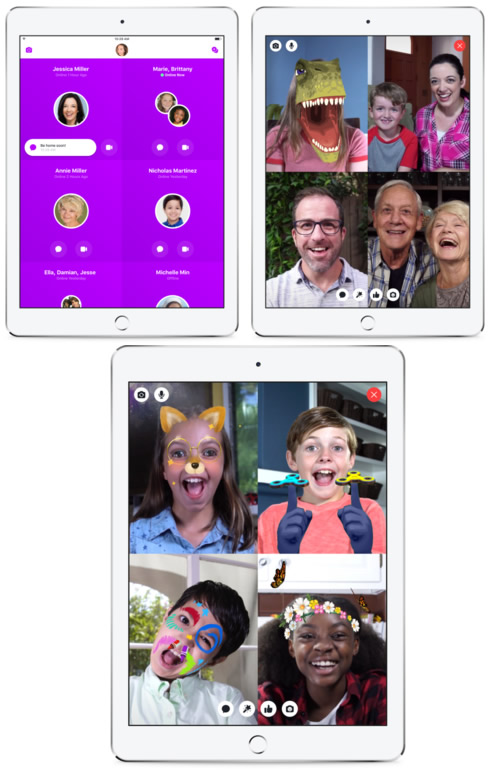
A library of kid-appropriate and specially chosen GIFs, frames, stickers, masks and drawing tools lets them decorate content.

Messenger Kids gives parents more control. Parents fully control the contact list and kids can't connect with contacts that their parent does not approve. Parents control kids accounts and contacts through the Messenger Kids Controls panel in their main Facebook app.

Every child account on Messenger Kids must be set up by a parent. For parents, setting your child up with a Messenger Kids account is done in four steps:

  • Download: First, download the Messenger Kids app on your child's iPad, iPod touch, or iPhone from the App Store.
    Authenticate: Then, authenticate your child's device using your own Facebook username and password. This will not create a Facebook account for your child or give them access to your Facebook account.
  • Create an account: Finish the setup process by creating an account for your child, where all you'll need to do is provide their name. Then the device can be handed over to the child so they can start chatting with the family and friends you approve.
  • Add contacts: To add people to your child's approved contact list, go to the Messenger Kids parental controls panel in your main Facebook app. To get there, click on "More" on the bottom right corner in your main Facebook app, and click "Messenger Kids" in the Explore section.

Facebook says that there are no ads in Messenger Kids and that your child's information isn't used for ads. It is free to download and there are no in-app purchases. Messenger Kids is also designed to be compliant with the Children's Online Privacy and Protection Act (COPPA).

This preview of Messenger Kids is only available in the US at this time on the Apple App Store, and will be coming to Amazon App Store and Google Play Store in the coming months.


Tags: facebook
Previous Post
NVIDIA GPU Cloud Now Available to AI Researchers
Next Post
Broadcom to Nominate 11 Directors for Election at Qualcomm's 2018 Annual Meeting as Takeover Fight Escalates

Related Posts

  • EU Privacy Watchdog Accused of Delaying Probe Procedures Against Facebook

  • Zuckerberg Says Remote Work is Here to Stay

  • Facebook to Launch New Shopping Feature Across Apps

  • EU Tech Chief Demands More From Facebook Regarding Business Practices

  • Facebook Buys GIPHY as Part of Instagram Team

  • Facebook Works With Telecoms on 2Africa Subsea Cable for Future Internet Connectivity

  • Facebook Reports Increased Number of Removals of Hate speech, Terrorism

  • Facebook Users Accept $550 Million Privacy Deal Over Facebook's “Tag Suggestions”

Latest News

Why has G.SKILL DRAM memory prices increased so much recently (since 2025 Q4)
PC components

Why has G.SKILL DRAM memory prices increased so much recently (since 2025 Q4)

Samsung Expands Premium Micro RGB TV Lineup for 2026 with New Sizes and Advanced Features
Consumer Electronics

Samsung Expands Premium Micro RGB TV Lineup for 2026 with New Sizes and Advanced Features

Viltrox AF 35mm F1.2 LAB Z Launch Ends Year With a Milestone
Cameras

Viltrox AF 35mm F1.2 LAB Z Launch Ends Year With a Milestone

Arctic announces MX-7 – ULTIMATE Performance Thermal Paste
Cooling Systems

Arctic announces MX-7 – ULTIMATE Performance Thermal Paste

Akasa introduces Euler TX3 Fanless Thin Mini‑ITX Case
Cooling Systems

Akasa introduces Euler TX3 Fanless Thin Mini‑ITX Case

Popular Reviews

be quiet! Dark Mount Keyboard

be quiet! Dark Mount Keyboard

Terramaster F8-SSD

Terramaster F8-SSD

be quiet! Light Mount Keyboard

be quiet! Light Mount Keyboard

Soundpeats Pop Clip

Soundpeats Pop Clip

Akaso 360 Action camera

Akaso 360 Action camera

Dragon Touch Digital Calendar

Dragon Touch Digital Calendar

Noctua NF-A12x25 G2 fans

Noctua NF-A12x25 G2 fans

be quiet! Pure Loop 3 280mm

be quiet! Pure Loop 3 280mm

Main menu

  • Home
  • News
  • Reviews
  • Essays
  • Forum
  • Legacy
  • About
    • Submit News

    • Contact Us
    • Privacy

    • Promotion
    • Advertise

    • RSS Feed
    • Site Map
  • About
  • Privacy
  • Contact Us
  • Promotional Opportunities @ CdrInfo.com
  • Advertise on out site
  • Submit your News to our site
  • RSS Feed