
Elby CloneCD CD-R Software
4. Add-ons Patchers
Review Pages
2. CD-Protections Overview
3. Copy Protection Detectors
4. Add-ons Patchers
5. Interface - Options (1)
6. Interface - Options (2)
7. Various Protection Tests - Page 1
8. Various Protection Tests - Page 2
9. Various Protection Tests - Page 3
10. Tests Conclusion
11. Final Conclusion
12. FAQ
13. Hardware Suggestions
14. Tips
15. Future Plans
CloneCD Guide - Page 4
Add-ons Patchers
Since many users faces problems with either SafeDisc 2 or with SubChannel data several new utilities are out and will help you solve them!
PlayBack
This is the first ever patcher out for CloneCD images. The
utility works ONLY with CloneCD images and the author seems to be unknown (cann't
you guess who is behind?). The software installs a VXD driver ,which emulates
the missing protection theme, and using the included patcher you will be able
to make the SD2 backups you have always wanted. Note that the software currently
works in Win9x platform and the patched backup will run only when PlayBack is
installed.
- Why use it?
As the PlayBack author says "...SafeDisk2 protected CDs can only be copied
with certain CD-Writers. Copies of SecuROM protected CDs require special hardware
- a RAW-DAO burner and a Reader, which is able to read Subchannel Data from
Data Tracks. Not everybody has such hardware. Backups of SecuROM 2 protected
CDs will only run from CD-ROMs, not a CD-Writer or a DVD-CD-Writer combo drive..."
- How it works?
The PlayBackup utility does't crack the application since it only alters the
"copy protection related" data delivered from the CD-ROM "on
the fly"
SecuROM patch: If the application tries to read subchannel data from the CD-ROM, the PlayBackup driver delivers altered data. Result: The copy will be identified as an original.
Hide CD-Writer patch: When the application checks, if the inserted media is a CD-R or CD-RW, the PlayBackup driver will always deliver "This is a pressed, silver CD". Result: Backups will run from CD-Writers and combo drives.
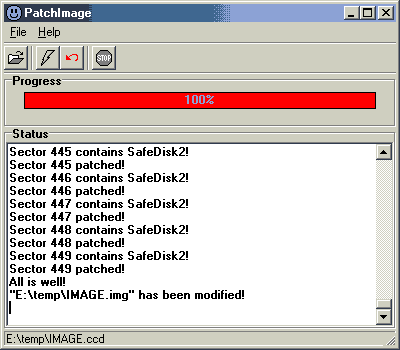
SafeDisk2 patch: As a lot of writers can't write special "SafeDisk2 Sectors", PatchImage replaces these sectors with "literal descriptions" of the sector content. These replacement sectors can be written by all writers. When playing the backup, the PlayBackup driver converts these sectors to the original content. Result: The backup will run.
 -
How use it?
-
How use it?
The procedure is simple. Make an image of the SD2 - Securom protected title
with CloneCD and afterwards use the included patcher in order to *fix* the image!
After the patcher finishes you must burn the image with CloneCD to an empty
CD and activate the PlayBackup driver. To enable the driver, click on the "Smiley"
icon in your Taskbar. If PatchImage has altered your Image file (watch the Status
window!) the copy will not run, if the PlayBackup driver is not running. The
PlayBackup driver gives you the options to enable/disable it and which protection
you want to enable:

InseKtor
 After
the PlayBack utility, InseKtor is the second utility that can be used in order
backup SD 1/2 protected CDs. Many users had problems using PlayBack since it
supports only the Win9x platform. InseKtor on the other hand supports only Win2k
platform! Heh. None is perfect.
After
the PlayBack utility, InseKtor is the second utility that can be used in order
backup SD 1/2 protected CDs. Many users had problems using PlayBack since it
supports only the Win9x platform. InseKtor on the other hand supports only Win2k
platform! Heh. None is perfect.
 InseKtor
as the PlayBack is an utility that patches SafeDisc 1/2 images and installs
a VXD driver in order to make them working with all CD-Roms. The nice about
InseKtor is that supports a variety of images ,author suggests using BlindRead
but CloneCD will work find, which PlayBack doesn't. On the other hand the InseKtor
can only *fix* SafeDisc and not SecuROM images as the PlayBack does.
InseKtor
as the PlayBack is an utility that patches SafeDisc 1/2 images and installs
a VXD driver in order to make them working with all CD-Roms. The nice about
InseKtor is that supports a variety of images ,author suggests using BlindRead
but CloneCD will work find, which PlayBack doesn't. On the other hand the InseKtor
can only *fix* SafeDisc and not SecuROM images as the PlayBack does.
- Why use it?
SafeDisc 1 has a bunch of sectors with uncorrectables errors. To reproduce such
sectors, a RAW-MODE CD writer is needed, as well as a RAW CD-Recording tool.
(Blindwrite, CloneCD)
Safedisc 2 has some sectors with special mathematical patterns, so these sectors turn CD READER circuitry into a real nightmare. Every CD recording App can copy SD 2 sectors, but the resulting copy will be unpredictibily read by some CD Readers. Safedisc is owned, developped and copyrighted by ç-dilla, which is owned by Microsoft.
InseKtor solves all the hardware requirements!
- How it works?
The InseKtor works in the same way as PlayBackup utility does: "...All
the protected sectors (hard to read or to write) are removed on the CD, and
replaced by a signature. A Hook driver will seek the signed sectors as they
are read, and replace with the expected sector at runtime..."
- How use it?
The procedure is very easy even for the novice user. Use either BlindRead/CloneCD
and make an image of the SD 1/2. Afterwards use the included InseKtor software
to *fix* the image and burn the image in a blank CD!
Now since you have installed the VXD driver (called Hook) choose from the "Driver Status' tab the CD-Rom/CDR-W drive where the backup will run from. So simple!
Review Pages
2. CD-Protections Overview
3. Copy Protection Detectors
4. Add-ons Patchers
5. Interface - Options (1)
6. Interface - Options (2)
7. Various Protection Tests - Page 1
8. Various Protection Tests - Page 2
9. Various Protection Tests - Page 3
10. Tests Conclusion
11. Final Conclusion
12. FAQ
13. Hardware Suggestions
14. Tips
15. Future Plans





