
Breaking News

Noctua at Computex 2026 GIGABYTE announces AORUS GeForce RTX 50 Series AI BOX Sony Expands Professional Display Lineup with Crystal LED UNIFY PlayStation Plus Game Catalog for June 2026 Introducing the Razer Seiren V3 Pro

logo

  • Share Us
    • Facebook
    • Twitter
  • Home
  • Home
  • News
  • Reviews
  • Essays
  • Forum
  • Legacy
  • About
    • Submit News

    • Contact Us
    • Privacy

    • Promotion
    • Advertise

    • RSS Feed
    • Site Map

Search form

DVD Shrink simple guide

Mar 3,2004 0

2. Open files from DVD Drive


Review Pages

1. Introduction
2. Open files from DVD Drive
3. Open existing files from Hard Disk
4. Re-author
5. Program Preferences
6. Backup


DVD Shrink Guide - Page 2

Open files from DVD drive

Below you can see the main screen of DVD Shrink software:

We select the "Open Disk" icon. As soon as we press it, we will see the following message:
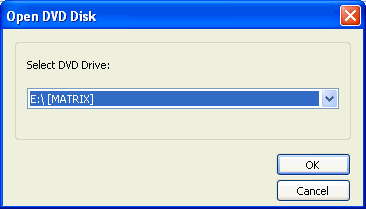
Here we have to define the drive in which we have inserted the DVD Video disc. In our case the "Matrix" movie title is in the is the E drive of ourPC. With the defauls settings, we press "OK" and the movie analyzing process begins:
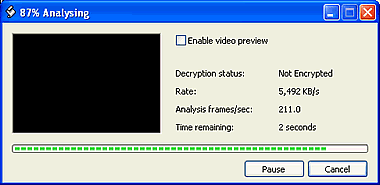
There is also a option for a video preview, by checking the box of "Enable video preview". Here you can watch the movie in fast mode. It is not recommended since it makes the analyzing process slower and of course, this would reveal you the end of the movie before actually watching it!

After the end of analyzing the following screen will be appeared:
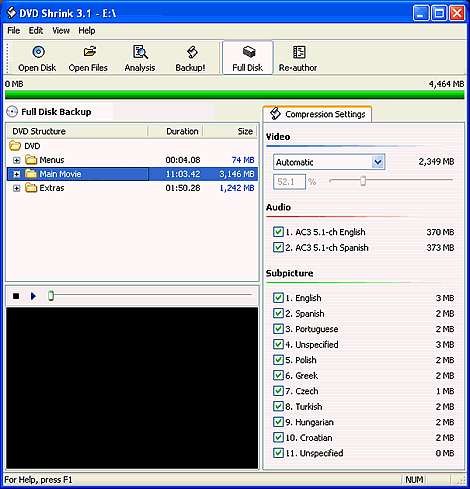
Users of Nero Recode 2 will find this interface familiar:))

In the following page you can see how to open exciting files from your hard disk, where you have already use a software such as DVD Decrypter to remove all protections.


Review Pages

1. Introduction
2. Open files from DVD Drive
3. Open existing files from Hard Disk
4. Re-author
5. Program Preferences
6. Backup


 

Pages

  • « first
  • ‹ previous
  • 1
  • 2
  • 3
  • 4
  • 5
  • 6
  • next ›
  • last »

Tags:
Previous Post
Mitsumi DW-7872TE
Next Post
Teac DV-W58G

Related Posts

Latest Reviews

Swit NP-FZ100 Battery
Cameras

Swit NP-FZ100 Battery

The Technology Stack Behind Modern Digital Gaming Platforms
Consumer Electronics

The Technology Stack Behind Modern Digital Gaming Platforms

be quiet! Dark Rock Pro 6
Cooling Systems

be quiet! Dark Rock Pro 6

How Online Casinos Use Encryption, Verification, and Risk Controls to Build User Trust
Enterprise & IT

How Online Casinos Use Encryption, Verification, and Risk Controls to Build User Trust

Why Low-Latency Infrastructure Matters More Than Raw Specs
Enterprise & IT

Why Low-Latency Infrastructure Matters More Than Raw Specs

Popular News

CORSAIR announces Vanguard Pro 96 and Vanguard 96 Gaming Keyboards

CORSAIR announces Vanguard Pro 96 and Vanguard 96 Gaming Keyboards

TEAMGROUP Launches EXPERT P34F Find My External SSD

TEAMGROUP Launches EXPERT P34F Find My External SSD

MSI Launches FORGE GK600 TKL WIRELESS Special Edition Compact Mechanical Keyboard

MSI Launches FORGE GK600 TKL WIRELESS Special Edition Compact Mechanical Keyboard

Samsung announces Galaxy Tab S11 and Galaxy S25 FE series

Samsung announces Galaxy Tab S11 and Galaxy S25 FE series

Viltrox Showcases Upcoming Lens Lineup and New TTL Flash at IBC 2025

Viltrox Showcases Upcoming Lens Lineup and New TTL Flash at IBC 2025

Panasonic Introduces the First Ultra-Telephoto Zoom Lens in the LUMIX S Series

Panasonic Introduces the First Ultra-Telephoto Zoom Lens in the LUMIX S Series

MSI Launches DATAMAG 40Gbps Magnetic Portable SSD

MSI Launches DATAMAG 40Gbps Magnetic Portable SSD

Viltrox Joins the L-Mount Alliance, Expanding Creative Possibilities

Viltrox Joins the L-Mount Alliance, Expanding Creative Possibilities

Main menu

  • Home
  • News
  • Reviews
  • Essays
  • Forum
  • Legacy
  • About
    • Submit News

    • Contact Us
    • Privacy

    • Promotion
    • Advertise

    • RSS Feed
    • Site Map
  • About
  • Privacy
  • Contact Us
  • Promotional Opportunities @ CdrInfo.com
  • Advertise on out site
  • Submit your News to our site
  • RSS Feed