Breaking News

LiberNovo Showcases Ergonomic Innovation at IFA 2026 with Maxis Series for Big And Tall Users TIMEKETTLE UNVEILS NEW W4 PLUS AI INTERPRETER EARBUDS EXPANDING REAL-TIME TRANSLATION ACROSS CALLS, MEETINGS AND MULTIMEDIA CONTENT Hollyland Launches Pyro 7 Ultra, an All-in-One Wireless Monitoring System for Professional Film Production ADATA Powers AI Servers, Edge Systems and Intelligent Applications with Enterprise Memory and Storage Acer Expands Gaming Handheld Portfolio with Predator Atlas 7

logo

  • Share Us
    • Facebook
    • Twitter
  • Home
  • Home
  • News
  • Reviews
  • Essays
  • About
    • Submit News

    • Contact Us
    • Privacy

    • Promotion
    • Advertise

    • RSS Feed

Search form

Club3D X1800XT

Jan 24,2006 0

15. Overclocking


Review Pages

1. Introduction
2. Features
3. A Closer Look
4. Test System
5. 3DMark2005
6. 3DMark2003
7. Codecreatures
8. Aquamark - 3DMark01
9. F.E.A.R.
10. Need For Speed - Most Wanted
11. Quake 4
12. Half Life 2
13. Far Cry
14. Ground Control II
15. Overclocking
16. Conclusion


No matter your graphics card, there comes a time in your computer's life when it can no longer cope with the latest technology the ever so popular games use. This is one of the main reasons for overclocking your graphics card. Gamers are always looking forward for a little extra boost in terms of framerate. Even though most of the times the boost is far from noticeable, overclocking remains the last resort when you can't afford to buy a brand new VGA card.
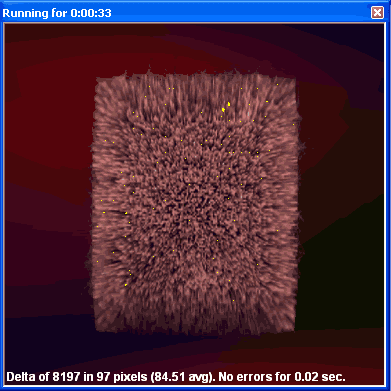
Increasing the memory clock too much,
produces the so-called "artifacts".

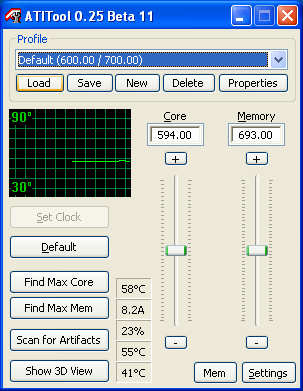
The stock clock speeds for the Club3D X1800XT were 600MHz for the core and 700MHz (1.4GHz effective) for the memory.

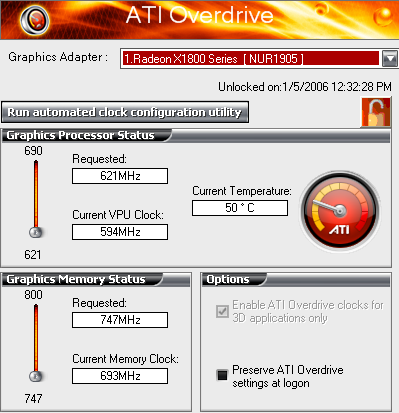
There are two ways to overclock the card. One is by manually selecting the frequencies through ATITool and one using the Catalyst Overdrive function. Of course, we simply had to try both.
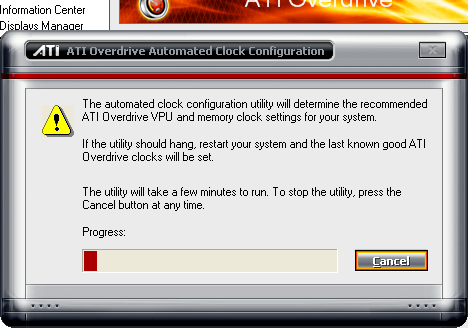
After letting the Automated clock configuration run for a little while, the overclocking frequencies selected were 620MHz for the GPU and 750MHz for the memory.
Firing up ATITool, we loaded the card's default speeds and started tweaking them.
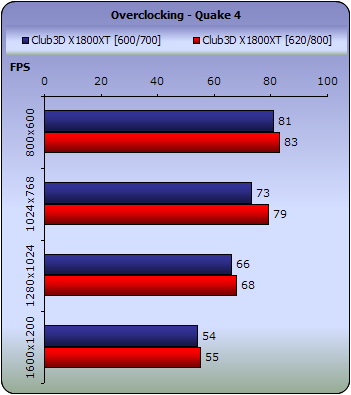
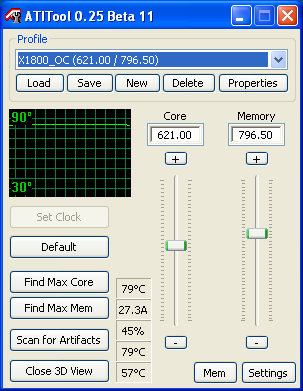
After quite a few rounds of trial and error (some resulted in crashes) we settled on 620/800 combination. The core was indeed unable to work properly at a higher speed, however the memory could operate at 800MHz just fine.
Let's see what difference that clock tweaking makes.
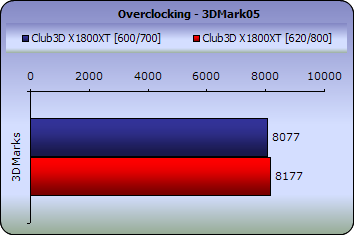
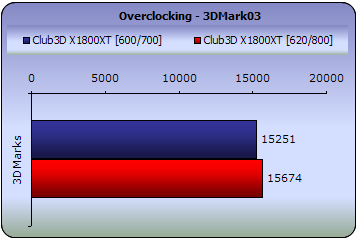
Judging by the small differences, overclocking the card is just not worth the trouble. The difference can barely be seen and actually, this card doesn't really need to be overclocked in the first place.

 

Review Pages

1. Introduction
2. Features
3. A Closer Look
4. Test System
5. 3DMark2005
6. 3DMark2003
7. Codecreatures
8. Aquamark - 3DMark01
9. F.E.A.R.
10. Need For Speed - Most Wanted
11. Quake 4
12. Half Life 2
13. Far Cry
14. Ground Control II
15. Overclocking
16. Conclusion


Pages

  • « first
  • ‹ previous
  • …
  • 8
  • 9
  • 10
  • 11
  • 12
  • 13
  • 14
  • 15
  • 16
  • next ›
  • last »

Club 3D

Tags: Club 3D
Previous Post
BenQ DW1655
Next Post
Samsung SE-W164C

Related Posts

  • Club3D announces 40Gbps USB4 NVMe enclosure and Space-Saving dual port Wall Charger

  • Club3D releases its first fully passive 9 m USB4 cable

  • Club 3D Announced their first new products of 2026

  • Club 3D transforms workspace connectivity with universal docking stations and hubs

  • Club 3D new products for May 2024

  • Club3D CAC-1587 TypeC to HDMI Adapter

  • Club 3D announces first USB4 6-in-1 Hub

  • Club 3D Press Release - DisplayPort to HDMI 4K120Hz Adapter

Latest Reviews

be quiet! Dark Power 14 IO
PC components

be quiet! Dark Power 14 IO

SanDisk High Endurance 512GB microSDXC
Cameras

SanDisk High Endurance 512GB microSDXC

Samsung PRO Ultimate 512GB microSDXC
Cameras

Samsung PRO Ultimate 512GB microSDXC

be quiet! Light Mount TKL
Consumer Electronics

be quiet! Light Mount TKL

be quiet! Light Loop IO LCD
Cooling Systems

be quiet! Light Loop IO LCD

Popular News

CORSAIR announces Vanguard Pro 96 and Vanguard 96 Gaming Keyboards

CORSAIR announces Vanguard Pro 96 and Vanguard 96 Gaming Keyboards

MSI Launches FORGE GK600 TKL WIRELESS Special Edition Compact Mechanical Keyboard

MSI Launches FORGE GK600 TKL WIRELESS Special Edition Compact Mechanical Keyboard

Viltrox Showcases Upcoming Lens Lineup and New TTL Flash at IBC 2025

Viltrox Showcases Upcoming Lens Lineup and New TTL Flash at IBC 2025

Panasonic Introduces the First Ultra-Telephoto Zoom Lens in the LUMIX S Series

Panasonic Introduces the First Ultra-Telephoto Zoom Lens in the LUMIX S Series

MSI Launches DATAMAG 40Gbps Magnetic Portable SSD

MSI Launches DATAMAG 40Gbps Magnetic Portable SSD

MSI’s Latest AMD X870E MAX & EVO Series Motherboards

MSI’s Latest AMD X870E MAX & EVO Series Motherboards

COLORFUL Launches iGame B850M ULTRA Series Micro-ATX Motherboards

COLORFUL Launches iGame B850M ULTRA Series Micro-ATX Motherboards

COLORFUL Presents Limited Edition Chitu MAG-60 Magnetic Keyboard Inspired by the Year of the Horse

COLORFUL Presents Limited Edition Chitu MAG-60 Magnetic Keyboard Inspired by the Year of the Horse

Main menu

  • Home
  • News
  • Reviews
  • Essays
  • About
    • Submit News

    • Contact Us
    • Privacy

    • Promotion
    • Advertise

    • RSS Feed
  • About
  • Privacy
  • Contact Us
  • Promotional Opportunities @ CdrInfo.com
  • Advertise on out site
  • Submit your News to our site
  • RSS Feed