Breaking News

Razer Unleashes the Kraken V4 X Sensa HD Haptics Sony Rewrites the Rules of Super-Telephoto: Announces World's Lightest 400mm and 600mm G Master Primes Transcend Debuts High-Performance 64GB DDR5-6400 CUDIMM & CSODIMM Embedded DRAM Modules Micron Unveils World's First 512GB Ultra-Dense DDR5 Module for Next-Gen Servers Fujifilm Officially Introduces the instax Pal 2 Digital Camera

logo

  • Share Us
    • Facebook
    • Twitter
  • Home
  • Home
  • News
  • Reviews
  • Essays
  • About
    • Submit News

    • Contact Us
    • Privacy

    • Promotion
    • Advertise

    • RSS Feed

Search form

Asus P5GD2 Premium

Apr 28,2005 0

8. Bios & Overclocking


Review Pages

1. Introduction
2. Features
3. Board Layout
4. 3DMark03
5. Performance Part 2
6. Half Life 2
7. Ground Control II
8. Bios & Overclocking
9. Bundled Software
10. Conclusion


As with all the latest and feature-rich motherboards, so too the P5GD2 has an option in the BIOS where you can enable or disable all the intergrated peripherals. HD-Audio, Firewire, Gigabit Lan and the WiFi controller can all be disabled so that they don't even get detected by the operating system. Disabling the RAID controller is strongly suggested if you don't need it, as it takes up quite some time during boot scanning checking for available RAID configurations.

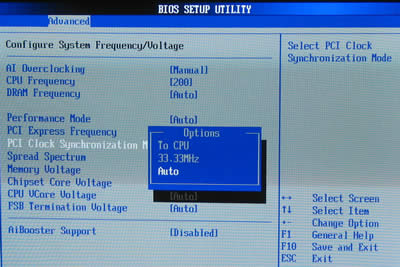
Overclocking is really easy with the Asus P5GD2 from the Advanced tab menu in the BIOS. AI Overclocking powers this Asus motherboard too, with the options you can see in the picture below.

As soon as you set the "N.O.S." value to the AI Overclocking option, there's nothing else to worry about. The next time the system boots into the operating system and the chipset detects heavy CPU load, it will automatically adjust the FSB clock and CPU core voltage and overclock your processor. N.O.S. is quite a safe overclocking method as it tends to clock the processor only a little higher than it's stock clock frequency.

We used N.O.S to overclock our P4 3.0GHz processor. When idling, the processor settings are the following as detected by CPU-Z:
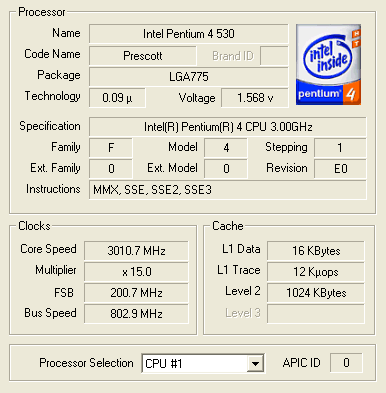
However, when running an application that required a little more CPU power, N.O.S. was activated and we had the following:

Apart from N.O.S. Asus offers another easy way of overclocking the CPU. Choosing for "Overclocking Profile" the "Overclock 30%" option, our Intel 3.0GHz is automatically clocked to 3.9GHz at all times :
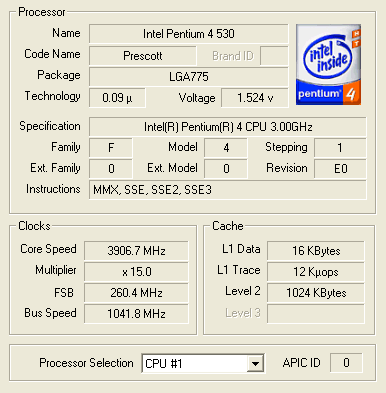
As you can see, the FSB speed was boosted up to 260MHz and consequently, the Bus Speed reached 1040MHz.

Both N.O.S. and Overclocking profiles are excellent choices for the average computer user since they don't require much knowledge to use them. Voltage settings, memory speeds and everything else is taken care off by the BIOS.

In the picture above you can see the BIOS setting allowing you to choose whether the RAID controller should be used as a Standard IDE controller or RAID 0/1/0+1.

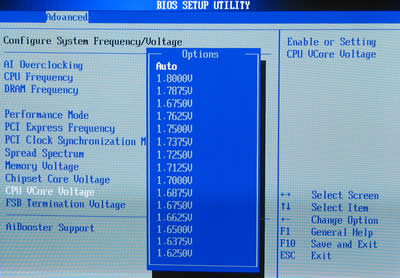
Just like the P5AD2-E, apart from automatic overclocking the P5GD2 allows you to manually overclock the processor with a large variety of settings to mess with, if you have the time and knowledge for it.
 

Review Pages

1. Introduction
2. Features
3. Board Layout
4. 3DMark03
5. Performance Part 2
6. Half Life 2
7. Ground Control II
8. Bios & Overclocking
9. Bundled Software
10. Conclusion


Pages

  • « first
  • ‹ previous
  • …
  • 2
  • 3
  • 4
  • 5
  • 6
  • 7
  • 8
  • 9
  • 10
  • next ›
  • last »

ASUS

Tags: ASUS
Previous Post
LiteON vs LG
Next Post
VSO latest results April 24th 2005

Related Posts

  • ASUS Announces WiFi 8 Router

  • Asus announces ExpertBook B3 G2 and ExpertBook P3 G2

  • ASUS Announces Prime AP304 PC Case

  • ASUS Announces ProArt Display OLED PA279CDV and PA329CDV

  • ASUS Announces T1 GeForce RTX 5070 and RTX 5060 Ti Graphics Cards

  • ASUS Announces ProArt GeForce RTX 5090 Graphics Card

  • ASUS Announces ProArt Display OLED PA27USD and PA32USD

  • ASUS Announces TUF Gaming Platinum Power Supply Series

Latest Reviews

Fanxiang MP83 M.2 NVMe SSD Enclosure
Enterprise & IT

Fanxiang MP83 M.2 NVMe SSD Enclosure

Ugreen CM642 USB4.0 Enclosure
PC components

Ugreen CM642 USB4.0 Enclosure

be quiet! Dark Power 14 IO
PC components

be quiet! Dark Power 14 IO

SanDisk High Endurance 512GB microSDXC
Cameras

SanDisk High Endurance 512GB microSDXC

Samsung PRO Ultimate 512GB microSDXC
Cameras

Samsung PRO Ultimate 512GB microSDXC

Popular News

CORSAIR announces Vanguard Pro 96 and Vanguard 96 Gaming Keyboards

CORSAIR announces Vanguard Pro 96 and Vanguard 96 Gaming Keyboards

MSI Launches FORGE GK600 TKL WIRELESS Special Edition Compact Mechanical Keyboard

MSI Launches FORGE GK600 TKL WIRELESS Special Edition Compact Mechanical Keyboard

MSI’s Latest AMD X870E MAX & EVO Series Motherboards

MSI’s Latest AMD X870E MAX & EVO Series Motherboards

Panasonic Introduces the First Ultra-Telephoto Zoom Lens in the LUMIX S Series

Panasonic Introduces the First Ultra-Telephoto Zoom Lens in the LUMIX S Series

COLORFUL Launches iGame B850M ULTRA Series Micro-ATX Motherboards

COLORFUL Launches iGame B850M ULTRA Series Micro-ATX Motherboards

COLORFUL Presents Limited Edition Chitu MAG-60 Magnetic Keyboard Inspired by the Year of the Horse

COLORFUL Presents Limited Edition Chitu MAG-60 Magnetic Keyboard Inspired by the Year of the Horse

COLORFUL Presents iGame Z890 ULTRA-S W and iGame Z890M ULTRA Z Motherboards

COLORFUL Presents iGame Z890 ULTRA-S W and iGame Z890M ULTRA Z Motherboards

LIAN LI Launches 8.8” Universal Screen with Flexible Mounting Solution

LIAN LI Launches 8.8” Universal Screen with Flexible Mounting Solution

Main menu

  • Home
  • News
  • Reviews
  • Essays
  • About
    • Submit News

    • Contact Us
    • Privacy

    • Promotion
    • Advertise

    • RSS Feed
  • About
  • Privacy
  • Contact Us
  • Promotional Opportunities @ CdrInfo.com
  • Advertise on out site
  • Submit your News to our site
  • RSS Feed