Breaking News

DZOFILM Expands Arles Cine Lens System With 25–75mm and 65–180mm T2.6 Zooms G.SKILL Launches Trident Z5 Royal NeoX Series DDR5 Memory with AMD EXPO Technology XERON Launches NEX A61 ARGB CPU Air Cooler Viltrox to Unveil New Lenses And Production Solutions at IBC2026 ASUS Announces WiFi 8 Router

logo

  • Share Us
    • Facebook
    • Twitter
  • Home
  • Home
  • News
  • Reviews
  • Essays
  • About
    • Submit News

    • Contact Us
    • Privacy

    • Promotion
    • Advertise

    • RSS Feed

Search form

Asus Commando

Jun 12,2007 0

2. The Package


Review Pages

1. Introduction
2. The Package
3. BIOS
4. Everest Ultimate Edition 2006 - SiSoft Sandra
5. PCMARK - 3DMARK
6. Science Mark - PovRay - Nero Digital
7. CINEBENCH -SuperPI
8. Overclocking
9. Conclusion


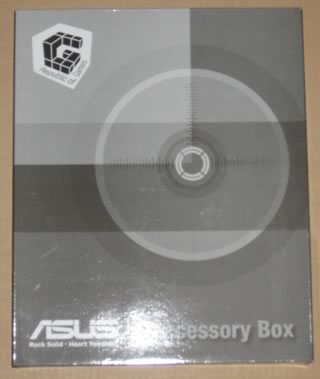
Asus Commando costs around €200~250. The motherboard has been available on the market for sometime now, so the price has settled enough to feel right for the features and performance it offers, but more on that later. The retail package follows the usual design for the "Republic of Gamers" motherboard series:

All included accessories are well packaged and the motherboard is protected by a plastic shell:

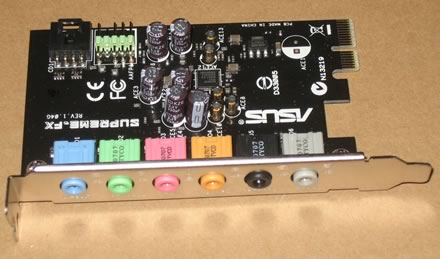
The sound card is based on the Soundmax chipset and needs to be installed.

There are 6 ports available, colour coded according to function.
The package includes all information about the board's design and special features. Below is a list of what's included in the retail package

  • UltraDMA 133/100/66 cable
  • FDD cable
  • SATA cables
  • SATA power cables
  • I/O Shield
  • User's manual
  • USB2.0 port module
  • 3 in 1 Q-connector
  • 7 x cable ties
  • IEEE1394 port module
  • 1x printed user's manual
  • 1x CD-ROM with InterVideo® Media Launcher (WinDVD Creator 2, InterVideo PhotoAlbum, DiscMaster 2.5 Platinum, DVD Copy 2.5 Platinum)
  • 1x CD-ROM with drivers and software
  • 1x CD-ROM with Retail version of Tom Clancy's Ghost Recon Advanced Warfighter
The board itself, is well laid out and all parts can be identified easily:

Let's zoom at the CPU area.

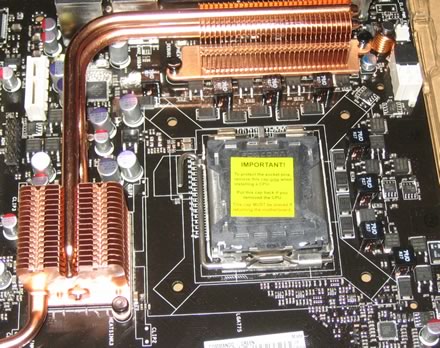
We can clearly see the passive cooling solution for the northbridge. As Asus comments "...The Heat Pipe design effectively directs the heat generated by the chipsets to the heatsink near the back IO ports, where it can be carried away by existing airflow from CPU fan or bundled optional fan...". The nearby components are low profile so there shouldn't be a problem with larger cooling solutions. After installing Intel's stock fan, the space between the passive heatsinks and CPU cooler is very limited. Perhaps larger coolers may not fit, so before purchasing a third party cooler, check the compatibility list:

The passive heatsinks do their job well and keep the northbridge cool. Of course, we advise you not to touch them since the temperatures are rather high. The motherboard supports four banks for memory modules.
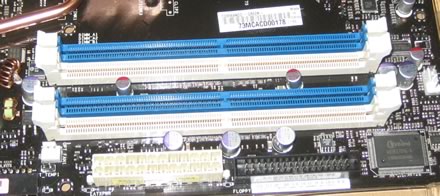
Click to Enlarge!

Moving to the south area of the board, we can see the passive heatsink for the southbridge and the 6x SATA 2 connectors, well organized, not crowded. It is advised to install the cables before placing the motherboard inside the case:

The motherboard supports the CrossFire Technology. There are 2x PCI-E x16 slots, the blue PCI-E lanes work at 16x & 4x. Like other P965 motherboards, you can run Nvidia's SLI, with hacked drivers of course. There is enough space between the three PCI-E slots so no problem here for extra large VGA cards:
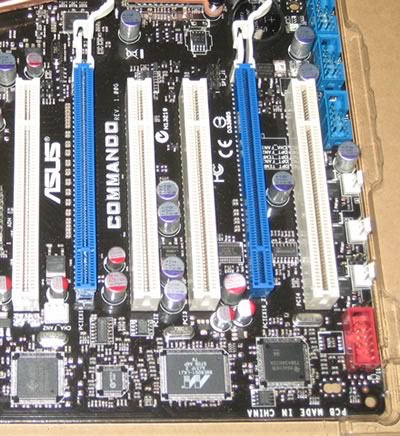
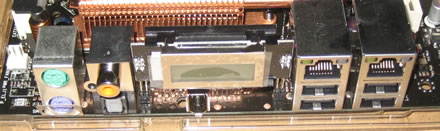
There are several extra connections for USB, Front Panel Audio, COM2 and Firewire for the back. Asus has included all port modules in the retail package. The back I/O panel has the usual connections:

  • 1 x LCD Poster
  • 1 x PS/2 keyboard port (purple)
  • 1 x PS/2 mouse (green)
  • 1 x S/PDIF output port (Optical + Coaxial)
  • 2 x LAN (RJ45) port
  • 4 x USB 2.0/1.1 ports
  • 1 x IEEE1394a port

The LCD panel is backlit offering POST messages during bootup. We didn't find any option under the BIOS that would allow us to change the messages, as can be done with the Striker Extreme series. Lastly, there are three buttons on-board that are used to perform the most basic functions on a motherboard, shutdown, reset and clear CMOS. No need to look in the dark for onboard switches:

 

Review Pages

1. Introduction
2. The Package
3. BIOS
4. Everest Ultimate Edition 2006 - SiSoft Sandra
5. PCMARK - 3DMARK
6. Science Mark - PovRay - Nero Digital
7. CINEBENCH -SuperPI
8. Overclocking
9. Conclusion


Pages

  • « first
  • ‹ previous
  • 1
  • 2
  • 3
  • 4
  • 5
  • 6
  • 7
  • 8
  • 9
  • next ›
  • last »

ASUS

Commando

Tags: ASUS Commando
Previous Post
Thermaltake 1200W
Next Post
LG GSA-H55L

Related Posts

  • ASUS Announces WiFi 8 Router

  • Asus announces ExpertBook B3 G2 and ExpertBook P3 G2

  • ASUS Announces Prime AP304 PC Case

  • ASUS Announces ProArt Display OLED PA279CDV and PA329CDV

  • ASUS Announces T1 GeForce RTX 5070 and RTX 5060 Ti Graphics Cards

  • ASUS Announces ProArt GeForce RTX 5090 Graphics Card

  • ASUS Announces ProArt Display OLED PA27USD and PA32USD

  • ASUS Announces TUF Gaming Platinum Power Supply Series

Latest Reviews

Ugreen CM642 USB4.0 Enclosure
PC components

Ugreen CM642 USB4.0 Enclosure

be quiet! Dark Power 14 IO
PC components

be quiet! Dark Power 14 IO

SanDisk High Endurance 512GB microSDXC
Cameras

SanDisk High Endurance 512GB microSDXC

Samsung PRO Ultimate 512GB microSDXC
Cameras

Samsung PRO Ultimate 512GB microSDXC

be quiet! Light Mount TKL
Consumer Electronics

be quiet! Light Mount TKL

Popular News

CORSAIR announces Vanguard Pro 96 and Vanguard 96 Gaming Keyboards

CORSAIR announces Vanguard Pro 96 and Vanguard 96 Gaming Keyboards

MSI Launches FORGE GK600 TKL WIRELESS Special Edition Compact Mechanical Keyboard

MSI Launches FORGE GK600 TKL WIRELESS Special Edition Compact Mechanical Keyboard

Panasonic Introduces the First Ultra-Telephoto Zoom Lens in the LUMIX S Series

Panasonic Introduces the First Ultra-Telephoto Zoom Lens in the LUMIX S Series

MSI’s Latest AMD X870E MAX & EVO Series Motherboards

MSI’s Latest AMD X870E MAX & EVO Series Motherboards

COLORFUL Launches iGame B850M ULTRA Series Micro-ATX Motherboards

COLORFUL Launches iGame B850M ULTRA Series Micro-ATX Motherboards

COLORFUL Presents Limited Edition Chitu MAG-60 Magnetic Keyboard Inspired by the Year of the Horse

COLORFUL Presents Limited Edition Chitu MAG-60 Magnetic Keyboard Inspired by the Year of the Horse

COLORFUL Presents iGame Z890 ULTRA-S W and iGame Z890M ULTRA Z Motherboards

COLORFUL Presents iGame Z890 ULTRA-S W and iGame Z890M ULTRA Z Motherboards

LIAN LI Launches 8.8” Universal Screen with Flexible Mounting Solution

LIAN LI Launches 8.8” Universal Screen with Flexible Mounting Solution

Main menu

  • Home
  • News
  • Reviews
  • Essays
  • About
    • Submit News

    • Contact Us
    • Privacy

    • Promotion
    • Advertise

    • RSS Feed
  • About
  • Privacy
  • Contact Us
  • Promotional Opportunities @ CdrInfo.com
  • Advertise on out site
  • Submit your News to our site
  • RSS Feed