Arctic MX-7
2. Installation - Tests
In order to test the new MX-7 we used samples of various other Arctic thermal paste we had in our labs, including MX-4, MX-5, MX-6 and of course MX-7. In addition we also tested Noctua NT-H2 thermal paste, which has a well-respected reputation among many users.
For our tests we used an open-air test system to avoid interference from case fans. Then we set the room temperature around 24 Celsius via A/C control. All tests are done with the same system, operating system, drivers, and software running in the background. CPU fans were controlled via software with the same curve fan and the following test system based upon AMD 7950X:
- CPU: AMD Ryzen 9 7950X
- CPU Cooler: be quiet! Light Loop 360 IO LCD with latest firmware / software updates
- Open Case: StreaCom BC1 V2 Bench Table
- Motherboard: Asus ProArt X670E-CREATOR WIFI with 3902 BIOS
- Memory: 2x24GB Crucial DDR5-6000 CL48 (EXPO Profile)
- PSU: be quiet! Dark Pro 13 1300Watt
- Main Storage: Samsung 980Pro 1TB
- VGA: MSI GeForce RTX 4090 SUPRIM X 24G
- Operating system: Windows 11 x64 + latest motherboard/AMD chipset drivers installed
- Software: OCCT Enterprise Edition (2 sec interval monitor)
- Ambient room temperature ~ 24 Celsius (with AC climate control) - Environment Temperature measurements: Precision Gold N09AQ Envirometer Meter
We performed the test with cTDP ~ 222Watt (via PBO at auto), while we set the following voltages for all tests.
- CPU Core Voltage: Auto
- CPU SOC Voltage: 1.25V
- CPU VDDIO / MC Voltage: Auto
- Misc Voltage: 1.10V
At the OCCT software, we performed the Stability Test->CPU Test 15mins duration with various settings to get the maximum thermal production from the AMD 7950X.
Tests Disclaimer: Despite placing CPU voltages manually, the motherboard may supply the CPU with slightly different voltages, resulting in some cases higher temperatures that also result in higher working temperatures. Our results are valid with the above test system and using other variations may result in different results. Using other stress test software may also introduce different test results.
Before each run, we clean the CPU surface with 95% isopropyl alcohol and paper roll and we apply each thermal paste with the same methodology (central dot, small X lines, and small dots) to cover the full surface of the CPU area. All of our tests are done with the default be quiet! IO Center "Performance" fan / pump curves.
Steady-state results (temperatures averaged after the first 5 minutes, once the system had settled):
Below is a table that sums up the following graph
| Paste | Steady-State Mean | Steady-State Max |
|---|---|---|
| MX-7 | 83.19°C | 86.00°C |
| NT-H2 (Noctua) | 84.66°C | 86.38°C |
| MX-4 | 84.83°C | 86.00°C |
| MX-6 | 85.06°C | 85.88°C |
| MX-5 | 86.80°C | 88.50°C |
The MX-7 finished as the coolest-running paste of the five, roughly 1.6–1.9°C ahead of MX-4 and MX-6 on average, and nearly 3.6°C ahead of MX-5, which brought up the rear by a clear margin. It even edged out Noctua's well-regarded NT-H2 by about 1.5°C on average, though the two were essentially tied at peak temperature. That MX-7 lead lines up with the more optimistic third-party reviews above and is a larger gap than the near-zero difference one outlet found at lower CPU power draw, a reminder that results really do depend on how hard the chip is being pushed. On a power-hungry chip like the 7950X under sustained load, MX-7's advantage was consistent and repeatable, not just noise.
For context, Arctic's own marketing materials show a similar gap on a different platform: on an Intel Core Ultra 9 285K running at 4.5GHz and drawing around 284W (25°C ambient), Arctic's internal testing puts MX-7 at 68.0°C, versus 70.3°C for MX-6 and 72.1°C for MX-4, a 2.3°C edge over MX-6 and 4.1°C over MX-4 by the manufacturer's own numbers. That's a bigger gap than we saw on the 7950X, likely a reflection of just how much heat the 285K's higher power draw is dumping into the IHS, but directionally it points the same way as our independent results.
Pricing and Packaging
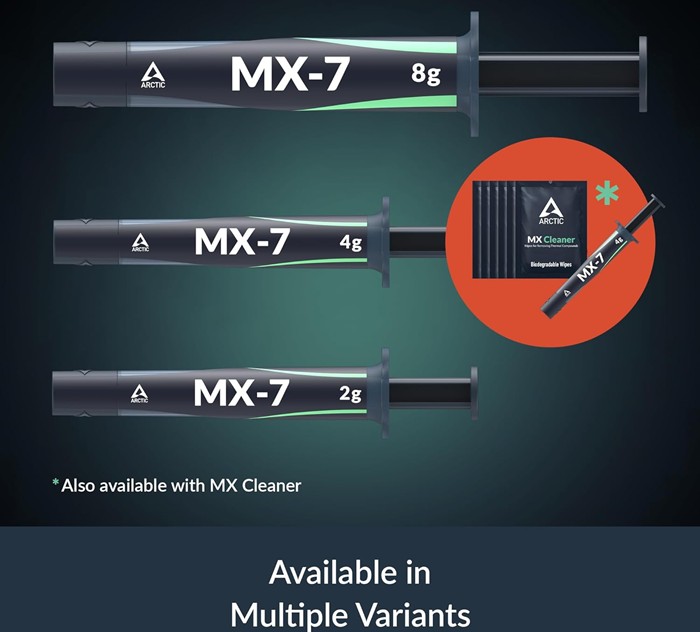
MX-7 ships in 2g, 4g, and 8g tubes with a 5-year shelf life, and can also be bundled with Arctic's own MX Cleaner, biodegradable wipes for old-paste removal. Officially, Arctic lists the 2g syringe at an MSRP of $12.99 (prices exclude VAT and shipping), with the 4g and 8g options priced up from there; actual street pricing at retailers tends to run a bit under MSRP. Arctic has also rolled out an expanded anti-counterfeiting system for MX-7 called MX Fake Check, which lets buyers verify a tube's authenticity, worth using given how many knockoff MX-series tubes circulate online.
Long-Term Stability
Peak performance on day one tells only half the story. Many thermal compounds perform exceptionally well immediately after installation before gradually degrading due to pump-out, drying, or binder separation. Arctic specifically engineered the MX-7 to combat these issues. The thicker consistency allows the paste to better withstand thousands of heating and cooling cycles without significant migration away from the CPU hotspot. Although true long-term validation requires years of real-world use, the engineering behind the formulation suggests improved longevity over previous generations.
This makes the MX-7 particularly attractive for:
- Workstations
- Always-on servers
- Gaming PCs
- Laptops
- Graphics cards
- Small form factor systems
All of these environments subject thermal compounds to frequent and significant temperature fluctuations.
Comparison with the Competition
The thermal paste market has become increasingly competitive over the past several years.
Compounds such as Thermal Grizzly Kryonaut, Noctua NT-H2, Gelid GC-Extreme, and Arctic's own MX-6 all occupy the enthusiast segment. The MX-7 doesn't completely redefine expectations. Instead, it positions itself as one of the most balanced options available.
Compared to Thermal Grizzly Kryonaut, the MX-7 sacrifices virtually no meaningful cooling performance while offering greater emphasis on long-term stability.
Against Noctua NT-H2, Arctic's newest paste demonstrates similarly excellent application characteristics but generally edges ahead under sustained heavy thermal loads.
Existing MX-6 users should not expect transformative improvements.
If your current application remains in excellent condition, replacing it solely for lower temperatures is unlikely to be worthwhile. However, builders assembling a new system or repasting aging hardware have little reason to choose the older formulation.
Value
One area where Arctic continues to excel is pricing. Historically, the company's MX series has delivered premium performance at prices well below many enthusiast-focused competitors. The MX-7 continues that trend. Rather than charging a premium simply because it represents the newest generation, Arctic has maintained aggressive pricing that makes the compound attractive for both hobbyists and professional system builders. Considering the modest thermal improvements together with increased longevity, it represents one of the strongest values in the premium thermal paste category.
Arctic backs the broader MX line with a "Proven Quality Since 2001" badge, a 6-year manufacturer warranty across its product range, and a stated commitment to CO2-neutral operations, points that won't move the needle on thermal performance but are worth knowing if brand reputation and support factor into your buying decision.