Breaking News

CORSAIR Changes the Game with PureVector, a Science-Based Personalized Aiming Technology, Launching Exclusively in the SABRE v3 PRO PureVector Mouse Series AMD FSR Upscaling 4.1 Boosts Frames and Image Quality on More Devices TerraMaster TerraSync Update COLORFUL Launches iGame X870E ULTRA-S V14 Motherboard SWIT Packs 210Wh and 200W Output into Compact MINO-A Gold Mount Battery Series

logo

  • Share Us
    • Facebook
    • Twitter
  • Home
  • Home
  • News
  • Reviews
  • Essays
  • About
    • Submit News

    • Contact Us
    • Privacy

    • Promotion
    • Advertise

    • RSS Feed

Search form

Viewsonic VP930b

Jul 28,2006 0

2. Package


Review Pages

1. Introduction
2. Package
3. Installation
4. Using the device
5. Final thoughts


- The package

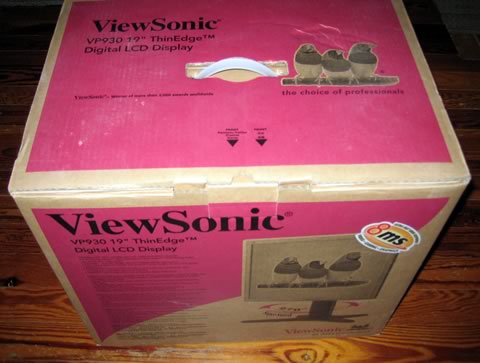
Our Viewsonic VP930b was bought at the retail price of €520 (including 19% VAT). The package was quite big for a 19" TFT monitor, but the LCD monitor was well packaged and secure.
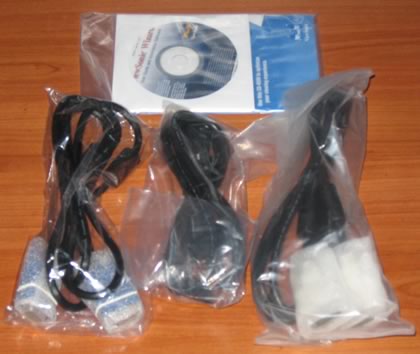
Package contents include a power cord, two connection cables (D-Sub15 and DVI), two CDs (Viewsonic Wizard and Perfect Suite) and quick start guide.
Looking at the screen, its design is very simple. The LCD display comes with its base included, which is quiet heavy, at least compared with other standard 19" TFT monitors. This is probably done to add stability since the height can be adjusted.

Click for hi-res!

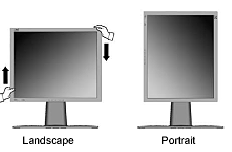
The major advantage of the display is its pivot mechanism. You can swivel, tilt, adjust the height with simple moves and the best part is that the mechanism operates very smoothly, at least for the moment. By applying little force, you can move the display up or down .

The LCD panel can be lowered down to the base or raised to a maximum of 16.5cm (table-top to bottom edge). As the Viewsonic specs indicate, the swivel range reaches 135° (from full left to full right), while tilt can be adjusted from 5° (forward) to 20° (backward).

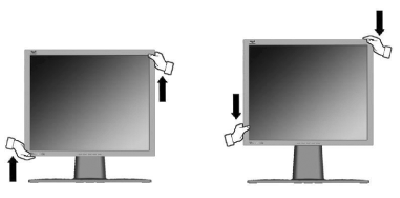
The Pivot action can be performed with a little force, while with Viewsonic's software you can enjoy full A4 page appearance on screen. Ideal for those who view documents, such as lawyers for example:
The OSD menu is complete with many options and information. It is very easy to understand and configure all functions.

At the back, you will find the connection and power ports. Viewsonic offers 1x DVI and 2x D-Sub15 inputs, which can rotated by pressing the "2" button at the front.

It would be great if the VP930b had PiP mode, but this isn't anything to worry over. In order to avoid cable chaos, the VP930b comes with three clips on the back of the stand, to help keep them organized. Very useful.


Review Pages

1. Introduction
2. Package
3. Installation
4. Using the device
5. Final thoughts


Pages

  • « first
  • ‹ previous
  • 1
  • 2
  • 3
  • 4
  • 5
  • next ›
  • last »

ViewSonic

Tags: ViewSonic
Previous Post
Evermore BT-R900
Next Post
OCZ PC2-5400

Related Posts

  • ViewSonic's Latest 4K Presentation Displays Harness Video Conferencing AI to Put the Focus on All Meeting Participants

  • ViewSonic Launches New Docking Monitor for Workspaces

  • ViewSonic Introduces the VX85 Series of Monitors for Home or Office

  • CES: ViewSonic Unveils New Gaming Monitors, Portable and 4K Projectors

  • ViewSonic Launches Two New Projectors for Home Theater and Gaming

  • ViewSonic Introduces the Ultra-Portable M1 Mini LED Projector

  • New ViewSonic ELITE Gaming Monitors Support G-SYNC IPS Nano Colour and 1ms Response Time

  • ViewSonic Launches New ViewSonic ELITE Sub-Brand of Monitors, X Series of Smart 4K Ultra HD LED Projectors

Latest Reviews

Fanxiang MP83 M.2 NVMe SSD Enclosure
Enterprise & IT

Fanxiang MP83 M.2 NVMe SSD Enclosure

Ugreen CM642 USB4.0 Enclosure
PC components

Ugreen CM642 USB4.0 Enclosure

be quiet! Dark Power 14 IO
PC components

be quiet! Dark Power 14 IO

SanDisk High Endurance 512GB microSDXC
Cameras

SanDisk High Endurance 512GB microSDXC

Samsung PRO Ultimate 512GB microSDXC
Cameras

Samsung PRO Ultimate 512GB microSDXC

Popular News

MSI’s Latest AMD X870E MAX & EVO Series Motherboards

MSI’s Latest AMD X870E MAX & EVO Series Motherboards

COLORFUL Launches iGame B850M ULTRA Series Micro-ATX Motherboards

COLORFUL Launches iGame B850M ULTRA Series Micro-ATX Motherboards

COLORFUL Presents Limited Edition Chitu MAG-60 Magnetic Keyboard Inspired by the Year of the Horse

COLORFUL Presents Limited Edition Chitu MAG-60 Magnetic Keyboard Inspired by the Year of the Horse

COLORFUL Launches iGame B850I MINI OC V14 Motherboard

COLORFUL Launches iGame B850I MINI OC V14 Motherboard

COLORFUL Launches the iGame X870E VULCAN W OC Motherboard

COLORFUL Launches the iGame X870E VULCAN W OC Motherboard

COLORFUL Presents iGame Z890 ULTRA-S W and iGame Z890M ULTRA Z Motherboards

COLORFUL Presents iGame Z890 ULTRA-S W and iGame Z890M ULTRA Z Motherboards

COLORFUL Expands B850 Motherboard Lineup with New CVN, Battle-Ax, and MEOW Models

COLORFUL Expands B850 Motherboard Lineup with New CVN, Battle-Ax, and MEOW Models

ASRock Adds Support for One Sub-Channel DRAM Module on Intel DDR5 Motherboards

ASRock Adds Support for One Sub-Channel DRAM Module on Intel DDR5 Motherboards

Main menu

  • Home
  • News
  • Reviews
  • Essays
  • About
    • Submit News

    • Contact Us
    • Privacy

    • Promotion
    • Advertise

    • RSS Feed
  • About
  • Privacy
  • Contact Us
  • Promotional Opportunities @ CdrInfo.com
  • Advertise on out site
  • Submit your News to our site
  • RSS Feed