Breaking News

Akasa Announces Fermi CM5 Fanless Case for Raspberry Pi Compute Module 5 LG Electronics Advances the LG Sound Suite Experience With New DTS DJI Delivers First Drone Dock with Automated, 25-Second Battery Swaps ASUS Announces ExpertBook A7 (AMD) Kioxia Introduces Direct Liquid Cooling Support for Enterprise SSDs

logo

  • Share Us
    • Facebook
    • Twitter
  • Home
  • Home
  • News
  • Reviews
  • Essays
  • About
    • Submit News

    • Contact Us
    • Privacy

    • Promotion
    • Advertise

    • RSS Feed

Search form

Linux Raid Guide

Feb 14,2007 0

5. Performance


Review Pages

1. Introduction
2. Partitioning
3. Kernel and modules
4. Making the array
5. Performance


Untitled Document Performance

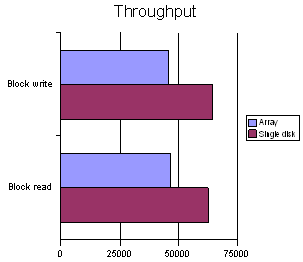
The RAID-1 setup has slightly worse write performance than a single disk but slightly better read performance, due to the fact that data may be read, at first, from the drive whose heads are closest. On average, this reduces seek times somewhat. Don't expect to see significant performance gains or losses from this setup, unless your drives differ too much in performance (say, an old 15GB ATA66 drive and a modern 320GB SATA II drive). I have benchmarked the array with the well-known “bonnie++” benchmark using a 4Gb file size. Bear in mind that the array is composed of different disks, /dev/sdb is the fastest, while /dev/sda is slightly slower.

These are the results for the array (/dev/md0):

These are the results for the fastest disk (/dev/sdb):

As expected, the block read and write speed is faster on the single disk, as is the rewrite speed.
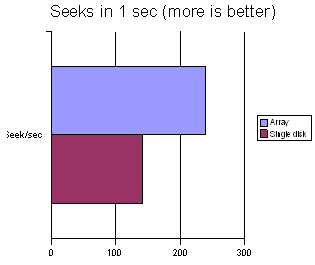
The array is noticeably faster when doing random seeks, for the reason we explained above (the kernel is intelligent enough to chose the drive whose heads are closest), and the estimated seek times are 7.1 ms for the single disk and 4.2 ms for the array. This explains the marginally faster character reads and writes, where seek time matters more than throughput. Finally, software RAID 1 does not seem to have a noticeable impact on processor usage, which is comparable between the single disk and array setups.
Conclusion

The RAID-1 setup that we described is an easy way to ensure some extra safety for your data with minimal user involvement. The best thing about it is that after installation you get extra peace of mind automagically.  However, do not be fooled into thinking that your data are perfectly secure and do not neglect to take regular backups. There are many, albeit unlikely, ways that can cause both disks to fail at once (fire, computer gets stolen etc) and result in loss of RAID-1 data.

―DISCLAIMER―

Although we try our best to give you accurate and useful advice, we are not to be held responsible if your hard drives blow up or your data are permanently lost or your computer gets abducted by aliens. You really need to be careful and exercise common sense and caution. You did backup your data, didn't you?

PKT

PS. All commands are also available at this .txt file


Review Pages

1. Introduction
2. Partitioning
3. Kernel and modules
4. Making the array
5. Performance


Pages

  • « first
  • ‹ previous
  • 1
  • 2
  • 3
  • 4
  • 5

Linux

Tags: Linux
Previous Post
Motorola Q (Sprint Moto Q)
Next Post
Asus P5W64WS Pro

Related Posts

  • NVIDIA Accelerates Open Data Center Innovation

  • System76's Lemur Pro Linux Laptop Now Available

  • System76 Is Designing Its Own Keyboard

  • Microsoft Brings Microsoft Defender ATP to Linux, iOS and Android

  • Tuxedo Computers and Manjaro Team Up on New Linux Laptops

  • Huawei Unveils The openEuler CentOS-based Linux Distribution

  • Lazarus Group Targets Linux With New Malware

  • Microsoft Teams Available on Linux

Latest Reviews

Fanxiang MP83 M.2 NVMe SSD Enclosure
Enterprise & IT

Fanxiang MP83 M.2 NVMe SSD Enclosure

Ugreen CM642 USB4.0 Enclosure
PC components

Ugreen CM642 USB4.0 Enclosure

be quiet! Dark Power 14 IO
PC components

be quiet! Dark Power 14 IO

SanDisk High Endurance 512GB microSDXC
Cameras

SanDisk High Endurance 512GB microSDXC

Samsung PRO Ultimate 512GB microSDXC
Cameras

Samsung PRO Ultimate 512GB microSDXC

Popular News

MSI’s Latest AMD X870E MAX & EVO Series Motherboards

MSI’s Latest AMD X870E MAX & EVO Series Motherboards

COLORFUL Launches iGame B850M ULTRA Series Micro-ATX Motherboards

COLORFUL Launches iGame B850M ULTRA Series Micro-ATX Motherboards

COLORFUL Presents Limited Edition Chitu MAG-60 Magnetic Keyboard Inspired by the Year of the Horse

COLORFUL Presents Limited Edition Chitu MAG-60 Magnetic Keyboard Inspired by the Year of the Horse

COLORFUL Launches iGame B850I MINI OC V14 Motherboard

COLORFUL Launches iGame B850I MINI OC V14 Motherboard

COLORFUL Presents iGame Z890 ULTRA-S W and iGame Z890M ULTRA Z Motherboards

COLORFUL Presents iGame Z890 ULTRA-S W and iGame Z890M ULTRA Z Motherboards

COLORFUL Launches the iGame X870E VULCAN W OC Motherboard

COLORFUL Launches the iGame X870E VULCAN W OC Motherboard

COLORFUL Expands B850 Motherboard Lineup with New CVN, Battle-Ax, and MEOW Models

COLORFUL Expands B850 Motherboard Lineup with New CVN, Battle-Ax, and MEOW Models

ASRock Adds Support for One Sub-Channel DRAM Module on Intel DDR5 Motherboards

ASRock Adds Support for One Sub-Channel DRAM Module on Intel DDR5 Motherboards

Main menu

  • Home
  • News
  • Reviews
  • Essays
  • About
    • Submit News

    • Contact Us
    • Privacy

    • Promotion
    • Advertise

    • RSS Feed
  • About
  • Privacy
  • Contact Us
  • Promotional Opportunities @ CdrInfo.com
  • Advertise on out site
  • Submit your News to our site
  • RSS Feed