Breaking News

SAMA Introduces the S32 WOOD, a Compact M-ATX Case Bundled with an 80 PLUS Gold PSU Thypoch Completes Simera-C Cine Prime Lineup with New 100mm T1.9 Lens CORSAIR Launches the RM1200e Power Supply with Built-in PinProtect GPU Overcurrent Protection and Platinum-certified Efficiency CORSAIR Changes the Game with PureVector, a Science-Based Personalized Aiming Technology, Launching Exclusively in the SABRE v3 PRO PureVector Mouse Series AMD FSR Upscaling 4.1 Boosts Frames and Image Quality on More Devices

logo

  • Share Us
    • Facebook
    • Twitter
  • Home
  • Home
  • News
  • Reviews
  • Essays
  • About
    • Submit News

    • Contact Us
    • Privacy

    • Promotion
    • Advertise

    • RSS Feed

Search form

Globalsat TR-101

Sep 11,2006 0

3. Installation


Review Pages

1. Introduction
2. Package Contents
3. Installation
4. Conclusion


- Installation

In order to use the device, first you have to charge it. Globalsat recommends to connect it with AC power adapter for battery charging at least 10 hours under the power-off condition.

Globalsat suggests that: "...The included battery is specially designed for TR-101. Please do not use other type of battery, otherwise it will damage the device...". Then you have to install the SIM card, which can be done in three simple steps:

1. Press on the battery cover, then pull it downward to open it.
2. Remove the battery.
3. Insert the SIM card into the cartridge according to the direction shown, and close the cartridge when done.
4. Put back the battery, and close the battery cover.

Afterwards, you have to install the included USB driver and software in order to setup and properly use TR-101 device.

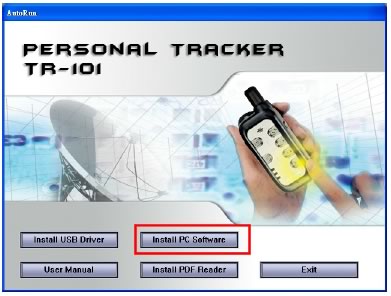
The first time you run the TR101 setup wizard, you will have to follow an exact procedure, as explained below:

After typing SIM pin,

, you proceed to the next step,
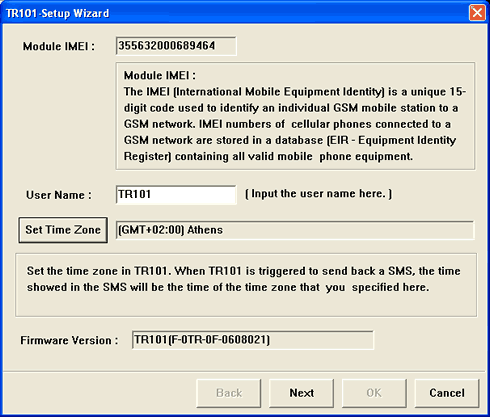
where you can set the time zone, according to your region,

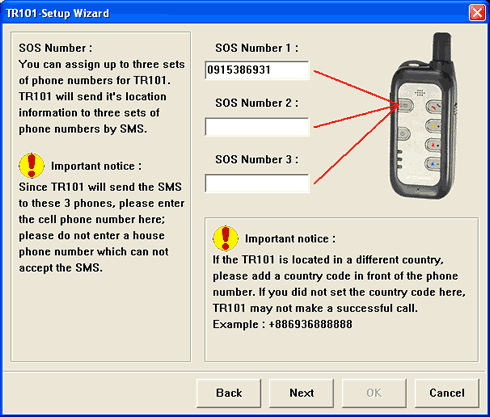
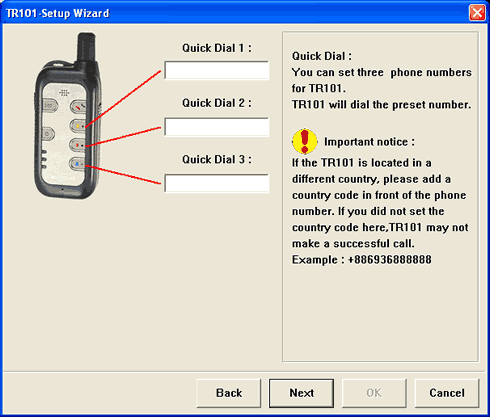
From here you can enter various numbers, either mobile or fixed, according to each function
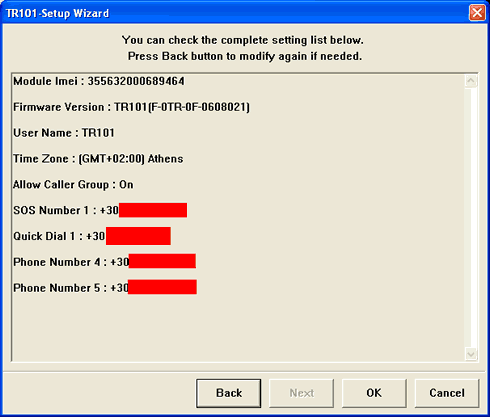
A final overview of your settings before upload them to TR-101
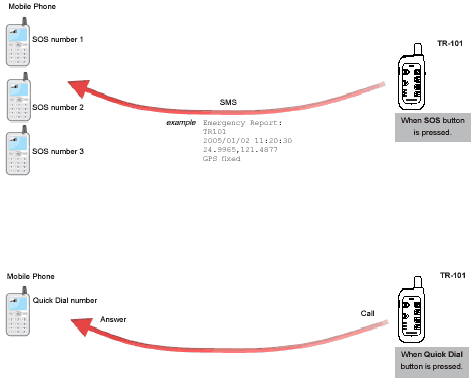
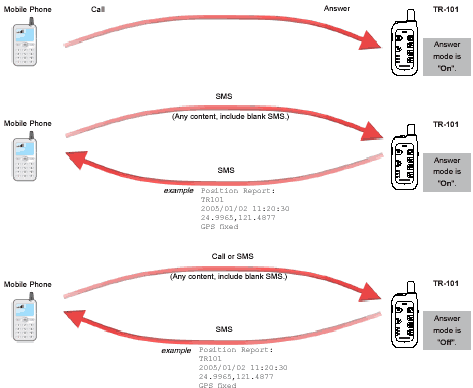
TR-101 uses your mobile network either to send SMS, make and receive phone calls, according to the following slides,

The most obvious functions are to:

  • Send SOS SMS, you can do this by pressing and releasing for more than 2 seconds the SOS button
  • Answer/hang the phone functions, you can do this by pressing the phone call button by more than 1second
  • Making a phone call, using the quick dial button, again keep pressing it for more than 1second.

How does it work when you press the SOS button?

1. To confirm that you have pressed SOS button correctly, TR-101 will followed by long flash the red LED about 2 times.
2. TR-101 will start to position itself with green GPS LED flashing; when the GPS position is fixed, the LED will be on.
3. Then, TR-101 will turn off GPS and green LED goes out.
4. TR-101 begins to send SMS with blue LED flash once per second.
5. When it finished sending SMS, the blue LED comes back to standby mode with flash once per three seconds.
6. If the SMS has been sent out successfully, TR-101 will again long flash the red LED about 2 times.
7. If the GPS position can not be fixed for 3 minutes, it will send back the SMS with a "no fixed" message and the last fixed position.

You can track back TR-101 by sending a simple SMS (The message content can be anything, even a blank message). When TR-101 receives a short message, it will return the location information by SMS in the following format (numbers erased for obvious reasons ;-).

From here you can track TR-101 either by using Google Earth or by visiting Google Maps, where you can enter the GPS information xx.xxxx, xx.xxxx, as showed at the following picture, and get a picture of the place where TR-101 is located.

- GPS performance

Unfortunaly, TR-101 cannot be used with a laptop or PDA to provide back GPS information. Therefore, we couldn't measure its performance using our usual testing method. However, we were surpized with its performance, even in closed rooms, the device had 3D fix (blue led blinking), indicating that SiRF III chipset and its external antenna do really work wonderful.
 

Review Pages

1. Introduction
2. Package Contents
3. Installation
4. Conclusion


Pages

  • « first
  • ‹ previous
  • 1
  • 2
  • 3
  • 4
  • next ›
  • last »

GlobalSat

GPS

Tags: GlobalSat GPS
Previous Post
Parrot Rhythm N Blue, CD/MP3/ Hands Free Receiver
Next Post
Motorla Q

Related Posts

  • SpaceX Launches And Lands Its First Rocket For This Year

  • Researchers to Use Quantum Sensing Technology to Make GPS More Secure

  • FCC Approves Use of Galileo Global Navigation Satellite System in the U.S.

  • Japan to Dramatically Improve GPS Accuracy Using Fourth Satellite

  • Your Next Smartphone's GPS Will be Extremely Accurate

  • QSTARZ Releases New GPS Travel Recorder

  • Qstarz Launched BT-Q1000eX GPS Lap Timer With 5Hz Log Speed

  • Globalsat BT-368

Latest Reviews

be quiet! Light Wings Pro IO fan
Cooling Systems

be quiet! Light Wings Pro IO fan

Why Intelligent Firmware Matters More Than Peak Throughput in NAS Systems
Enterprise & IT

Why Intelligent Firmware Matters More Than Peak Throughput in NAS Systems

Fanxiang MP83 M.2 NVMe SSD Enclosure
Enterprise & IT

Fanxiang MP83 M.2 NVMe SSD Enclosure

Ugreen CM642 USB4.0 Enclosure
PC components

Ugreen CM642 USB4.0 Enclosure

be quiet! Dark Power 14 IO
PC components

be quiet! Dark Power 14 IO

Popular News

MSI’s Latest AMD X870E MAX & EVO Series Motherboards

MSI’s Latest AMD X870E MAX & EVO Series Motherboards

COLORFUL Launches iGame B850M ULTRA Series Micro-ATX Motherboards

COLORFUL Launches iGame B850M ULTRA Series Micro-ATX Motherboards

COLORFUL Presents Limited Edition Chitu MAG-60 Magnetic Keyboard Inspired by the Year of the Horse

COLORFUL Presents Limited Edition Chitu MAG-60 Magnetic Keyboard Inspired by the Year of the Horse

COLORFUL Launches iGame B850I MINI OC V14 Motherboard

COLORFUL Launches iGame B850I MINI OC V14 Motherboard

COLORFUL Launches the iGame X870E VULCAN W OC Motherboard

COLORFUL Launches the iGame X870E VULCAN W OC Motherboard

COLORFUL Presents iGame Z890 ULTRA-S W and iGame Z890M ULTRA Z Motherboards

COLORFUL Presents iGame Z890 ULTRA-S W and iGame Z890M ULTRA Z Motherboards

COLORFUL Expands B850 Motherboard Lineup with New CVN, Battle-Ax, and MEOW Models

COLORFUL Expands B850 Motherboard Lineup with New CVN, Battle-Ax, and MEOW Models

ASRock Adds Support for One Sub-Channel DRAM Module on Intel DDR5 Motherboards

ASRock Adds Support for One Sub-Channel DRAM Module on Intel DDR5 Motherboards

Main menu

  • Home
  • News
  • Reviews
  • Essays
  • About
    • Submit News

    • Contact Us
    • Privacy

    • Promotion
    • Advertise

    • RSS Feed
  • About
  • Privacy
  • Contact Us
  • Promotional Opportunities @ CdrInfo.com
  • Advertise on out site
  • Submit your News to our site
  • RSS Feed