Breaking News

LIAN LI Announces Edge Platinum V2, Edge Gold V2, and GPU Cable Thermal Monitoring via Edge Hub ADV Razer Unveils the Huntsman V3 Pro Mini 8KHz ASRock DeskSlim Series Delivers RTX PRO Blackwell Performance in a Compact 5L Workstation Samsung Introduces Galaxy Tab S12 Series PlayStation Plus Monthly Games for October 2026

logo

  • Share Us
    • Facebook
    • Twitter
  • Home
  • Home
  • News
  • Reviews
  • Essays
  • About
    • Submit News

    • Contact Us
    • Privacy

    • Promotion
    • Advertise

    • RSS Feed

Search form

Toshiba Exceria Pro 64GB SDXC UHS-II review

Oct 7,2015 0

2. Performance


Review Pages

1. Features
2. Performance
3. Summary


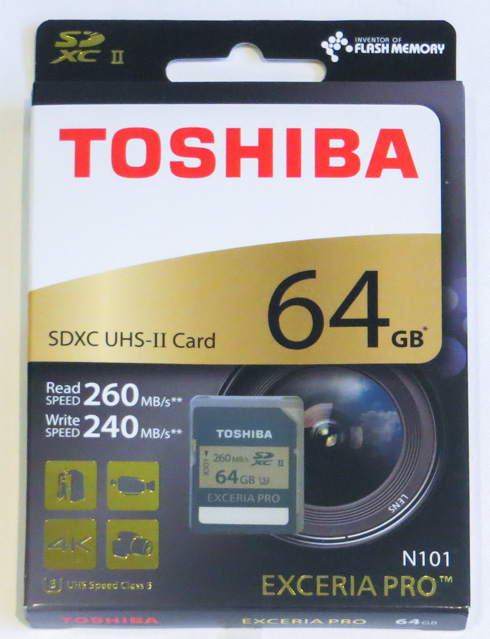
The Toshiba Exceria PRO 64GB USH -II SDXC retails in the box you see below. As you see below, on the outside of the package you can find everything that we need to know from the capacity and speed to the more detailed card information. The back of the box contains additional specifications.
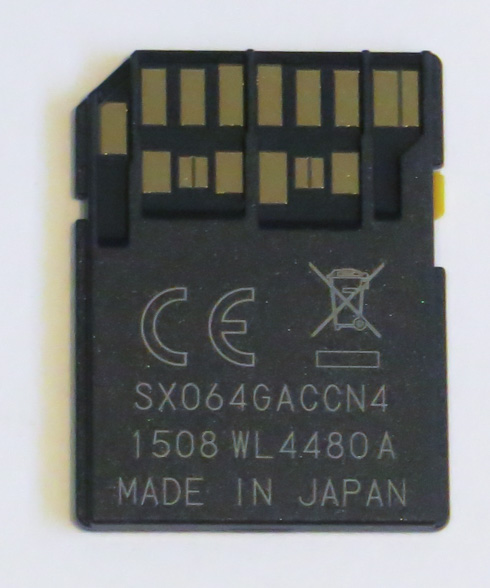
The card has the typical 32.0 mm (L) x 24.0 mm (W) x 2.1 mm (H) size for the category and its read and write speed ratings are visible on its body, along with its SDXC UHS-II interface and UHS speed class 3 speed class symbols.

By utilizing the new UHS-II 4-channel serial bus with contacts for 17 pin configuration the card operates at UHS-II bus modes HD312 (3.12 Gbps) and FD156 (1.56 Gbps). In UHS-II devices, Toshiba claims the card can provide up to 260 MB/s read and 240 MB/s write. Still, the card is backward compatible with UHS-I and conventional SD devices. At UHS-I can operate up to 104 MB/s bus speed (SDR104). Toshiba says it provides 95 MB/s read and 90 MB/s write speed in UHS-I mode. Conventional SD operation is quoted as 25 MB/s bus speed for 23 MB/s read and write.
It's time to run some benchmarks with the new SD card. For our tests, we measured speeds of the Toshiba Exceria PRO 64GB SDXC UHS-II card using a Panasonic AJMPD1 USB 3.0 card reader. The reader was plugged into a USB3.0 port of a PC, with the following specs:

  • Motherboard: Gigabyte ga-z77x-d3H, BIOS Ver.F18
  • Memory: 2x4GB Crucial RAM 2133MHz
  • HDD: 500GB WD HDD
  • Graphics card: HIS IceQ X2 VGA card
  • VIA USB 3.0 controller

As it was expected, in order to get the full speeds out of the Exceria Pro UHS-II, you should use a UHS-II compatible reader. The card performed at 247.6 MB/s sequential read and 214.5 MB/s sequential write.

When used in a UHS-I card reader such as the Kingston fcr-h23, the card reverted to UHS-I speeds. It gave 87.3 MB/s read and 79.99 MB/s write.

CrystalDiskMark
Sequential Read
Sequential Write
Kingston UltimateX 32GB SDHC Class 10
33.58 MB/s
17.02 MB/s
Kingston UltimateXX 32GB SDHC
92.97 MB/s
48.59 MB/s
Sandisk Extreme 32GB SDHC UHS-I
47.83 MB/s
43.99 MB/s
Toshiba Exceria PRO 64GB SDXC UHS-II
247.6 MB/s
214.5 MB/s
Toshiba Exceria PRO 32GB SDHC UHS-II
236.5 MB/s
209.8 MB/s

Consequently, cameras that do not support UHS-II will force the Exceria Pro UHS-II card operate at UHS-I speed.


Review Pages

1. Features
2. Performance
3. Summary


Pages

  • « first
  • ‹ previous
  • 1
  • 2
  • 3
  • next ›
  • last »

Toshiba

Tags: Toshiba
Previous Post
Toshiba 16GB NFC SDHC UHS-I Card
Next Post
Toshiba FlashAir III 32GB SDHC review

Related Posts

  • Toshiba launches Canvio Ready portable hard drive with partly recycled-material top cover

  • Toshiba Demonstrates Storage Infrastructure for Scientific AI and Research at ISC 2026

  • Toshiba Canvio Flex Portable Hard Drive, Now in Metallic Blue

  • Toshiba Begins Sampling of 30-34 TB SMR Nearline Hard Disk Drives

  • World Backup Day 2026: A Backup Doesn’t Always Need to be in the Cloud

  • Toshiba to Showcase High-Performance AI and Petabyte-Scale Storage Solutions at Cloudfest 2026

  • Asustor AS5404T 4-Bay NAS System

  • Toshiba Storage Trends 2026

Latest Reviews

Fanxiang MP83 M.2 NVMe SSD Enclosure
Enterprise & IT

Fanxiang MP83 M.2 NVMe SSD Enclosure

Ugreen CM642 USB4.0 Enclosure
PC components

Ugreen CM642 USB4.0 Enclosure

be quiet! Dark Power 14 IO
PC components

be quiet! Dark Power 14 IO

SanDisk High Endurance 512GB microSDXC
Cameras

SanDisk High Endurance 512GB microSDXC

Samsung PRO Ultimate 512GB microSDXC
Cameras

Samsung PRO Ultimate 512GB microSDXC

Popular News

MSI’s Latest AMD X870E MAX & EVO Series Motherboards

MSI’s Latest AMD X870E MAX & EVO Series Motherboards

COLORFUL Launches iGame B850M ULTRA Series Micro-ATX Motherboards

COLORFUL Launches iGame B850M ULTRA Series Micro-ATX Motherboards

COLORFUL Presents Limited Edition Chitu MAG-60 Magnetic Keyboard Inspired by the Year of the Horse

COLORFUL Presents Limited Edition Chitu MAG-60 Magnetic Keyboard Inspired by the Year of the Horse

COLORFUL Launches iGame B850I MINI OC V14 Motherboard

COLORFUL Launches iGame B850I MINI OC V14 Motherboard

COLORFUL Presents iGame Z890 ULTRA-S W and iGame Z890M ULTRA Z Motherboards

COLORFUL Presents iGame Z890 ULTRA-S W and iGame Z890M ULTRA Z Motherboards

COLORFUL Expands B850 Motherboard Lineup with New CVN, Battle-Ax, and MEOW Models

COLORFUL Expands B850 Motherboard Lineup with New CVN, Battle-Ax, and MEOW Models

ASRock Adds Support for One Sub-Channel DRAM Module on Intel DDR5 Motherboards

ASRock Adds Support for One Sub-Channel DRAM Module on Intel DDR5 Motherboards

COLORFUL Launches the iGame X870E VULCAN W OC Motherboard

COLORFUL Launches the iGame X870E VULCAN W OC Motherboard

Main menu

  • Home
  • News
  • Reviews
  • Essays
  • About
    • Submit News

    • Contact Us
    • Privacy

    • Promotion
    • Advertise

    • RSS Feed
  • About
  • Privacy
  • Contact Us
  • Promotional Opportunities @ CdrInfo.com
  • Advertise on out site
  • Submit your News to our site
  • RSS Feed