Breaking News

Powerful Cooling with the Freezer 4U-OneX Samsung Launches Galaxy A07 5G Mobile phone Samsung Ships Industry-First Commercial HBM4 With Ultimate Performance for AI Computing BIOSTAR INTRODUCES DDR5 16GB UDIMM 4800MHz/5600MHz MEMORY GAMEMAX Launches NEX C51 and NEX C31 Panoramic PC Cases

logo

  • Share Us
    • Facebook
    • Twitter
  • Home
  • Home
  • News
  • Reviews
  • Essays
  • Forum
  • Legacy
  • About
    • Submit News

    • Contact Us
    • Privacy

    • Promotion
    • Advertise

    • RSS Feed
    • Site Map

Search form

Terramaster F2-212

Sep 10,2023 0

3. Installation


Review Pages

1. Introduction
2. The package
3. Installation
4. Operating System
5. Conclusion


In order to get everything started, you need to install at least one 2.5"/3.5" HDD. No NVME support here, after all this is a budget product. Terramaster suggests that novice users download the TNAS PC Setup software, which automatically will recognize the installed Terramster product and help them start the installation process. Alternatively, you can simply look up the local DHCP server and just type the https://xxx.xxx.xxx.xxx where xxx is the IP address of your new Terramaster product.

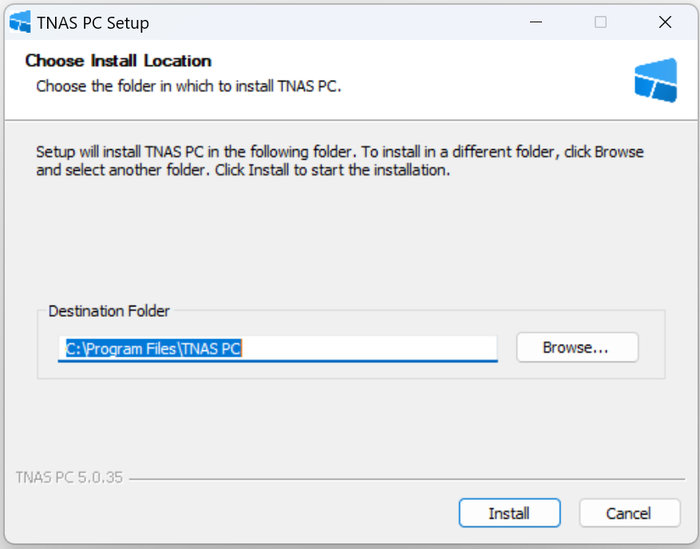
We got the latest build of the TNAS PC Setup software from the TerraMaster web page and after installing it, we started our installation.
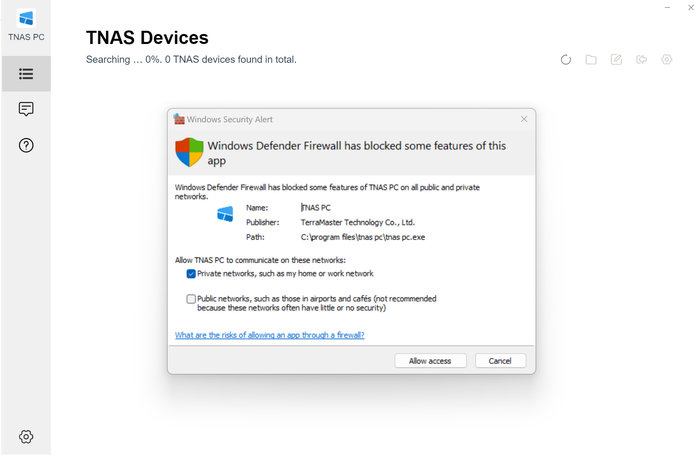
You have to give the software firewall access
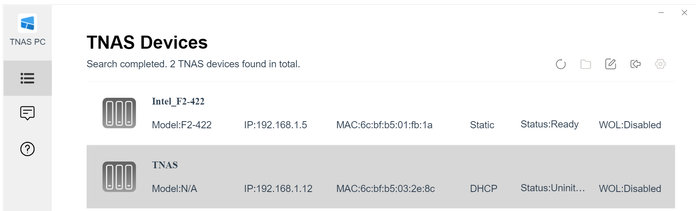
And our new TNAS server was recognized, it had 192.168.1.12 IP Address
Pressing the arrow at the TNAS software opens a new window that will guide us through the installation of the TNAS operating system.

Several steps have to be made. Be sure to be connected to the Internet to get things started.


We used the default (easy) installation method, advanced users can control the file system and other options

The installation wizard will download from the Internet all the needed files

and after restarting

We can finally setup our username/password
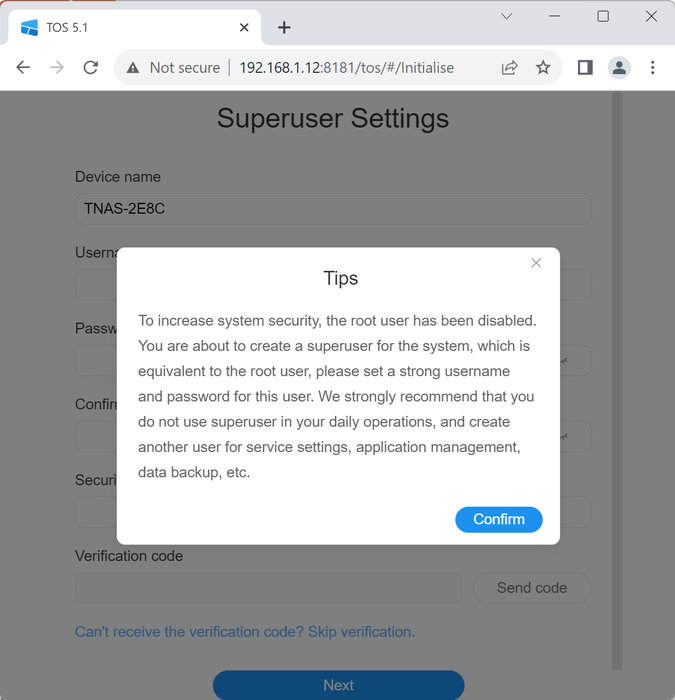
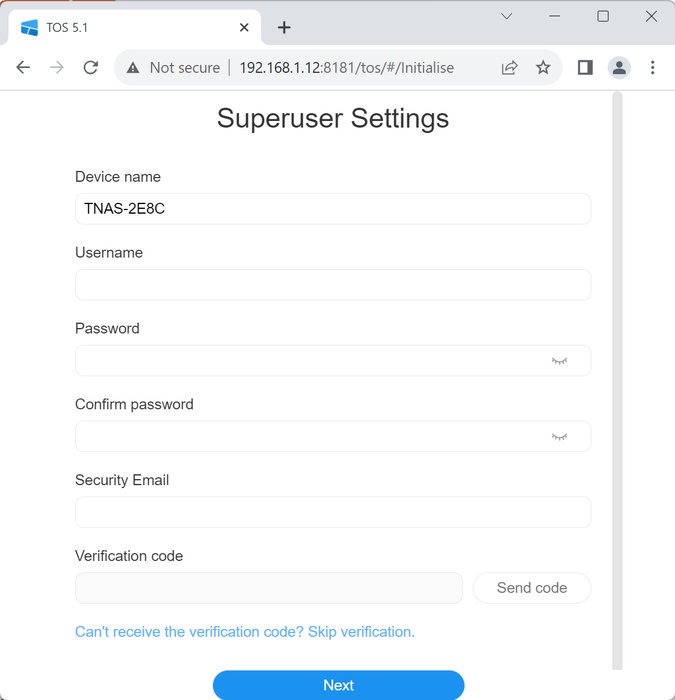
 

After getting email verification, we can access finally access the TNAS server


Review Pages

1. Introduction
2. The package
3. Installation
4. Operating System
5. Conclusion


Pages

  • « first
  • ‹ previous
  • 1
  • 2
  • 3
  • 4
  • 5
  • next ›
  • last »

TerraMaster

Tags: TerraMaster
Previous Post
Crucial Pro DDR5-5600 32GB Memory Kit
Next Post
addlink AddGame A93 4TB NVME SSD

Related Posts

  • TerraMaster launces D1 SSD Pro 80Gbps Thunderbolt 5 Enclosure

  • TerraMaster TOS 7 Beta Now Open Worldwide

  • TerraMaster Black Friday & Cyber Monday 2025 Mega Sale Is Here

  • TerraMaster Unveils TOS 7 Insider Preview

  • TerraMaster Launches F2-425 2-Bay NAS

  • TerraMaster Launches D1 SSD Plus

  • TerraMaster Offers Up to 25% Off on Amazon Prime Day 2025

  • TerraMaster Launches F4 SSD

Latest Reviews

Asustor AS5404T 4-Bay NAS System
Enterprise & IT

Asustor AS5404T 4-Bay NAS System

be quiet! Pure Power 13M 1200W
PC components

be quiet! Pure Power 13M 1200W

Server-Side Gaming Why Canadian Online Casinos Are Abandoning Local Clients for HTML5 Clouds
Enterprise & IT

Server-Side Gaming Why Canadian Online Casinos Are Abandoning Local Clients for HTML5 Clouds

Airfanta 3 Pro Air
Consumer Electronics

Airfanta 3 Pro Air

Akaso Brave 8 Lite
Cameras

Akaso Brave 8 Lite

Popular News

COLORFUL Introduces CVN B850I GAMING FROZEN Motherboard

COLORFUL Introduces CVN B850I GAMING FROZEN Motherboard

COLORFUL Presents CVN X870 ARK FROZEN Motherboard for AMD Ryzen 9000 CPUs

COLORFUL Presents CVN X870 ARK FROZEN Motherboard for AMD Ryzen 9000 CPUs

TEAMGROUP Launches EXPERT P34F Find My External SSD

TEAMGROUP Launches EXPERT P34F Find My External SSD

Samsung announces Galaxy Tab S11 and Galaxy S25 FE series

Samsung announces Galaxy Tab S11 and Galaxy S25 FE series

Viltrox Showcases Upcoming Lens Lineup and New TTL Flash at IBC 2025

Viltrox Showcases Upcoming Lens Lineup and New TTL Flash at IBC 2025

CORSAIR announces Vanguard Pro 96 and Vanguard 96 Gaming Keyboards

CORSAIR announces Vanguard Pro 96 and Vanguard 96 Gaming Keyboards

Panasonic Introduces the First Ultra-Telephoto Zoom Lens in the LUMIX S Series

Panasonic Introduces the First Ultra-Telephoto Zoom Lens in the LUMIX S Series

MSI Launches DATAMAG 40Gbps Magnetic Portable SSD

MSI Launches DATAMAG 40Gbps Magnetic Portable SSD

Main menu

  • Home
  • News
  • Reviews
  • Essays
  • Forum
  • Legacy
  • About
    • Submit News

    • Contact Us
    • Privacy

    • Promotion
    • Advertise

    • RSS Feed
    • Site Map
  • About
  • Privacy
  • Contact Us
  • Promotional Opportunities @ CdrInfo.com
  • Advertise on out site
  • Submit your News to our site
  • RSS Feed