
Sapphire 9100IGP-AA38 motherboard
2. Page 2
Sapphire - Axion 9100 review - Page 2
For the board itself, things are pretty standard. Along with the integrated graphics adapter, you get an AGP 8x port if you decide to use an add-on graphics card. There is a bracket that when connected, offers TV-Out and S-Video outputs. You will find also 5 PCI slots, and 4 memory slots. Then there are the two ATA 100 controllers, and a floppy controller. Close to the CPU socket is the graphics chipset, cooled by a passive heat sink.

Moving to the back of the case, there is the VGA connector, two PS/2 connectors, 4 USB2.0 ports (total of 6, if installing the included bracket), 1 COM port (total of 2 with a bracket, not included) and a LAN port. The Ethernet chipset is from Realtek and it supports speeds up to 100 Mbps. There is an integrated AC97 Audio codec chip also from Realtek that supports 2, 4 and 6 channel audio configurations, selectable through software included in the bundled CD.
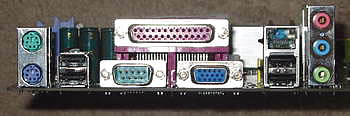
There are also 2 IEEE1394 connectors, but in order to be able to use them you have to install the necessary bracket in the back. Same goes for the game port, and the digital SPDIF output for digital sound. The brackets were not included in the packaging. The board does not feature a Serial ATA controller as well, but there is another flavor of the board that has it built-in for those who want it.

Assembling our test system was a breeze. With everything being on board, we only had to install the processor with the heatsink, add memory, attach the board to the case with the necessary cables and we’re set to go.
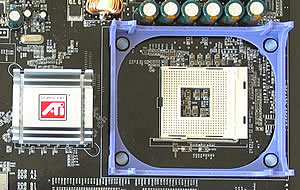
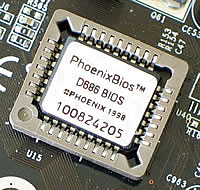
When powering up and hitting the Del key, we are presented with the Phoenix- Award BIOS, from where we can tune most of the settings. Unfortunately the manual is quite far from the best we have seen, so less advanced users may have a hard time here. While adequate, the BIOS lacks the advanced settings some might expect.
 For example, if you were having thoughts about overclocking,
you can start thinking again. While offering some sort of option to increase
the FSB of the CPU, it is limited up to 15 MHz above the default FSB. Same
goes for the memory. In our tests we tried to overclock a 2.6 Pentium4 with
an increase of +7 or 8 and the system would end up not being able to POST at
all.The lack of control on the voltages of the CPU and the memory (Vcore and
Vdimm respectively) hindered any further attempts. This has not to do with
the BIOS though, don’t forget that probably the ATI chipset was not
designed for hard core overclockers. Nevertheless, the boards operation at
stock speeds
was very stable and unproblematic.
For example, if you were having thoughts about overclocking,
you can start thinking again. While offering some sort of option to increase
the FSB of the CPU, it is limited up to 15 MHz above the default FSB. Same
goes for the memory. In our tests we tried to overclock a 2.6 Pentium4 with
an increase of +7 or 8 and the system would end up not being able to POST at
all.The lack of control on the voltages of the CPU and the memory (Vcore and
Vdimm respectively) hindered any further attempts. This has not to do with
the BIOS though, don’t forget that probably the ATI chipset was not
designed for hard core overclockers. Nevertheless, the boards operation at
stock speeds
was very stable and unproblematic.




