Breaking News

KIOXIA expands EXCERIA line with new EXCERIA G3 SSD series TerraMaster TOS 7 Beta Now Open Worldwide CORSAIR announces XENEON EDGE 14.5" LCD Touchscreen Club3D announces new products! Firewalla Announces Firewalla Orange, a Portable Multi-Gigabit Cybersecurity Firewall and WiFi 7 Router that Brings Zero Trust Anywhere

logo

  • Share Us
    • Facebook
    • Twitter
  • Home
  • Home
  • News
  • Reviews
  • Essays
  • Forum
  • Legacy
  • About
    • Submit News

    • Contact Us
    • Privacy

    • Promotion
    • Advertise

    • RSS Feed
    • Site Map

Search form

Galaxy Note10 Features Come to the Galaxy S10

Galaxy Note10 Features Come to the Galaxy S10

Smartphones Oct 28,2019 0

Starting this week, Galaxy S10 users will be able to download a software update that brings favorite innovations from the Galaxy Note10 and Note10+ to the Galaxy S10, S10+, S10e and S10 5G.

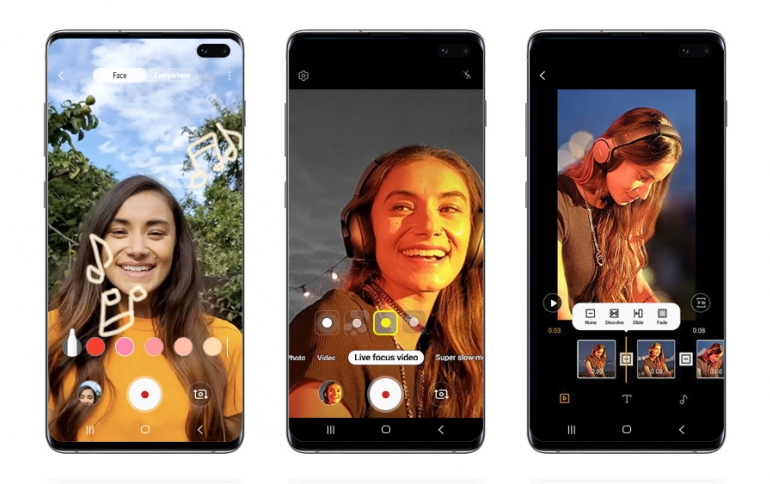
The update includes several features such as AR Doodle, a built-in video editor, Link to Windows integration and an expanded Night Mode with a front-facing camera, so you never miss a shot, even after dark.

AR Doodle will give Galaxy S10 users the freedom to customize their videos with augmented-reality drawings and messages. Live Focus video allows users to apply bokeh effects (including blur, big circle, color point and glitch) to videos recorded on the front or rear cameras. The update also brings improved Super steady to stabilize footage, and is now available in Hyperlapse mode.

The camera’s native video editor (accessible in the Gallery app) offers more opportunities to turn captured moments into shared moments. The feature makes it easy to edit videos like a pro wherever you go—with simple tools for trimming clips, stitching them together, adjusting playback speed and more. You can even add subtitles and background music to video clips to personalize and publish footage straight from your Galaxy S10.
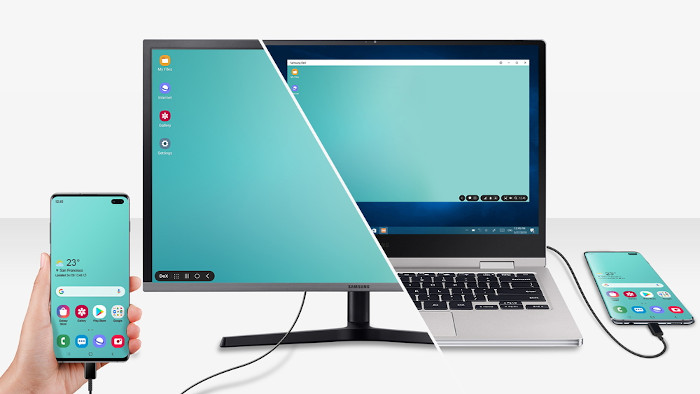
The productivity enhancing features introduced with the Galaxy Note10 are also coming to the Galaxy S10, including Samsung DeX for PC. Once users download the app from SamsungDeX.com, you can launch Samsung DeX on your PC or Mac by simply connecting your Galaxy S10 to your computer via USB. Link to Windows support has also been added to the Galaxy S10, allowing you to wirelessly connect your phone to your Windows 10 PC and see notifications, send and receive messages and review recent photos without pausing to look down at your phone.

This latest update also makes the Samsung Pass and Messages apps more convenient. The set-up process for Samsung Pass has been simplified so Galaxy S10 users can log-in to apps and websites through the device’s biometric technologies. In Messages, new icons for adding photos and videos are positioned to the left of the text so you can effortlessly access the files you need.

Tags: Galaxy Note 10Galaxy S10
Previous Post
Google To Buy Fitbit: Report
Next Post
Sharp Brings the First Certified Windows Collaboration Display to Market

Related Posts

  • Software Update brings New Features to Samsung Galaxy S10 and Galaxy Note10 Smartphones

  • Samsung Galaxy Note 10 Lite Coming Soon

  • Samsung PlayGalaxy Link Service Allows You to Take PC Power in Your Galaxy Note 10

  • Samsung Announces Galaxy Note10+ Star Wars Special Edition

  • Samsung Released Software Fix For Galaxy Fingerprint Recognition Problem

  • Samsung to Correct Galaxy S10 Fingerprint Problem

  • Samsung Launches One UI Android 10 Beta Program For Galaxy S10 Devices

  • Software Update Brings Galaxy Note10 Features to the Galaxy S10

Latest News

KIOXIA expands EXCERIA line with new EXCERIA G3 SSD series
Enterprise & IT

KIOXIA expands EXCERIA line with new EXCERIA G3 SSD series

TerraMaster TOS 7 Beta Now Open Worldwide
Enterprise & IT

TerraMaster TOS 7 Beta Now Open Worldwide

CORSAIR announces XENEON EDGE 14.5" LCD Touchscreen
PC components

CORSAIR announces XENEON EDGE 14.5" LCD Touchscreen

Club3D announces new products!
Enterprise & IT

Club3D announces new products!

Firewalla Announces Firewalla Orange, a Portable Multi-Gigabit Cybersecurity Firewall and WiFi 7 Router that Brings Zero Trust Anywhere
Enterprise & IT

Firewalla Announces Firewalla Orange, a Portable Multi-Gigabit Cybersecurity Firewall and WiFi 7 Router that Brings Zero Trust Anywhere

Popular Reviews

be quiet! Dark Mount Keyboard

be quiet! Dark Mount Keyboard

Terramaster F8-SSD

Terramaster F8-SSD

be quiet! Light Mount Keyboard

be quiet! Light Mount Keyboard

Soundpeats Pop Clip

Soundpeats Pop Clip

Akaso 360 Action camera

Akaso 360 Action camera

Dragon Touch Digital Calendar

Dragon Touch Digital Calendar

Noctua NF-A12x25 G2 fans

Noctua NF-A12x25 G2 fans

be quiet! Pure Loop 3 280mm

be quiet! Pure Loop 3 280mm

Main menu

  • Home
  • News
  • Reviews
  • Essays
  • Forum
  • Legacy
  • About
    • Submit News

    • Contact Us
    • Privacy

    • Promotion
    • Advertise

    • RSS Feed
    • Site Map
  • About
  • Privacy
  • Contact Us
  • Promotional Opportunities @ CdrInfo.com
  • Advertise on out site
  • Submit your News to our site
  • RSS Feed