Breaking News

TerraMaster Offers up to 25% Off on Selected NAS & DAS Razer Debuts the New Seiren V3 Chroma Pulsar and Noctua release Feinmann F01 Noctua Edition gaming mouse ASUS Republic of Gamers Announces Availability of ROG Swift OLED PG27UCWM and PG32UCWM Tandem RGB OLED Gaming Monitors TAMRON announces 12-20mm F2.8 Ultra Wide-Angle Zoom

logo

  • Share Us
    • Facebook
    • Twitter
  • Home
  • Home
  • News
  • Reviews
  • Essays
  • Forum
  • Legacy
  • About
    • Submit News

    • Contact Us
    • Privacy

    • Promotion
    • Advertise

    • RSS Feed
    • Site Map

Search form

Razer Kishi V2 for Android

Apr 12,2023 0

3. Razer Nexus App


Review Pages

1. Introduction
2. Retail Package
3. Razer Nexus App
4. Conclusion


Razer has introduced a new app (for Android/IOS) called Razer Nexus App that can be found and installed for free.

After the installation and first run, several permissions have to be enabled in order for the app to access the Kishi V2 controller.

The main screen is rather simple, the app will recognized installed apps/games and present them here for quick access. It also has several suggestions for games to test (with payment), that may interest some users...

After installing several games they were recognized.
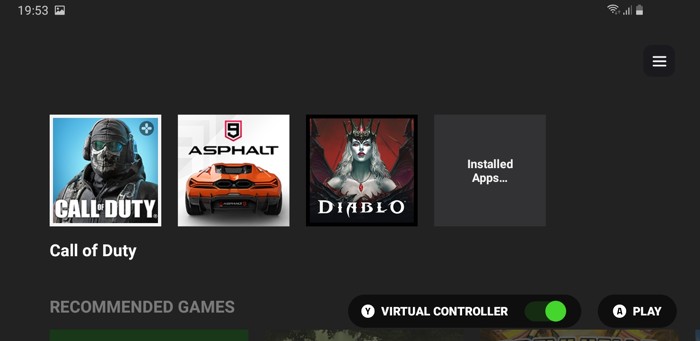
If you have more apps you can get them at the main screen (press Installed apps... and press the top right heart to add them to favorites).

Getting into the settings area, you will find several different sections.

You can live-stream directly to favorite platforms like Facebook or Youtube within the Razer Nexus App.

Passing to more important features, we can remap the M1/M2 buttons as the Razer App button.

You simply touch each button and below you will find what you can select. Too bad you cannot do combos, like X+X+A+B for example for games like Street Fighter.

A much-needed feature is here the Virtual Controller, which should be enabled for games that need touchscreen control.

At the firmware area, you will find newer new firmware updates, in our case v2.0 was available so we went ahead and installed it.

Firmware v2.0 is a major release since included the Virtual Controller mode that allowed touchscreen mapping technology for the product, a much-discussed and needed feature.

The firmware update procedure is easy to perform, just have internet access.

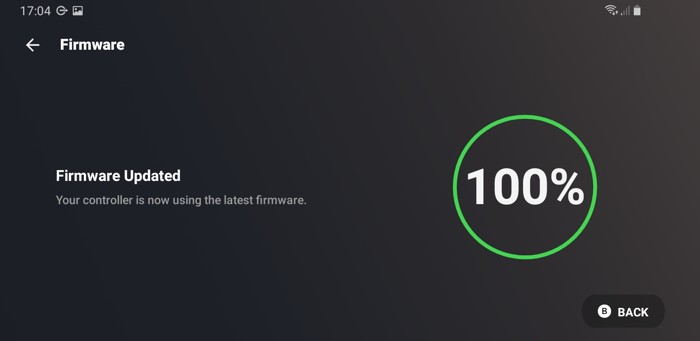
The installed version was the latest available v2.1.5.

After you have enabled Virtual Controller, (in our case Call of Duty mobile),
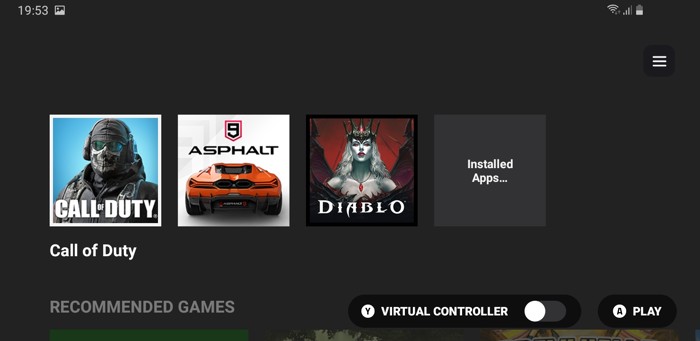
you have to press Y to enable it.

By starting the game you will have to agree to several permissions for the overlay to work.

The game starts and at the top center, you will see an overlay with the game options.

Pressing the main button opens up the menu. In the right area, you will find the overlay settings.

While in the game you have the Virtual Controls. Here you have to press the Left/Right joystick, and they will appear in the game area, and you have to place them upon the game's virtual controls.
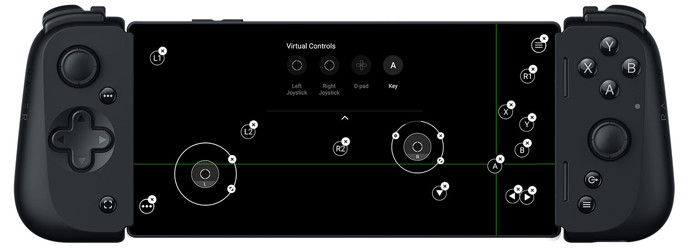
At the left/right joysticks, you can increase/reduce the radius of the movement. Also if the game supports it you can place D-pad and keys. Note that for each key you have to press again for virtual buttons to appear and then you move them upon each game virtual button.

The right joystick has additional settings

The right joystick can work as a camera Pan mode that helps you check the surrounding area.


Review Pages

1. Introduction
2. Retail Package
3. Razer Nexus App
4. Conclusion


Pages

  • « first
  • ‹ previous
  • 1
  • 2
  • 3
  • 4
  • next ›
  • last »

Razer

Tags: Razer
Previous Post
JSAUX Modcase PC0104
Next Post
JSAUX Clear Back Shell PC0106

Related Posts

  • Razer Debuts the New Seiren V3 Chroma

  • Introducing the Razer Seiren V3 Pro

  • Razer Introduces the Huntsman V3 Tenkeyless 8KHz

  • Introducing the Razer Atlas Pro

  • Introducing the 2026 Blade 16

  • Razer Introduces Dynamic Haptics

  • Razer Elevates Everyday Carry with the Laptop Sleeve 16” with Wireless Charging

  • Razer announces Kiyo V2 4K AI Webcamera

Latest Reviews

Latency Is No Longer a Backend Detail
Enterprise & IT

Latency Is No Longer a Backend Detail

Noctua NL-LC1-36
Cooling Systems

Noctua NL-LC1-36

Swit NP-FZ100 Battery
Cameras

Swit NP-FZ100 Battery

The Technology Stack Behind Modern Digital Gaming Platforms
Consumer Electronics

The Technology Stack Behind Modern Digital Gaming Platforms

be quiet! Dark Rock Pro 6
Cooling Systems

be quiet! Dark Rock Pro 6

Popular News

CORSAIR announces Vanguard Pro 96 and Vanguard 96 Gaming Keyboards

CORSAIR announces Vanguard Pro 96 and Vanguard 96 Gaming Keyboards

TEAMGROUP Launches EXPERT P34F Find My External SSD

TEAMGROUP Launches EXPERT P34F Find My External SSD

MSI Launches FORGE GK600 TKL WIRELESS Special Edition Compact Mechanical Keyboard

MSI Launches FORGE GK600 TKL WIRELESS Special Edition Compact Mechanical Keyboard

Samsung announces Galaxy Tab S11 and Galaxy S25 FE series

Samsung announces Galaxy Tab S11 and Galaxy S25 FE series

Viltrox Showcases Upcoming Lens Lineup and New TTL Flash at IBC 2025

Viltrox Showcases Upcoming Lens Lineup and New TTL Flash at IBC 2025

Panasonic Introduces the First Ultra-Telephoto Zoom Lens in the LUMIX S Series

Panasonic Introduces the First Ultra-Telephoto Zoom Lens in the LUMIX S Series

MSI Launches DATAMAG 40Gbps Magnetic Portable SSD

MSI Launches DATAMAG 40Gbps Magnetic Portable SSD

Viltrox Joins the L-Mount Alliance, Expanding Creative Possibilities

Viltrox Joins the L-Mount Alliance, Expanding Creative Possibilities

Main menu

  • Home
  • News
  • Reviews
  • Essays
  • Forum
  • Legacy
  • About
    • Submit News

    • Contact Us
    • Privacy

    • Promotion
    • Advertise

    • RSS Feed
    • Site Map
  • About
  • Privacy
  • Contact Us
  • Promotional Opportunities @ CdrInfo.com
  • Advertise on out site
  • Submit your News to our site
  • RSS Feed