
Breaking News

Viltrox Launches AF 16mm F1.8 L for Full Frame Casio to Release G-SHOCK with Minimalist Metal Design and Even Better Fit Logitech G325 LIGHTSPEED Delivers Comfort, Style, and Game-Ready Audio Samsung Launches Glasses-Free 3D Digital Signage Globally at ISE 2026 Levelplay Launches Combat Liquid HUD and Combat Liquid SE AIO CPU Coolers

logo

  • Share Us
    • Facebook
    • Twitter
  • Home
  • Home
  • News
  • Reviews
  • Essays
  • Forum
  • Legacy
  • About
    • Submit News

    • Contact Us
    • Privacy

    • Promotion
    • Advertise

    • RSS Feed
    • Site Map

Search form

Primera Bravo Disc Publisher

Jan 22,2003 0

4. Overview of operation


Review Pages

1. Introduction
2. Identifying the parts
3. Hardware and Software Installation
4. Overview of operation
5. Creating a publishing job
6. Printer driver-settings
7. Finishing publishing job - Prassi PrimoDVD2.0
8. Performance
9. Conclusion


PRIMERA BRAVO OPTICAL PUBLISHING SYSTEM - Page 4

Overview of operation

Let's take a look at the complete process of duplicating and printing a single CD/DVD job. After having loaded up to 25 blank discs into the input bin, the Robotic Disc Transporter "picks" one disc at a time and places it into the recorder, which has already its disc tray been open.
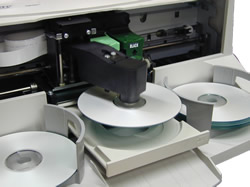
The Recorder Tray then automatically shuts. Through software control, you can perform a test on each disc before recording. If a disc does not pass (meaning that all or part of that disc is not recordable), the Robotic Disc Transporter picks it out of the CD Tray and sends it to the Reject Area.

The Recorder is now able to write to the disc. The average recording time on a 650MB CD-R disc is about 3½ minutes. A full DVD records in about 30 minutes. After recording, the Recorder Tray opens automatically. The Robotic Disc Transporter will lift the disc out of the Recorder Tray.
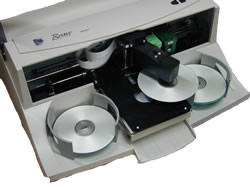
Then, the Recorder Tray will close, and the Printer Tray will open. The Robotic Disc Transporter will lower the disc into the Printer Tray, and the Printer Tray will then automatically close too.
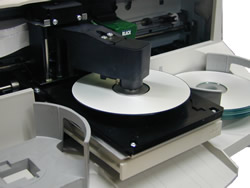
If publishing more than one disc, the Robotic Disc Transporter will load the Recording Drive with a blank disc from the Input Bin to start recording the next round. Once recording has started, the Publisher will start printing directly onto the surface of the previously recorded disc. This simultaneous recording and printing of discs increases the throughput of Publisher.

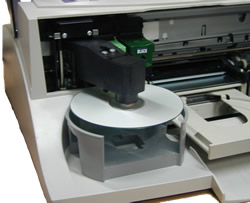
Print time varies according to the print mode being selected . Primera notes that in most cases, print time takes no more than 2 minutes. After printing the first disc, the Publisher's Printer Disc Tray opens automatically. The Robotic Disc Transporter moves the finished disc to the Output Bin.
 

Review Pages

1. Introduction
2. Identifying the parts
3. Hardware and Software Installation
4. Overview of operation
5. Creating a publishing job
6. Printer driver-settings
7. Finishing publishing job - Prassi PrimoDVD2.0
8. Performance
9. Conclusion


Pages

  • « first
  • ‹ previous
  • 1
  • 2
  • 3
  • 4
  • 5
  • 6
  • 7
  • 8
  • 9
  • next ›
  • last »

Tags:
Previous Post
Toshiba SD-M1712 DVD-ROM
Next Post
Jitter Tests

Related Posts

Latest Reviews

Soundpeats Air 5
Consumer Electronics

Soundpeats Air 5

XbotGo Chamaleon
Consumer Electronics

XbotGo Chamaleon

be quiet! Dark Perk Mice
Gaming

be quiet! Dark Perk Mice

Acemagic W1
PC components

Acemagic W1

be quiet! Power Zone 2 1200W
PC components

be quiet! Power Zone 2 1200W

Popular News

COLORFUL Introduces CVN B850I GAMING FROZEN Motherboard

COLORFUL Introduces CVN B850I GAMING FROZEN Motherboard

COLORFUL Presents CVN X870 ARK FROZEN Motherboard for AMD Ryzen 9000 CPUs

COLORFUL Presents CVN X870 ARK FROZEN Motherboard for AMD Ryzen 9000 CPUs

TEAMGROUP Launches EXPERT P34F Find My External SSD

TEAMGROUP Launches EXPERT P34F Find My External SSD

ASRock AM5 Motherboards Now Fully Support AMD Ryzen 9 9950X3D & 9900X3D Processors

ASRock AM5 Motherboards Now Fully Support AMD Ryzen 9 9950X3D & 9900X3D Processors

Samsung announces Galaxy Tab S11 and Galaxy S25 FE series

Samsung announces Galaxy Tab S11 and Galaxy S25 FE series

Viltrox Showcases Upcoming Lens Lineup and New TTL Flash at IBC 2025

Viltrox Showcases Upcoming Lens Lineup and New TTL Flash at IBC 2025

CORSAIR announces Vanguard Pro 96 and Vanguard 96 Gaming Keyboards

CORSAIR announces Vanguard Pro 96 and Vanguard 96 Gaming Keyboards

Panasonic Introduces the First Ultra-Telephoto Zoom Lens in the LUMIX S Series

Panasonic Introduces the First Ultra-Telephoto Zoom Lens in the LUMIX S Series

Main menu

  • Home
  • News
  • Reviews
  • Essays
  • Forum
  • Legacy
  • About
    • Submit News

    • Contact Us
    • Privacy

    • Promotion
    • Advertise

    • RSS Feed
    • Site Map
  • About
  • Privacy
  • Contact Us
  • Promotional Opportunities @ CdrInfo.com
  • Advertise on out site
  • Submit your News to our site
  • RSS Feed
