Breaking News

Powerful Cooling with the Freezer 4U-OneX Samsung Launches Galaxy A07 5G Mobile phone Samsung Ships Industry-First Commercial HBM4 With Ultimate Performance for AI Computing BIOSTAR INTRODUCES DDR5 16GB UDIMM 4800MHz/5600MHz MEMORY GAMEMAX Launches NEX C51 and NEX C31 Panoramic PC Cases

logo

  • Share Us
    • Facebook
    • Twitter
  • Home
  • Home
  • News
  • Reviews
  • Essays
  • Forum
  • Legacy
  • About
    • Submit News

    • Contact Us
    • Privacy

    • Promotion
    • Advertise

    • RSS Feed
    • Site Map

Search form

Plextor PX-740A

Jul 1,2005 0

20. Booktype Setting


Review Pages

1. Introduction
2. Transfer Rate Reading Tests
3. CD Error Correction Tests
4. DVD Error Correction Tests
5. Protected Disc Tests - Reading Tests
6. DAE Tests
7. Protected AudioCDs
8. CD Recording Tests
9. C1 / C2 Error Measurements
10. Writing Quality Tests - Clover System Tests
11. DVD Recording Tests
12. CDSpeed/PlexTools Scans - Page 1
13. CDSpeed/PlexTools Scans - Page 2
14. CDSpeed/PlexTools Scans - Page 3
15. CDSpeed/PlexTools Scans - Page 4
16. CDSpeed/PlexTools Scans - Page 5
17. Writing Quality Tests - Almedio AEC-1000
18. DVDR DL - Page 1
19. DVDR DL - Page 2
20. Booktype Setting
21. Conclusion


The Plextor 740A supports Booktype setting, through some of the well know utilities such as Nero CD-DVD Speed and DVDInfo Pro. We used a blank Datawrite (Prodisc W02) 4X DVD+RW disc and tried to modify its booktype, with the aid of DVDInfo Pro. Since the Plextor drive uses the same chipset as the BenQ 1640, we used the BenQ booktype management utility to see if that works.

  • CD-DVD Speed Bitsetting
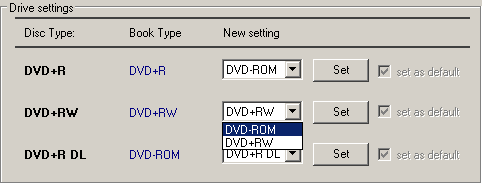
1.We choose the DVD-ROM setting for +RW media at the drop down menu...

The only known traditional way to change the booktype prior to burning, in order to maximize compatibility with Plextor drives, is Nero CD-DVD Speed...

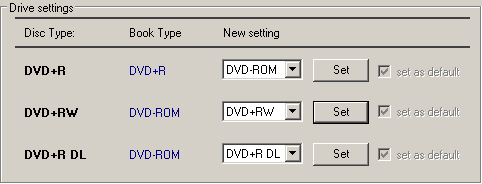
2.The confirmation message...


3.We successfully changed the DVD+RW booktype to DVD-ROM.
  • DVD Info Pro

Notice here the DVD Info Pro BitSetting utility title : "BenQ Drives Only". As mentioned before, Plextor uses the same Chipset as the BenQ 1640.
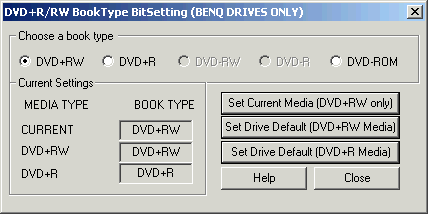
1.We insert the DVD+RW media in the drive...
2.We change its book type...

Here we used the Nero CD DVD Speed utility and through the Disc Info tab, we confirmed the book type change.
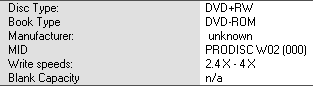
3. We check to see if the change has been made...
  • Book Type Management Ver. 8.3

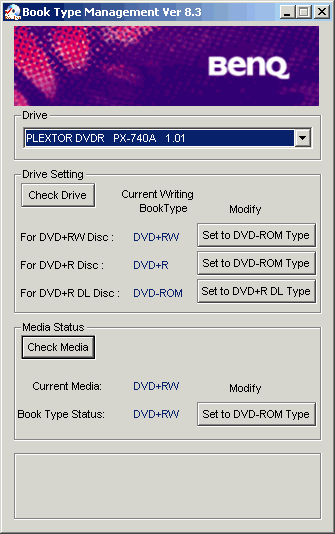
Now lets see if the BenQ BookType management utility can be used likewise.

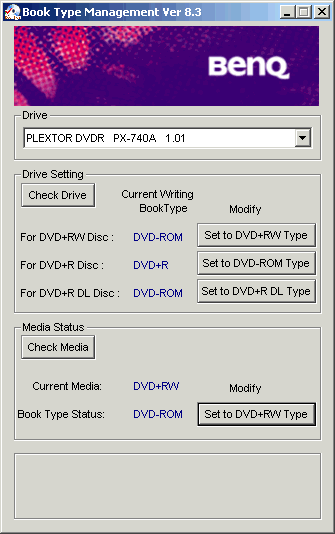
Same procedure here, as we insert the +RW media, modify its booktype to DVD-ROM.
And as we check the media to see if the changes have been saved, we get the DVD-ROM Book Type status, as can be seen at the bottom of the screenshot.
 

Review Pages

1. Introduction
2. Transfer Rate Reading Tests
3. CD Error Correction Tests
4. DVD Error Correction Tests
5. Protected Disc Tests - Reading Tests
6. DAE Tests
7. Protected AudioCDs
8. CD Recording Tests
9. C1 / C2 Error Measurements
10. Writing Quality Tests - Clover System Tests
11. DVD Recording Tests
12. CDSpeed/PlexTools Scans - Page 1
13. CDSpeed/PlexTools Scans - Page 2
14. CDSpeed/PlexTools Scans - Page 3
15. CDSpeed/PlexTools Scans - Page 4
16. CDSpeed/PlexTools Scans - Page 5
17. Writing Quality Tests - Almedio AEC-1000
18. DVDR DL - Page 1
19. DVDR DL - Page 2
20. Booktype Setting
21. Conclusion


 

Pages

  • « first
  • ‹ previous
  • …
  • 13
  • 14
  • 15
  • 16
  • 17
  • 18
  • 19
  • 20
  • 21
  • next ›
  • last »

Plextor

Tags: Plextor
Previous Post
Introduction to 3D graphics
Next Post
OCZ DDR PC-3200 Dual Channel Gold

Related Posts

  • Plextor SSD RMA Services Transition to SSSTC Official Website

  • Plextor Unveils M10P Series PCIe Gen4 Solid State Drives

  • Plextor Launches the M9P Plus Series of SSDs

  • LITE-ON Technology Approves the Transfer of its Solid State Drives Business to Toshiba Memory

  • Shinano Kenshi Introduces New ASPINA Corporate Brand

  • PLEXTOR Debuts New Consumer SSDs at CES 2019

  • Plextor Unveils the M9Pe Extreme NVMe SSD at Computex Taipei 2018

  • Plextool NVMe Edition Released

Latest Reviews

Asustor AS5404T 4-Bay NAS System
Enterprise & IT

Asustor AS5404T 4-Bay NAS System

be quiet! Pure Power 13M 1200W
PC components

be quiet! Pure Power 13M 1200W

Server-Side Gaming Why Canadian Online Casinos Are Abandoning Local Clients for HTML5 Clouds
Enterprise & IT

Server-Side Gaming Why Canadian Online Casinos Are Abandoning Local Clients for HTML5 Clouds

Airfanta 3 Pro Air
Consumer Electronics

Airfanta 3 Pro Air

Akaso Brave 8 Lite
Cameras

Akaso Brave 8 Lite

Popular News

COLORFUL Introduces CVN B850I GAMING FROZEN Motherboard

COLORFUL Introduces CVN B850I GAMING FROZEN Motherboard

COLORFUL Presents CVN X870 ARK FROZEN Motherboard for AMD Ryzen 9000 CPUs

COLORFUL Presents CVN X870 ARK FROZEN Motherboard for AMD Ryzen 9000 CPUs

TEAMGROUP Launches EXPERT P34F Find My External SSD

TEAMGROUP Launches EXPERT P34F Find My External SSD

Samsung announces Galaxy Tab S11 and Galaxy S25 FE series

Samsung announces Galaxy Tab S11 and Galaxy S25 FE series

Viltrox Showcases Upcoming Lens Lineup and New TTL Flash at IBC 2025

Viltrox Showcases Upcoming Lens Lineup and New TTL Flash at IBC 2025

CORSAIR announces Vanguard Pro 96 and Vanguard 96 Gaming Keyboards

CORSAIR announces Vanguard Pro 96 and Vanguard 96 Gaming Keyboards

Panasonic Introduces the First Ultra-Telephoto Zoom Lens in the LUMIX S Series

Panasonic Introduces the First Ultra-Telephoto Zoom Lens in the LUMIX S Series

MSI Launches DATAMAG 40Gbps Magnetic Portable SSD

MSI Launches DATAMAG 40Gbps Magnetic Portable SSD

Main menu

  • Home
  • News
  • Reviews
  • Essays
  • Forum
  • Legacy
  • About
    • Submit News

    • Contact Us
    • Privacy

    • Promotion
    • Advertise

    • RSS Feed
    • Site Map
  • About
  • Privacy
  • Contact Us
  • Promotional Opportunities @ CdrInfo.com
  • Advertise on out site
  • Submit your News to our site
  • RSS Feed