
Breaking News

Hollyland Launches Pyro 7 Ultra, an All-in-One Wireless Monitoring System for Professional Film Production ADATA Powers AI Servers, Edge Systems and Intelligent Applications with Enterprise Memory and Storage Acer Expands Gaming Handheld Portfolio with Predator Atlas 7 Sony Expands its ULT POWER SOUND series Lineup with 3 New Bass-Powered Speakers Sonos Introduces Sonos 27, the Next Generation of Its Audio Operating System

logo

  • Share Us
    • Facebook
    • Twitter
  • Home
  • Home
  • News
  • Reviews
  • Essays
  • About
    • Submit News

    • Contact Us
    • Privacy

    • Promotion
    • Advertise

    • RSS Feed

Search form

Plextor Manager 2000 Software

Feb 18,2002 0

5. Audio FS - Conclusion


Review Pages

1. Installation
2. Features
3. Features (2)
4. Features (3)
5. Audio FS - Conclusion


Plextor Manager 2000 - Page 5

Installation of Plextor Manager 2000 adds some features to the properties menu that is shown if you right-click on your Plextor drive's icon in My Computer or Windows Explorer and select Properties:

Features
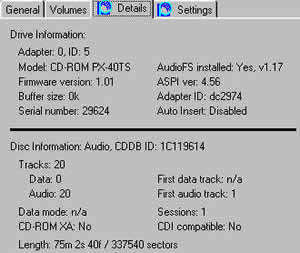
Details tab:
Shows you details regarding your Plextor CD-ROM, CD-R, or CD-RW drive, including the model number, serial number, the SCSI driver that's loaded, the ASPI version, and more. Also provides information about the disc in the drive, such as disc format, number of sessions, number of data and audio tracks, and more. With PlexWriter drives you can also identify manufacturer and type information for your CD-R and CD-RW media.
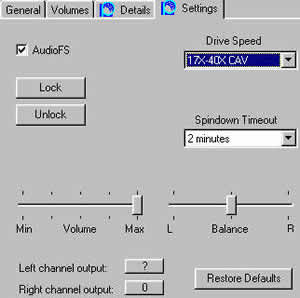
Settings Tab:
Enable/disable AudioFS, set spin down time-out, set drive read speed, lock or unlock the eject button on your Plextor drive for security, and adjust balance and volume settings.

All audio controls actually affect the drive, and not the sound card.

AudioFS

AudioFS (audioFS.vxd) makes all tracks on audio CDs (Red Book CD-DA format discs) appear automatically as WAV files, on Windows 95 and 98 systems. This allows easy drag and drop of audio tracks to your hard disc for a simple and quick audio extraction.

Advantages:
- Allows easy drag and drop of audio tracks to your hard disk for a simple and quick audio extraction to WAV format.
- Removes the need to use third-party software for audio extraction.
- Eliminates the need to store large WAV files on your hard disk, because your application can now access the tracks from the audio CD directly through AudioFS.
- Simplifies audio editing, encoding, and creation of compilation audio CDs.

Verdict of application:
AudioFS works ok. It is very useful when you want to make Mp3 directly from AudioCDs (no need to rip them first into HD). But you might face problems when the CD is scratched or generally have surface problems.

Conclusion of Plextor Manager 2000

I think the upgrade of Plextor Manager96 to 2000 was succefully. The new manager has more user friendly interface and it includes several improvements over previous version. The Error correction capability of Audio Capture 2000 is the most useful new feature added into this version. It really helps you to rip perfect wavs into your HD.

Do I miss something from previous version ? Yes! The previous version(s) the control of CD Rom was more easy (directly into task bar icon) to reach from now. But then again this is my personal opinion. :)


Review Pages

1. Installation
2. Features
3. Features (2)
4. Features (3)
5. Audio FS - Conclusion


Pages

  • « first
  • ‹ previous
  • 1
  • 2
  • 3
  • 4
  • 5

Tags:
Previous Post
Sanyo CRD-BP1500P CD-RW
Next Post
Iomega Predator USB CD-RW

Related Posts

Latest Reviews

be quiet! Dark Power 14 IO
PC components

be quiet! Dark Power 14 IO

SanDisk High Endurance 512GB microSDXC
Cameras

SanDisk High Endurance 512GB microSDXC

Samsung PRO Ultimate 512GB microSDXC
Cameras

Samsung PRO Ultimate 512GB microSDXC

be quiet! Light Mount TKL
Consumer Electronics

be quiet! Light Mount TKL

be quiet! Light Loop IO LCD
Cooling Systems

be quiet! Light Loop IO LCD

Popular News

CORSAIR announces Vanguard Pro 96 and Vanguard 96 Gaming Keyboards

CORSAIR announces Vanguard Pro 96 and Vanguard 96 Gaming Keyboards

MSI Launches FORGE GK600 TKL WIRELESS Special Edition Compact Mechanical Keyboard

MSI Launches FORGE GK600 TKL WIRELESS Special Edition Compact Mechanical Keyboard

TEAMGROUP Launches EXPERT P34F Find My External SSD

TEAMGROUP Launches EXPERT P34F Find My External SSD

Samsung announces Galaxy Tab S11 and Galaxy S25 FE series

Samsung announces Galaxy Tab S11 and Galaxy S25 FE series

Viltrox Showcases Upcoming Lens Lineup and New TTL Flash at IBC 2025

Viltrox Showcases Upcoming Lens Lineup and New TTL Flash at IBC 2025

Panasonic Introduces the First Ultra-Telephoto Zoom Lens in the LUMIX S Series

Panasonic Introduces the First Ultra-Telephoto Zoom Lens in the LUMIX S Series

MSI Launches DATAMAG 40Gbps Magnetic Portable SSD

MSI Launches DATAMAG 40Gbps Magnetic Portable SSD

MSI’s Latest AMD X870E MAX & EVO Series Motherboards

MSI’s Latest AMD X870E MAX & EVO Series Motherboards

Main menu

  • Home
  • News
  • Reviews
  • Essays
  • About
    • Submit News

    • Contact Us
    • Privacy

    • Promotion
    • Advertise

    • RSS Feed
  • About
  • Privacy
  • Contact Us
  • Promotional Opportunities @ CdrInfo.com
  • Advertise on out site
  • Submit your News to our site
  • RSS Feed
