
Breaking News

DZOFILM Expands Arles Cine Lens System With 25–75mm and 65–180mm T2.6 Zooms G.SKILL Launches Trident Z5 Royal NeoX Series DDR5 Memory with AMD EXPO Technology XERON Launches NEX A61 ARGB CPU Air Cooler Viltrox to Unveil New Lenses And Production Solutions at IBC2026 ASUS Announces WiFi 8 Router

logo

  • Share Us
    • Facebook
    • Twitter
  • Home
  • Home
  • News
  • Reviews
  • Essays
  • About
    • Submit News

    • Contact Us
    • Privacy

    • Promotion
    • Advertise

    • RSS Feed

Search form

Pioneer DVR-A03 DVD-R

Feb 18,2002 0

11. RW Writing Tests


Review Pages

1. Introduction
2. Installation
3. CD Data Tests
4. RW reading tests
5. DAE Tests
6. CDR Tests
7. DVD-R Tests - Page 1
8. DVD-R Tests - Page 2
9. DVD-R Tests - Page 3
10. DVD-R Tests - Page 4
11. RW Writing Tests
12. Conclusion


Pioneer DVR-A03 IDE DVD-R/RW - Page 11

RW Writing Tests

We used Nero 5.5.4.0 for writing CDs in maximum RW writing speed (4X) for the Pioneer DVR-A03. Note that the other two drives support 8x re-writing, so direct comparison cannot be done:
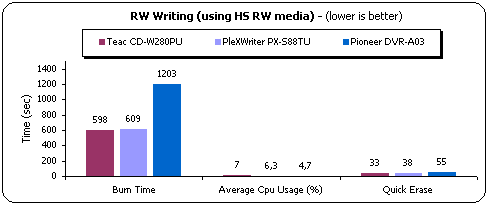
The Pioneer needs around 20mins to end the task, due to its low (4X) re-writing speed. The CPU Usage is low and the erase time is 53secs.

- CD Packet Writing Tests

We used Ahead InCD v2.26 for all Packet Writing tests. We used TDK HS-RW media and we formatted it. The formatted disc revealed 530mbs of free space. We copied a 403 MB file (403.147 kbs) from a Hard Disk (on the same PC as the writers) to the formatted RW media-using explorer (we dragged and dropped) and we completed the test twice to eliminate possible time measurement faults and user errors:
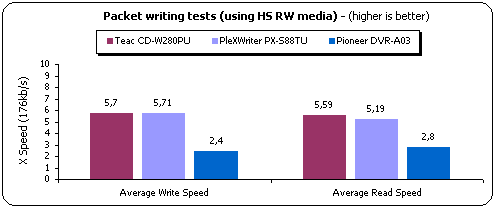
The Pioneer DVR-A03 has only 2.4X writing and 2.8X reading speeds under packet writing formatted RW disc.

- DVD-RW Packet Writing Tests

InstantCD/DVD offers the possibility to use a DVD-R/RW media under packet writing format. The process is quite easy: Just follow the InstantWrite wizard's steps:

You have 2 options for formatting your DVD-RW media. The first is called "Random Access Data DVD" which will prepare the disc for the packet writing use we all know (add/delete files). There is also the option to format the disc as "Data DVD"; you can use "Data DVD" for DVD-R and DVD-RW media. Here you can add, change and delete files and directories. The memory is not freed physically again. This writing method is useful for large backups.

After we press next, we are asked by the wizard about whether we want quick/full erase, and formatting starts.
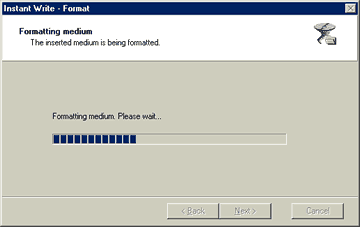
And we get a full report when formatting ends:

On the drives properties, InstantWrite tab has been added and there you can set the reading/writing speed and see if your media is finalized or not:

Unless we finalize our media we can use it on another systems that supports UDF format, as Win2k:

-Test Results

We used the same file/methodology we are using for our CD packet writing test. The drive needs 5:03mins to write the file and 4:50mins to read it. That can be translated in 0.96X writing and 1.00X reading (X factor = 1385Kb/s). The problem with DVD-RW packet writing is that the access times are very high and there is too much delay before you can access your written data.

 

Review Pages

1. Introduction
2. Installation
3. CD Data Tests
4. RW reading tests
5. DAE Tests
6. CDR Tests
7. DVD-R Tests - Page 1
8. DVD-R Tests - Page 2
9. DVD-R Tests - Page 3
10. DVD-R Tests - Page 4
11. RW Writing Tests
12. Conclusion


Pages

  • « first
  • ‹ previous
  • …
  • 4
  • 5
  • 6
  • 7
  • 8
  • 9
  • 10
  • 11
  • 12
  • next ›
  • last »

Tags:
Previous Post
Sanyo CRD-BP1500P CD-RW
Next Post
Iomega Predator USB CD-RW

Related Posts

Latest Reviews

Ugreen CM642 USB4.0 Enclosure
PC components

Ugreen CM642 USB4.0 Enclosure

be quiet! Dark Power 14 IO
PC components

be quiet! Dark Power 14 IO

SanDisk High Endurance 512GB microSDXC
Cameras

SanDisk High Endurance 512GB microSDXC

Samsung PRO Ultimate 512GB microSDXC
Cameras

Samsung PRO Ultimate 512GB microSDXC

be quiet! Light Mount TKL
Consumer Electronics

be quiet! Light Mount TKL

Popular News

CORSAIR announces Vanguard Pro 96 and Vanguard 96 Gaming Keyboards

CORSAIR announces Vanguard Pro 96 and Vanguard 96 Gaming Keyboards

MSI Launches FORGE GK600 TKL WIRELESS Special Edition Compact Mechanical Keyboard

MSI Launches FORGE GK600 TKL WIRELESS Special Edition Compact Mechanical Keyboard

Panasonic Introduces the First Ultra-Telephoto Zoom Lens in the LUMIX S Series

Panasonic Introduces the First Ultra-Telephoto Zoom Lens in the LUMIX S Series

MSI’s Latest AMD X870E MAX & EVO Series Motherboards

MSI’s Latest AMD X870E MAX & EVO Series Motherboards

COLORFUL Launches iGame B850M ULTRA Series Micro-ATX Motherboards

COLORFUL Launches iGame B850M ULTRA Series Micro-ATX Motherboards

COLORFUL Presents Limited Edition Chitu MAG-60 Magnetic Keyboard Inspired by the Year of the Horse

COLORFUL Presents Limited Edition Chitu MAG-60 Magnetic Keyboard Inspired by the Year of the Horse

COLORFUL Presents iGame Z890 ULTRA-S W and iGame Z890M ULTRA Z Motherboards

COLORFUL Presents iGame Z890 ULTRA-S W and iGame Z890M ULTRA Z Motherboards

LIAN LI Launches 8.8” Universal Screen with Flexible Mounting Solution

LIAN LI Launches 8.8” Universal Screen with Flexible Mounting Solution

Main menu

  • Home
  • News
  • Reviews
  • Essays
  • About
    • Submit News

    • Contact Us
    • Privacy

    • Promotion
    • Advertise

    • RSS Feed
  • About
  • Privacy
  • Contact Us
  • Promotional Opportunities @ CdrInfo.com
  • Advertise on out site
  • Submit your News to our site
  • RSS Feed