Breaking News

DZOFILM Expands Arles Cine Lens System With 25–75mm and 65–180mm T2.6 Zooms G.SKILL Launches Trident Z5 Royal NeoX Series DDR5 Memory with AMD EXPO Technology XERON Launches NEX A61 ARGB CPU Air Cooler Viltrox to Unveil New Lenses And Production Solutions at IBC2026 ASUS Announces WiFi 8 Router

logo

  • Share Us
    • Facebook
    • Twitter
  • Home
  • Home
  • News
  • Reviews
  • Essays
  • About
    • Submit News

    • Contact Us
    • Privacy

    • Promotion
    • Advertise

    • RSS Feed

Search form

Nero Express

Apr 15,2002 0

2. Page 1


Review Pages

1. Page 2
2. Page 1
3. Page 3
4. Page 4
5. Page 5


NERO EXPRESS - Page 2

DATA BURNING

The choices for Data burning are two, to create a data disc and a data and audio CD. (CD-Extra).
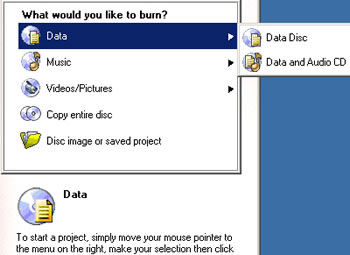
We choose Data Disc and proceed to the second window in order to add the compilation files.
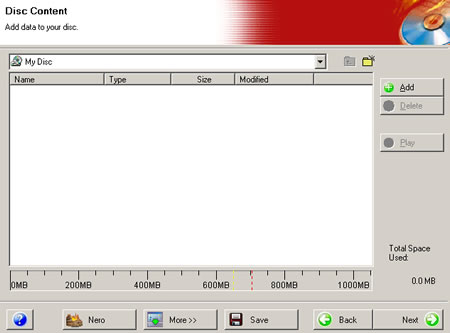
The "More" button on the bottom of the window allows user to make date and time settings for his new CD.

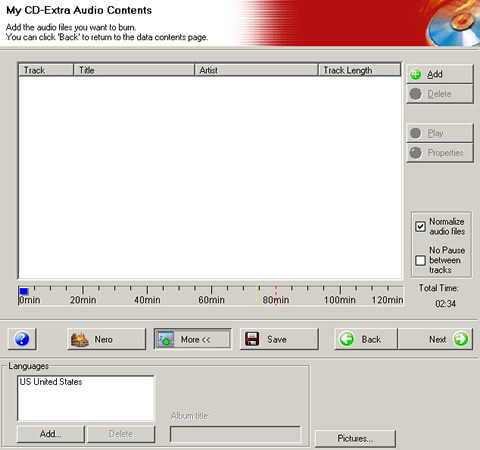
If you choose to burn a Data and Audio disc, you are firstly requested to add the data contents with the usual add window or with drag & drop from Windows Explorer, and then you can add the audio files.

In the audio files window, there are two more choices on the right, the "normalize audio files" and the "No pause between tracks" options. Also. In the "More" button there is a language selection list box and of course a picture button, which allows you too add any pictures on the CD-Extra.

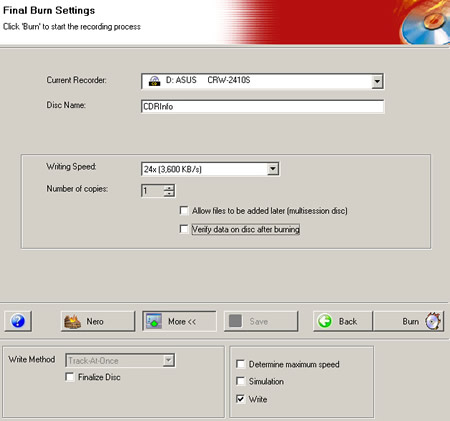
Our CD is ready for burning. The next window has the final burn settings. You can choose the recorder, the writing speed, and the number of copies. Options such as Multisession and data verification after burning are there and the "More" button allows you choose the write mode (DAO or TAO), simulation or straight writing process. You can also let the software to determine the maximum writing speed by checking the appropriate box in the same tab.
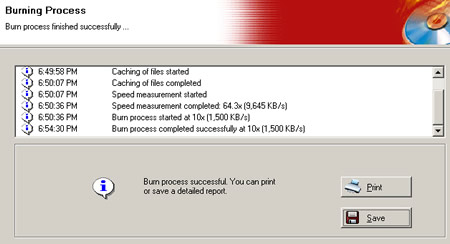
After a successful burning, you can ask the program to save a detailed log file about your PC configuration and of course the burning details of the process. You can also print these details easily with the "print" button:
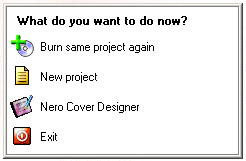
If you press the next button, you see the following picture that asks you how you want to continue, with a new or an existing project, or even to exit the application.

The final version of Nero Express will also incorporate the bootable CD creation option.


Review Pages

1. Page 2
2. Page 1
3. Page 3
4. Page 4
5. Page 5


Pages

  • « first
  • ‹ previous
  • 1
  • 2
  • 3
  • 4
  • 5
  • next ›
  • last »

Tags:
Previous Post
LiteOn LXR-24101A CD-RW
Next Post
Promise FastTrack TX2000

Related Posts

Latest Reviews

be quiet! Dark Power 14 IO
PC components

be quiet! Dark Power 14 IO

SanDisk High Endurance 512GB microSDXC
Cameras

SanDisk High Endurance 512GB microSDXC

Samsung PRO Ultimate 512GB microSDXC
Cameras

Samsung PRO Ultimate 512GB microSDXC

be quiet! Light Mount TKL
Consumer Electronics

be quiet! Light Mount TKL

be quiet! Light Loop IO LCD
Cooling Systems

be quiet! Light Loop IO LCD

Popular News

CORSAIR announces Vanguard Pro 96 and Vanguard 96 Gaming Keyboards

CORSAIR announces Vanguard Pro 96 and Vanguard 96 Gaming Keyboards

MSI Launches FORGE GK600 TKL WIRELESS Special Edition Compact Mechanical Keyboard

MSI Launches FORGE GK600 TKL WIRELESS Special Edition Compact Mechanical Keyboard

Panasonic Introduces the First Ultra-Telephoto Zoom Lens in the LUMIX S Series

Panasonic Introduces the First Ultra-Telephoto Zoom Lens in the LUMIX S Series

MSI’s Latest AMD X870E MAX & EVO Series Motherboards

MSI’s Latest AMD X870E MAX & EVO Series Motherboards

COLORFUL Launches iGame B850M ULTRA Series Micro-ATX Motherboards

COLORFUL Launches iGame B850M ULTRA Series Micro-ATX Motherboards

COLORFUL Presents Limited Edition Chitu MAG-60 Magnetic Keyboard Inspired by the Year of the Horse

COLORFUL Presents Limited Edition Chitu MAG-60 Magnetic Keyboard Inspired by the Year of the Horse

COLORFUL Presents iGame Z890 ULTRA-S W and iGame Z890M ULTRA Z Motherboards

COLORFUL Presents iGame Z890 ULTRA-S W and iGame Z890M ULTRA Z Motherboards

LIAN LI Launches 8.8” Universal Screen with Flexible Mounting Solution

LIAN LI Launches 8.8” Universal Screen with Flexible Mounting Solution

Main menu

  • Home
  • News
  • Reviews
  • Essays
  • About
    • Submit News

    • Contact Us
    • Privacy

    • Promotion
    • Advertise

    • RSS Feed
  • About
  • Privacy
  • Contact Us
  • Promotional Opportunities @ CdrInfo.com
  • Advertise on out site
  • Submit your News to our site
  • RSS Feed