
NEC ND-2510A
19. Firmware Hacks - Page 2
Review Pages
2. Transfer Rate Reading Tests
3. CD Error Correction Tests
4. DVD Error Correction Tests
5. Protected Disc Tests
6. DAE Tests
7. Protected AudioCD Tests
8. CD Recording Tests
9. Writing Quality Tests - 3T Jitter Tests
10. Writing Quality Tests - C1 / C2 Error Measurements
11. DVD Recording Tests
12. KProbe/PlexTools Scans - Page 1
13. KProbe/PlexTools Scans - Page 2
14. DVD+R DL - Page 1
15. DVD+R DL - Page 2
16. BookType Setting
17. Conclusion
18. Firmware Hacks - Page 1
19. Firmware Hacks - Page 2
20. Firmware Hacks - Page 3
21. Firmware Hacks - Page 4
22. Firmware Hacks - Page 5
NEC ND-2510A Recorder - Page 19
Firmware Hacks - Page 2
- Booktype Setting
As NEC claims "the DVD writers we sell in Europe do not need a bitsetting tool because they already set to the most compatible condition. But in some cases it is not compatible to (older) hardware equipment or standalone DvD players. With ND-1000A and ND-1100A a burned DvD+R media will be characterized automatically as DvD-ROM, but a DvD+RW will be characterized as itself. The ND-1300A, ND-2500A and ND-2510A marks DvD+R, DvD+RW, DvD-R and DvD-RW as given. There`s no chance to change this settings."
Although NEC does not offer a booktype setting utility, there are solutions to this all over the internet. DVD Info Pro will include a small booktype setting utility for the ND-2510A drive in the next release. The following pictures show the booktype setting changed using this program.
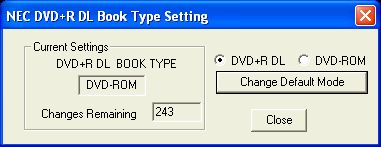
With DVD Info Pro, we have the ability to change the booktype setting up to 255 times. We would be happy to see this limit lifted by the authors of the software.
There is also a small utility available, called WinBType, that can be used to change booktype setting of +R DL discs. This utility is supposed to come from NEC, but NEC has denied its existence..
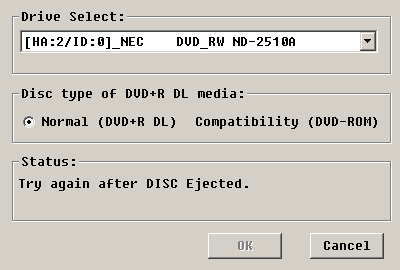
The drive was empty, but we needed to eject the tray once for the program to be able to make the necessary changes.
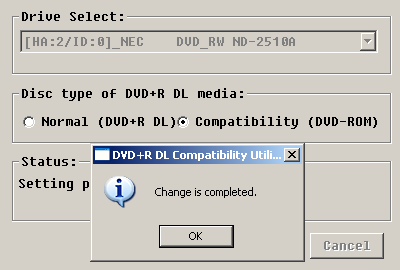
As you can see, the booktype was changed successfully. Unfortunately, this small utility can only change the booktype setting for +R DL media and not for +R/+RW media.
These issues are discussed in our forum, with more user comments on this matter.
Review Pages
2. Transfer Rate Reading Tests
3. CD Error Correction Tests
4. DVD Error Correction Tests
5. Protected Disc Tests
6. DAE Tests
7. Protected AudioCD Tests
8. CD Recording Tests
9. Writing Quality Tests - 3T Jitter Tests
10. Writing Quality Tests - C1 / C2 Error Measurements
11. DVD Recording Tests
12. KProbe/PlexTools Scans - Page 1
13. KProbe/PlexTools Scans - Page 2
14. DVD+R DL - Page 1
15. DVD+R DL - Page 2
16. BookType Setting
17. Conclusion
18. Firmware Hacks - Page 1
19. Firmware Hacks - Page 2
20. Firmware Hacks - Page 3
21. Firmware Hacks - Page 4
22. Firmware Hacks - Page 5





