Breaking News

TerraMaster Launches Storage Upgrade Season with Up to 30% Off During Prime Big Deal Days COLORFUL Launches iGame Guard G114 140W GaN Multi-Port Charger INNO3D TOWER WORKSTATION AWS-511Z-R1 Thermal Grizzly and Noctua introduce WireView Pro II Noctua Edition GPU monitoring device Nikon releases the Z5IIC full-frame mirrorless camera

logo

  • Share Us
    • Facebook
    • Twitter
  • Home
  • Home
  • News
  • Reviews
  • Essays
  • About
    • Submit News

    • Contact Us
    • Privacy

    • Promotion
    • Advertise

    • RSS Feed

Search form

MSI 915G Combo

Nov 15,2004 0

4. Bios & Overclocking


Review Pages

1. Introduction
2. CPU & Cooler
3. Performance
4. Bios & Overclocking
5. Conclusion


04 - Bios & Overclocking

With the originally equipped BIOS on the mainboard, we were unable to boot with an Asus AX600XT installed. We installed a Powercolor X300 in order to boot to windows and then flashed the BIOS to its latest version (1.40). Flashing was a piece of cake, as the only thing we had to do is install and run MSI's Live Monitor utility which took care of everything through an easy update wizard.
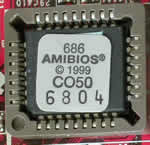
915G's BIOS is made by American Megatrends Inc. (AMI) and stored inside this chipset

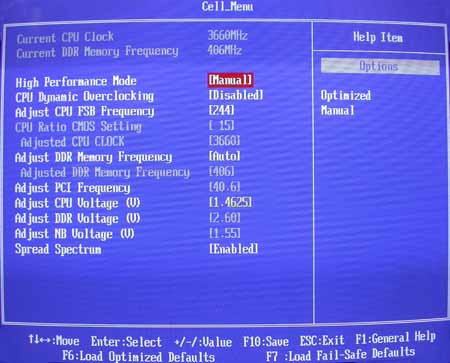
In order to overclock our P4 3.0GHz, we had to change the FSB and CPU voltage as the Multiplier in the P4 processors is locked by default. To achieve this, we entered the Cell Menu that is available through the main BIOS menu. The original values for our CPU were x15 for the multiplier, 200 for the FSB (15x200=3000MHz) and CPU voltage 1.3875.
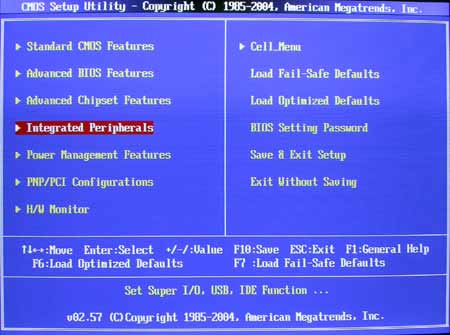
After an hour of playing with the settings, we managed to overclock the processor to 15x244=3660MHz. The CPU voltage wasn't enough to support that speed so we increased it from 1.3875 to 1.4625.

That's more than a 20% percent increase in the clock speed. Not bad considering the fact that we used our processor's stock standard cooling solution.
 

Review Pages

1. Introduction
2. CPU & Cooler
3. Performance
4. Bios & Overclocking
5. Conclusion


Pages

  • « first
  • ‹ previous
  • 1
  • 2
  • 3
  • 4
  • 5
  • next ›
  • last »

MSI

Tags: MSI
Previous Post
ADS DVD Xpress Converter
Next Post
Asus AX600XT

Related Posts

  • MSI Strengthens Strategic Partnership with Samsung Display

  • MSI announces Roamii BE Pro Mesh WiFi 7 System

  • MSI Unveils the GeForce RTX 5090 32G LIGHTNING Z

  • MSI announces new MEG X and MPG 341CQR QD-OLED X36 monitors

  • MSI announces new 32-inch 4K QD-OLED monitors

  • MSI’s Latest AMD X870E MAX & EVO Series Motherboards

  • MSI Unveils the AI-Ready Cubi Z AI Series Mini PC

  • MSI Clarifies GeForce RTX 5090 Is Not Officially Sold in China

Latest Reviews

Fanxiang MP83 M.2 NVMe SSD Enclosure
Enterprise & IT

Fanxiang MP83 M.2 NVMe SSD Enclosure

Ugreen CM642 USB4.0 Enclosure
PC components

Ugreen CM642 USB4.0 Enclosure

be quiet! Dark Power 14 IO
PC components

be quiet! Dark Power 14 IO

SanDisk High Endurance 512GB microSDXC
Cameras

SanDisk High Endurance 512GB microSDXC

Samsung PRO Ultimate 512GB microSDXC
Cameras

Samsung PRO Ultimate 512GB microSDXC

Popular News

MSI’s Latest AMD X870E MAX & EVO Series Motherboards

MSI’s Latest AMD X870E MAX & EVO Series Motherboards

COLORFUL Launches iGame B850M ULTRA Series Micro-ATX Motherboards

COLORFUL Launches iGame B850M ULTRA Series Micro-ATX Motherboards

COLORFUL Presents Limited Edition Chitu MAG-60 Magnetic Keyboard Inspired by the Year of the Horse

COLORFUL Presents Limited Edition Chitu MAG-60 Magnetic Keyboard Inspired by the Year of the Horse

COLORFUL Presents iGame Z890 ULTRA-S W and iGame Z890M ULTRA Z Motherboards

COLORFUL Presents iGame Z890 ULTRA-S W and iGame Z890M ULTRA Z Motherboards

COLORFUL Launches iGame B850I MINI OC V14 Motherboard

COLORFUL Launches iGame B850I MINI OC V14 Motherboard

COLORFUL Expands B850 Motherboard Lineup with New CVN, Battle-Ax, and MEOW Models

COLORFUL Expands B850 Motherboard Lineup with New CVN, Battle-Ax, and MEOW Models

ASRock Adds Support for One Sub-Channel DRAM Module on Intel DDR5 Motherboards

ASRock Adds Support for One Sub-Channel DRAM Module on Intel DDR5 Motherboards

Exceed the Infinite with New ASRock X870E Taichi White Motherboard

Exceed the Infinite with New ASRock X870E Taichi White Motherboard

Main menu

  • Home
  • News
  • Reviews
  • Essays
  • About
    • Submit News

    • Contact Us
    • Privacy

    • Promotion
    • Advertise

    • RSS Feed
  • About
  • Privacy
  • Contact Us
  • Promotional Opportunities @ CdrInfo.com
  • Advertise on out site
  • Submit your News to our site
  • RSS Feed