Microsoft Ready To start Offering Browser Choice Screen for European Computers
Over the next few weeks, Microsoft will begin offering a "Web browser choice screen" to Internet Explorer users in Europe, as required by the European Commission.
The company said that it is currently performing internal testing of the choice screen and that it would begin a limited roll-out externally next week. A full scale roll-out will begin around March 1, a couple of weeks ahead of schedule.
In December, the European Commission and Microsoft arrived at a resolution of a number of long-standing competition law issues. Microsoft made a legally binding commitment that PC manufacturers and users will continue to be able to install any browser on Windows, to make any browser the default browser, and to turn access to Internet Explorer on or off. In addition, Microsoft agreed to use Windows Update to provide a browser choice screen to Windows users in Europe who are running Internet Explorer as their default browser. This browser choice screen will present a list of browsers, with links to learn more about them and install them. The design and operation of this choice screen was worked out in the course of Microsoft's discussions with the Commission. Users who get the choice screen will be free to choose any browser or stick with the browser they have, as they prefer.
External testing of the choice screen will begin next week in three countries: the United Kingdom, Belgium and France. Anyone in those countries who wishes to test it can download the browser choice screen software update from Windows Update. The browser choice screen software update will be offered as an automatic download through Windows Update for Windows XP, Windows Vista and Windows 7. The software update will be installed automatically, or will prompt users to download or install it, depending on which operating system theyr are running and their settings for Windows Update. Those who do not have automatic updating enabled, they can get the choice screen by going to Windows Update and clicking on "Check for Updates."
If you are an Internet Explorer user in Europe, here is what to expect.
An introductory screen appears first. In the screen shot below we added a few comment bubbles to point out certain features. The introductory screen provides context for the next screen, which shows browser options.
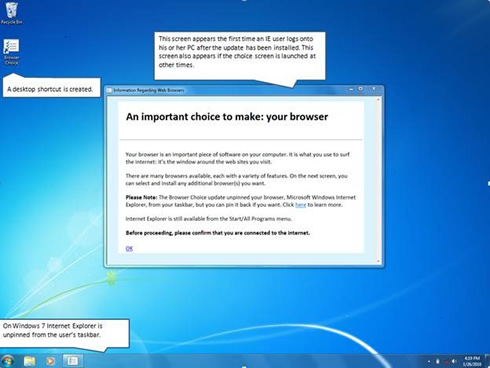
Windows 7 users will be able to "pin" frequently-used programs to the taskbar (shown along the bottom of the screen, above.) If Internet Explorer was "pinned" to your Windows 7 taskbar, the browser choice screen software update will automatically unpin it, as shown above. (Note that unpinning a program does not remove it from your computer.) Once you have selected your preferred browser, you can pin that browser to the taskbar just by right-clicking on the browser icon in the taskbar anytime it is running and selecting "pin this program to taskbar."
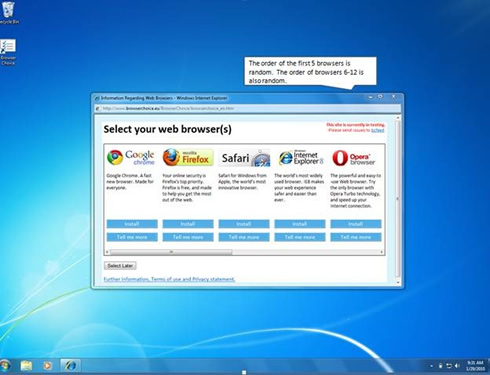
The browser choice screen, shown below, will present you with a list of leading browsers. In keeping with Microsoft's agreement with the European Commission, this list is presented in random order. You can also scroll to the right to see additional browsers, which are also presented in random order. The browsers that are listed and the content relating to them will be updated from time to time. The screen provides three options: Click on "Install" to install one of the listed browsers. Click on "Tell me more" to get more information about any of the browsers. These links (and the browser logos and associated text) are provided by each browser vendor. Click on "Select Later" to review the choice screen the next time you log onto your computer. This software update will also add a shortcut to your desktop, from which you can launch the choice screen at any time.
In December, the European Commission and Microsoft arrived at a resolution of a number of long-standing competition law issues. Microsoft made a legally binding commitment that PC manufacturers and users will continue to be able to install any browser on Windows, to make any browser the default browser, and to turn access to Internet Explorer on or off. In addition, Microsoft agreed to use Windows Update to provide a browser choice screen to Windows users in Europe who are running Internet Explorer as their default browser. This browser choice screen will present a list of browsers, with links to learn more about them and install them. The design and operation of this choice screen was worked out in the course of Microsoft's discussions with the Commission. Users who get the choice screen will be free to choose any browser or stick with the browser they have, as they prefer.
External testing of the choice screen will begin next week in three countries: the United Kingdom, Belgium and France. Anyone in those countries who wishes to test it can download the browser choice screen software update from Windows Update. The browser choice screen software update will be offered as an automatic download through Windows Update for Windows XP, Windows Vista and Windows 7. The software update will be installed automatically, or will prompt users to download or install it, depending on which operating system theyr are running and their settings for Windows Update. Those who do not have automatic updating enabled, they can get the choice screen by going to Windows Update and clicking on "Check for Updates."
If you are an Internet Explorer user in Europe, here is what to expect.
An introductory screen appears first. In the screen shot below we added a few comment bubbles to point out certain features. The introductory screen provides context for the next screen, which shows browser options.
Windows 7 users will be able to "pin" frequently-used programs to the taskbar (shown along the bottom of the screen, above.) If Internet Explorer was "pinned" to your Windows 7 taskbar, the browser choice screen software update will automatically unpin it, as shown above. (Note that unpinning a program does not remove it from your computer.) Once you have selected your preferred browser, you can pin that browser to the taskbar just by right-clicking on the browser icon in the taskbar anytime it is running and selecting "pin this program to taskbar."
The browser choice screen, shown below, will present you with a list of leading browsers. In keeping with Microsoft's agreement with the European Commission, this list is presented in random order. You can also scroll to the right to see additional browsers, which are also presented in random order. The browsers that are listed and the content relating to them will be updated from time to time. The screen provides three options: Click on "Install" to install one of the listed browsers. Click on "Tell me more" to get more information about any of the browsers. These links (and the browser logos and associated text) are provided by each browser vendor. Click on "Select Later" to review the choice screen the next time you log onto your computer. This software update will also add a shortcut to your desktop, from which you can launch the choice screen at any time.