JSAUX Clear Back Shell PC0106b
3. Installation
Before installing the PC0106b transparent back shell we advise you to view the following original installation video and general tear-down from iFixit.
Note that the original SteamDeck screws have blue lock tile so it might need extra force to remove them the first time. Also, make sure to remove any installed microSD, or else you will break it in half!!!
JSAUX has posted several warnings before starting the procedure:
1. The transparent back cover isn’t recommended for users that have no experience in DIY and/or disassembling electronic devices. We strongly recommend carefully reviewing the iFixit videos if you choose to install them or seek the services of a professional. Any equipment malfunction caused by the disassembly of the Deck, but not by this product, shall be borne by the user.
2. Because aluminum has good thermal conductivity, it will be hotter than other areas when touched. Be careful not to touch it to avoid being burned when you use your Deck.
3. Before use, please use a heat gun or hair dryer to slightly soften the thermal grease to ensure that it fits perfectly on the Back Plate. In case of accidental contact with the skin, please wipe it off immediately, then rinse with water.
So before you start installing the backplate, we advise you to choose from the three included back buttons. We tried all three and chose the middle height. Each back button is secured via two screws at the plate. below you can see all four buttons installed.
To get things started, you have e to remove 8 mini-screws. While JSAUX has included a mini Philps P00 screwdriver, we suggest getting a Philips P01 screwdriver that will have higher surface contact with the stock screws that have already blue lock tile to prevent them from moving out. With the Philips P01 screwdriver, we didn't have any problem removing all screws.
Before installing the backplate, we advise you to use a heat gun and heat up the included thermal paste. We tried an air hair blower for like 5 minutes (remember first to remove the plastic protective film from the thermal paste) and we placed the transparent backplate from the top to the bottom. Apply some small force to hear a click (confirmation that it has been secured) and then place carefully all previously removed screws.
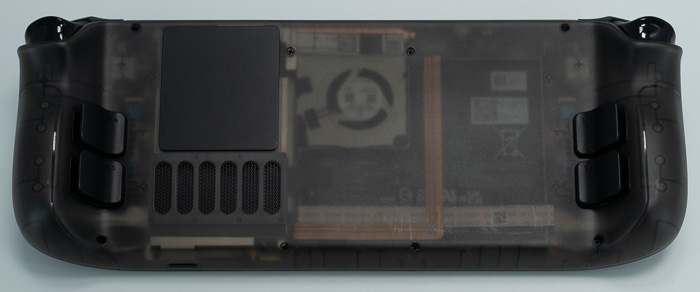
The final result is very impressive in our opinion.
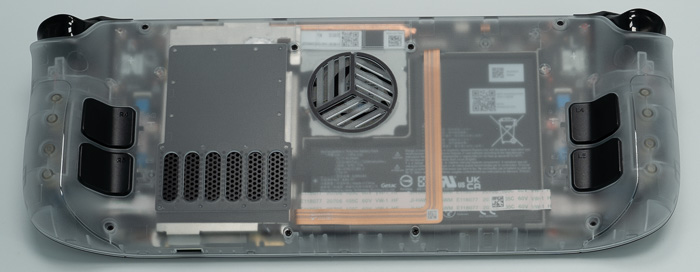
This is how the Steam Deck looked with the previous PC0106 shell
JSAUX has posted a FAQ which may help you answer several questions you might have.
Q1:Will the open hole affect the original air duct of the original case, resulting in reduced cooling effect?
A1: Please don't worry, we specially considered the effect on the Steam Deck air duct when designing this transparent case.
The position of the opening is carefully selected to directly align with the air intake of the fan, which can shorten the air flow path and increase the air circulation speed, thereby accelerating the heat dissipation process. This design helps to remove the heat from the surface of the heat-conducting copper tube inside the Steam Deck faster, improving the operating efficiency of the device.
In order to keep the original heat dissipation air duct of the equipment unaffected, we used pre-cut silicone grease inside, and reserved a place for the original air intake. This ensures that the function of the original air intake is not disturbed, thus ensuring the air flow inside the device.
Q2: Will dust get in after opening the hole in the back of the Transparent Back Plate ?
A2: Please don't worry, we installed a 50-mesh dust filter on the fan to cover the hole, which can prevent dust particles with a diameter of about 300 microns.
This mesh is typically used to keep larger airborne particles such as dust, pollen, and other impurities from entering the fan area while ensuring good airflow and cooling.
In addition, we also recommend that you clean the dust filter regularly and avoid using it in a dusty environment.
Q3: Can it be used together with a protective case?
A3: The perforated design behind the clear case is precisely designed to maximize air flow, thereby effectively dissipating the heat inside the device.
If Using with other protective cases and silicone cases, etc., may block these cooling vents, interfere with the thermal management of the device, and may reduce the performance of the device.
Therefore, we recommend that you use this clear case alone to get the best Excellent device protection and heat dissipation.