Google Launches of Google Toolbar 6 Beta For IE
Google released a BETA version of the new Google Toolbar 6, which brings the focus back to Google's core areas of search and navigation.
Toolbar 6 Beta for Internet Explorer includes a host of new features aimed at making search and navigation faster, stronger, and easier than ever before, Google said. This update to Toolbar is launching simultaneously in 40 languages.
Some highlights of Google Toolbar 6 include:
- Access to search (and more) from outside the browser with the new Quick Search Box feature.
- Bringing additional elements of the Google search results page into the Toolbar with enhanced search suggestions.
- Easier navigation to your favorite sites with a redesigned new tab page.
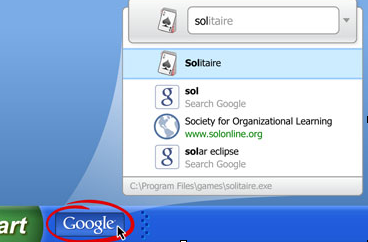
In today's Toolbar 6 launch for Internet Explorer Google is introducing the Quick Search Box (QSB) feature that provides search functionality outside of the browser. Just click on the Google logo in the taskbar to trigger it (or use the Ctrl+Space shortcut for quicker access). As you type, it will provide search and website suggestions, relevant bookmarks, and even allow you to launch applications directly from the search box.
Google is also experimenting with displaying high-quality website suggestions and sponsored links as you type your query. Clicking on these will take you directly to the website.
Lastly, Google brought the new tab page to its Internet Explorer users. You can quickly access your most viewed sites, recently closed tabs and bookmarked pages ? all from this new tab page.
For more information visit http://toolbar.google.com/T6 .
Some highlights of Google Toolbar 6 include:
- Access to search (and more) from outside the browser with the new Quick Search Box feature.
- Bringing additional elements of the Google search results page into the Toolbar with enhanced search suggestions.
- Easier navigation to your favorite sites with a redesigned new tab page.
In today's Toolbar 6 launch for Internet Explorer Google is introducing the Quick Search Box (QSB) feature that provides search functionality outside of the browser. Just click on the Google logo in the taskbar to trigger it (or use the Ctrl+Space shortcut for quicker access). As you type, it will provide search and website suggestions, relevant bookmarks, and even allow you to launch applications directly from the search box.
Google is also experimenting with displaying high-quality website suggestions and sponsored links as you type your query. Clicking on these will take you directly to the website.
Lastly, Google brought the new tab page to its Internet Explorer users. You can quickly access your most viewed sites, recently closed tabs and bookmarked pages ? all from this new tab page.
For more information visit http://toolbar.google.com/T6 .