
Breaking News

Samsung Expands Its Audio Ecosystem for 2026 With Multi-Device Sound and Immersive New Designs Xiaomi Unveils Xiaomi 17 Ultra Firewalla App 1.67 Brings Enterprise Wi-Fi, RADIUS, and Advanced AP7 Controls to Small Businesses and Power Users Samsung To Unveil AI Vision Built With Google Gemini at CES 2026 Samsung Unveils New Odyssey Gaming Monitor Lineup

logo

  • Share Us
    • Facebook
    • Twitter
  • Home
  • Home
  • News
  • Reviews
  • Essays
  • Forum
  • Legacy
  • About
    • Submit News

    • Contact Us
    • Privacy

    • Promotion
    • Advertise

    • RSS Feed
    • Site Map

Search form

EQS A44P8-MLF

Nov 29,2004 0

4. Bios & Overclocking


Review Pages

1. Introduction
2. Board Layout
3. Performance
4. Bios & Overclocking
5. Conclusion


04 - EQS A44P8-MLF - Bios & Overclocking

This mainboard is powered by a BIOS chip from PhoenixBios.

What is most interesting with the EQS A44P8 BIOS is the Advanced chipset features screen. The rest of the BIOS menus are pretty much stock standard to those available in every other motherboard.
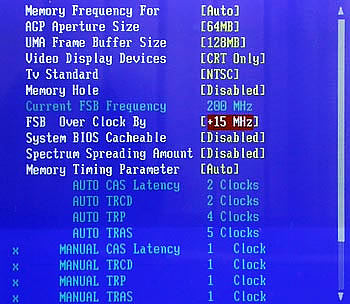
The difference here is the UMA Frame Buffer Size. So far, integrated graphics processors don't have any memory installed on-chip. Instead, they use some part of your computer's physical memory as their own. This architecture is called UMA (Unified Memory Architecture) and the physical memory assosiated with the graphics processor is the UMA Frame Buffer.

Setting the UMA Frame Buffer to 128Mb is the equivalent of having a 128MB graphics card, while leaving it at 32MB which was the default value, is like having a 32MB VGA card. Provided you have more than 256Mb of physical memory installed on the motherboard, choosing 128Mb is the perfect choice.

Moving further down the menu, there's an indicator for the current FSB frequency (which in our case was 200MHz by default) and below that a setting for FSB overclocking.

We were really disappointed to see you could only increase the FSB up to 15Mhz. To make matters worse, there is no additional voltage control apart from the Spectrum spreading amount. We immediately tried to increase the FSB by 15MHz and the system failed to boot. We restored the BIOS settings and tried again at +10MHz only to get the same tragic failure. Finally we managed to make the computer POST at +5.
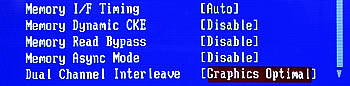
In the last screenshot, you can see the remaining options available in the Advanced Chipset menu. The Dual Channel Interleave can be set to a value of either Graphics Optimal or System Optimal. The former boosts performance in 3D applications while the latter provides slightly better overall system performance. By default, this value is set to System Optimal.


 

Review Pages

1. Introduction
2. Board Layout
3. Performance
4. Bios & Overclocking
5. Conclusion


Pages

  • « first
  • ‹ previous
  • 1
  • 2
  • 3
  • 4
  • 5
  • next ›
  • last »

EQS

Tags: EQS
Previous Post
Waitec Action16
Next Post
BenQ DW1620 (vB7P9)

Related Posts

  • EQS M56K9-MLF

Latest Reviews

Noctua NH-D15 G2 Chromax.Black
Cooling Systems

Noctua NH-D15 G2 Chromax.Black

EnGenius ECW520 AP
Enterprise & IT

EnGenius ECW520 AP

Noctua NP-DM3 desk mat
Gaming

Noctua NP-DM3 desk mat

Crucial P510 2TB NMVE
PC components

Crucial P510 2TB NMVE

The Quiet Technology Behind the Spin
Enterprise & IT

The Quiet Technology Behind the Spin

Popular News

COLORFUL Introduces CVN B850I GAMING FROZEN Motherboard

COLORFUL Introduces CVN B850I GAMING FROZEN Motherboard

COLORFUL Presents CVN X870 ARK FROZEN Motherboard for AMD Ryzen 9000 CPUs

COLORFUL Presents CVN X870 ARK FROZEN Motherboard for AMD Ryzen 9000 CPUs

COLORFUL Presents the B860 Series Motherboards

COLORFUL Presents the B860 Series Motherboards

Intel-AMD new motherboards announced

Intel-AMD new motherboards announced

TEAMGROUP Launches EXPERT P34F Find My External SSD

TEAMGROUP Launches EXPERT P34F Find My External SSD

ASRock AM5 Motherboards Now Fully Support AMD Ryzen 9 9950X3D & 9900X3D Processors

ASRock AM5 Motherboards Now Fully Support AMD Ryzen 9 9950X3D & 9900X3D Processors

Samsung announces Galaxy Tab S11 and Galaxy S25 FE series

Samsung announces Galaxy Tab S11 and Galaxy S25 FE series

Viltrox Showcases Upcoming Lens Lineup and New TTL Flash at IBC 2025

Viltrox Showcases Upcoming Lens Lineup and New TTL Flash at IBC 2025

Main menu

  • Home
  • News
  • Reviews
  • Essays
  • Forum
  • Legacy
  • About
    • Submit News

    • Contact Us
    • Privacy

    • Promotion
    • Advertise

    • RSS Feed
    • Site Map
  • About
  • Privacy
  • Contact Us
  • Promotional Opportunities @ CdrInfo.com
  • Advertise on out site
  • Submit your News to our site
  • RSS Feed
