Breaking News

Samsung Showcases Glasses-Free 3D and HDR10+ GAMING ASRock Z890I Nova WiFi R2.0 Supports CQDIMM GoPro Unveils GP3 Lenovo Unveils Adaptive AI PCs, Modular Concepts, and Lenovo Qira Rollout at MWC 2026 Say hello to MacBook Neo

logo

  • Share Us
    • Facebook
    • Twitter
  • Home
  • Home
  • News
  • Reviews
  • Essays
  • Forum
  • Legacy
  • About
    • Submit News

    • Contact Us
    • Privacy

    • Promotion
    • Advertise

    • RSS Feed
    • Site Map

Search form

Endorfy LIV Plus Wireless Onyx White

Apr 6,2025 0

4. Conclusion


Review Pages

1. Introduction
2. Retail Package
3. Software
4. Conclusion


The Liv Plus Wireless Onyx White is a new addition to the already big lineup of mice from Endorfy. The design of the mouse is not typical, meaning its open design allows the air to circulate into and ultimately cool down your hand and remove sweat for those long gaming sessions. The mouse has the typical gaming design and will fit in most middle-size hands and the low weight of 69gr is welcomed. The PixArt 3395 optical sensor is among the best and via the Endorfy software, you can boost its DPI up to 26.000 which is nice to have, even though most users will settle with much lower DPI settings.

The two main mouse buttons house Kailh GM 8.0 microswitches behind them and are smooth have an audible click midway down and feel similar to a linear mechanical keyboard switch, like Cherry MX Red. Some users may like it, others may dont. Also with that bouncy feeling for competitive gaming, click may not register as fast as someone would expect, perhaps using Kailh GM 4.0 would be a better idea, again this is a personal taste, others may find the Kailh GM 8.0 just perfect. The estimated 80 million clicks are good to hear, and since the mouse has 2 years warranty you can be assured of its durability. The scrolling wheel is made out of plastic has a texture pattern, and also includes an LED. Nothing fancy like other mice (metal) but works ok.

The build quality of the Liv Plus Wireless Onyx White is very good, the surface has a nice touch, the build material is ABS and the open design may need some time for hands to get used to. Endorfy at the retail package offers free "addons" to stick to the external shell and provide further grip in case you need it, after all, it's free to try.
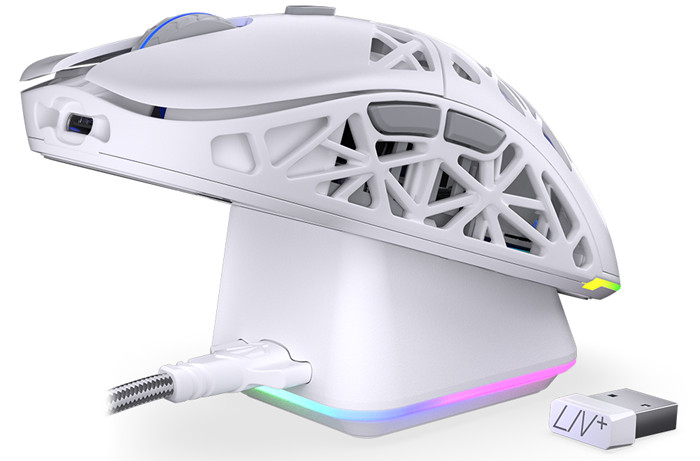
The included base offers housing for the 2.4G USB dongle and the advertised wireless charging. Magnets keep the mouse secure with the base and there will be no problem with this function. The mouse does have plenty of ARGB lighting either at the wireless base or at the back of the mouse. Users can set with the included software the ARGB lighting of both the base and the mouse and sync them of course, Too bad you cannot sync with the main PC system ARGB.

The provided free software is plain to use, and nothing fancy, changing the functions of each button works just fine and you can also set macros in case you need them. Too bad only the Windows version (at the writing of this article) is provided, so MAC/Linux users cannot set much of the mice properties.

Overall we find the proposal of the Endorfy LIV Plus Wireless Onyx White a solid one, It ticks most of the boxes an advanced user would want, top of a line optical sensor, a great retail package, support for 3 connection modes, wireless charging station, ARGB and great build quality with low weight. The retail price of the mouse is around 90 Euro, which is a good deal compared with other proposals from other vendors with similar weight and features.
 

Review Pages

1. Introduction
2. Retail Package
3. Software
4. Conclusion


Pages

  • « first
  • ‹ previous
  • 1
  • 2
  • 3
  • 4

ENDORFY

Tags: ENDORFY
Previous Post
be quiet! 140mm and 120mm reverse fans
Next Post
The Benefits of Gambling with Your Phone

Related Posts

  • ENDORFY introduces Signum M30 cases

  • ENDORFY introduces Atlas Electric desks

  • Endorfy Thock V2 Wireless Keyboard

  • ENDORFY Palm Rest V2 series delivers comfort with a magnetic pull

  • New Stoneflow mousepads by ENDORFY

  • New Vero L6 generation of the PSUs

  • Arx 500 White ARGB – compact form and full performance from ENDORFY

  • ENDORFY introduces Celeris 1800 keyboard

Latest Reviews

Why Streaming Live Casino Games Demands Smarter Tech
Enterprise & IT

Why Streaming Live Casino Games Demands Smarter Tech

Kioxia Exceria Plus G3 512GB microSD
Cameras

Kioxia Exceria Plus G3 512GB microSD

SoundPeats Cove Pro
Consumer Electronics

SoundPeats Cove Pro

Asustor AS5404T 4-Bay NAS System
Enterprise & IT

Asustor AS5404T 4-Bay NAS System

be quiet! Pure Power 13M 1200W
PC components

be quiet! Pure Power 13M 1200W

Popular News

COLORFUL Introduces CVN B850I GAMING FROZEN Motherboard

COLORFUL Introduces CVN B850I GAMING FROZEN Motherboard

COLORFUL Presents CVN X870 ARK FROZEN Motherboard for AMD Ryzen 9000 CPUs

COLORFUL Presents CVN X870 ARK FROZEN Motherboard for AMD Ryzen 9000 CPUs

TEAMGROUP Launches EXPERT P34F Find My External SSD

TEAMGROUP Launches EXPERT P34F Find My External SSD

Samsung announces Galaxy Tab S11 and Galaxy S25 FE series

Samsung announces Galaxy Tab S11 and Galaxy S25 FE series

Viltrox Showcases Upcoming Lens Lineup and New TTL Flash at IBC 2025

Viltrox Showcases Upcoming Lens Lineup and New TTL Flash at IBC 2025

CORSAIR announces Vanguard Pro 96 and Vanguard 96 Gaming Keyboards

CORSAIR announces Vanguard Pro 96 and Vanguard 96 Gaming Keyboards

Panasonic Introduces the First Ultra-Telephoto Zoom Lens in the LUMIX S Series

Panasonic Introduces the First Ultra-Telephoto Zoom Lens in the LUMIX S Series

MSI Launches DATAMAG 40Gbps Magnetic Portable SSD

MSI Launches DATAMAG 40Gbps Magnetic Portable SSD

Main menu

  • Home
  • News
  • Reviews
  • Essays
  • Forum
  • Legacy
  • About
    • Submit News

    • Contact Us
    • Privacy

    • Promotion
    • Advertise

    • RSS Feed
    • Site Map
  • About
  • Privacy
  • Contact Us
  • Promotional Opportunities @ CdrInfo.com
  • Advertise on out site
  • Submit your News to our site
  • RSS Feed