Breaking News

Levelplay Launches Combat Liquid HUD and Combat Liquid SE AIO CPU Coolers Intel Launches new Intel Xeon 600 Processors for Workstation Club 3D Announced their first new products of 2026 Samsung 2026 OLED TVs and Monitors Are NVIDIA G-SYNC Compatible for Elite Gaming Performance Kioxia and Sandisk Extend Yokkaichi Joint Venture Agreement Through 2034

logo

  • Share Us
    • Facebook
    • Twitter
  • Home
  • Home
  • News
  • Reviews
  • Essays
  • Forum
  • Legacy
  • About
    • Submit News

    • Contact Us
    • Privacy

    • Promotion
    • Advertise

    • RSS Feed
    • Site Map

Search form

ECS KN3SLI2 Motherboard

Dec 30,2006 0

3. Bios


Review Pages

1. Introduction
2. The Package
3. Bios
4. Installation
5. Everest Ultimate/SiSoft Sandra
6. PCMARK - 3DMARK
7. Science Mark - PovRay - Nero Digital
8. CINEBENCH -SuperPI
9. F.E.A.R - Prey
10. Splinter Cell Chaos Theory - Half Life
11. Overclocking
12. Conclusion


The BIOS is the very familiar Phoenix - Award.

There are two options we will look at closer:

Under the advanced chipset option, we find many useful settings, like FSB:
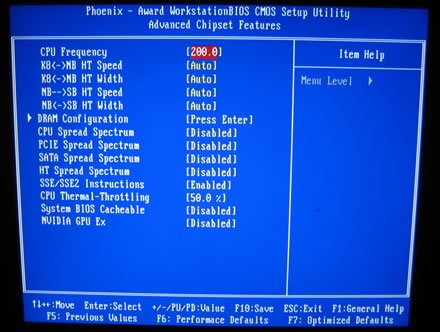
and DRAM configuration:
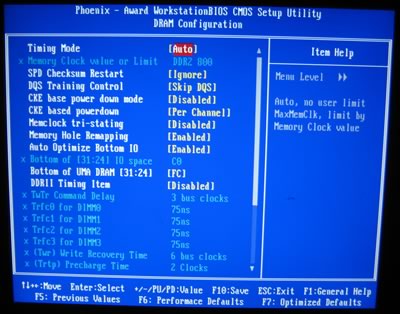
DRAM timings can be manually set for optimum performance:

In the Frequency/voltage control settings, you can set:

- the CPU multiplier

and various voltages for the DRAM and CPU.
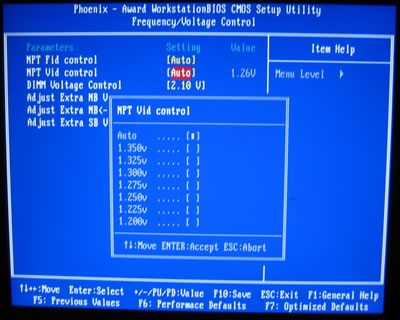
The Voltage settings for the DRAM don't go over 2.20V

Lastly, you can monitor your system's health:


Review Pages

1. Introduction
2. The Package
3. Bios
4. Installation
5. Everest Ultimate/SiSoft Sandra
6. PCMARK - 3DMARK
7. Science Mark - PovRay - Nero Digital
8. CINEBENCH -SuperPI
9. F.E.A.R - Prey
10. Splinter Cell Chaos Theory - Half Life
11. Overclocking
12. Conclusion


Pages

  • « first
  • ‹ previous
  • 1
  • 2
  • 3
  • 4
  • 5
  • 6
  • 7
  • 8
  • 9
  • …
  • next ›
  • last »

Tags:
Previous Post
NeoDigits X5000
Next Post
Samsung Blackjack

Related Posts

Latest Reviews

be quiet! Dark Perk Mice
Gaming

be quiet! Dark Perk Mice

Acemagic W1
PC components

Acemagic W1

be quiet! Power Zone 2 1200W
PC components

be quiet! Power Zone 2 1200W

The Difference Between American and European Stakes and Why It Changes How People Bet
Enterprise & IT

The Difference Between American and European Stakes and Why It Changes How People Bet

Endorfy Thock V2 Wireless Keyboard
PC components

Endorfy Thock V2 Wireless Keyboard

Popular News

COLORFUL Introduces CVN B850I GAMING FROZEN Motherboard

COLORFUL Introduces CVN B850I GAMING FROZEN Motherboard

COLORFUL Presents CVN X870 ARK FROZEN Motherboard for AMD Ryzen 9000 CPUs

COLORFUL Presents CVN X870 ARK FROZEN Motherboard for AMD Ryzen 9000 CPUs

TEAMGROUP Launches EXPERT P34F Find My External SSD

TEAMGROUP Launches EXPERT P34F Find My External SSD

ASRock AM5 Motherboards Now Fully Support AMD Ryzen 9 9950X3D & 9900X3D Processors

ASRock AM5 Motherboards Now Fully Support AMD Ryzen 9 9950X3D & 9900X3D Processors

Samsung announces Galaxy Tab S11 and Galaxy S25 FE series

Samsung announces Galaxy Tab S11 and Galaxy S25 FE series

Viltrox Showcases Upcoming Lens Lineup and New TTL Flash at IBC 2025

Viltrox Showcases Upcoming Lens Lineup and New TTL Flash at IBC 2025

CORSAIR announces Vanguard Pro 96 and Vanguard 96 Gaming Keyboards

CORSAIR announces Vanguard Pro 96 and Vanguard 96 Gaming Keyboards

Panasonic Introduces the First Ultra-Telephoto Zoom Lens in the LUMIX S Series

Panasonic Introduces the First Ultra-Telephoto Zoom Lens in the LUMIX S Series

Main menu

  • Home
  • News
  • Reviews
  • Essays
  • Forum
  • Legacy
  • About
    • Submit News

    • Contact Us
    • Privacy

    • Promotion
    • Advertise

    • RSS Feed
    • Site Map
  • About
  • Privacy
  • Contact Us
  • Promotional Opportunities @ CdrInfo.com
  • Advertise on out site
  • Submit your News to our site
  • RSS Feed