Breaking News

LIAN LI Announces Edge Platinum V2, Edge Gold V2, and GPU Cable Thermal Monitoring via Edge Hub ADV Razer Unveils the Huntsman V3 Pro Mini 8KHz ASRock DeskSlim Series Delivers RTX PRO Blackwell Performance in a Compact 5L Workstation Samsung Introduces Galaxy Tab S12 Series PlayStation Plus Monthly Games for October 2026

logo

  • Share Us
    • Facebook
    • Twitter
  • Home
  • Home
  • News
  • Reviews
  • Essays
  • About
    • Submit News

    • Contact Us
    • Privacy

    • Promotion
    • Advertise

    • RSS Feed

Search form

DeepCool LT720 WH 360mm

May 16,2023 0

3. Installation


Review Pages

1. Introduction
2. Retail Package
3. Installation
4. Tests
5. Conclusion


Installing the CPU cooler requires some steps and if this is your first time ever installed a water cooling solution, it's advised to read the included printed manual. For our AMD AM4 (AMD Ryzen 5600X) processor, you have to first remove the included stock brackets and also the motherboard backplate. First, you have to attach the included three 120mm fans to the radiator. The fans include the rotation direction and in general you should place them to look at the DeepCool logo.
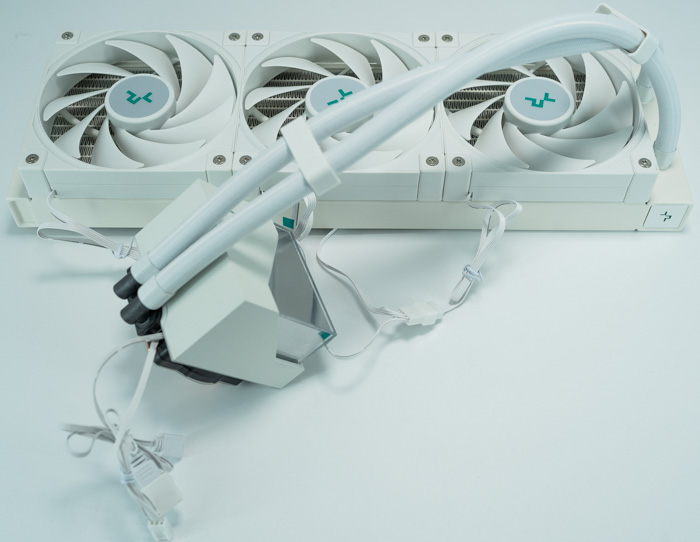
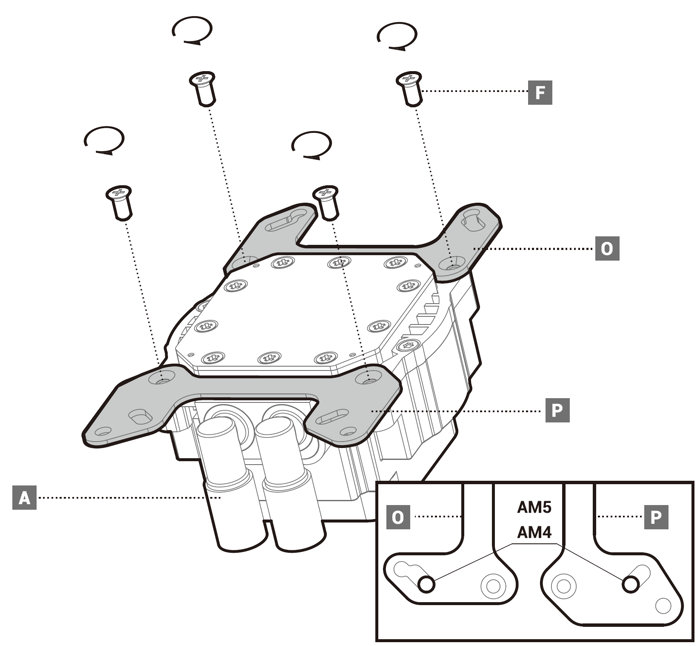
Then you need to place the included screws and mounting plate for the AM4 platform. Also, you need to place the included brackets at the pump
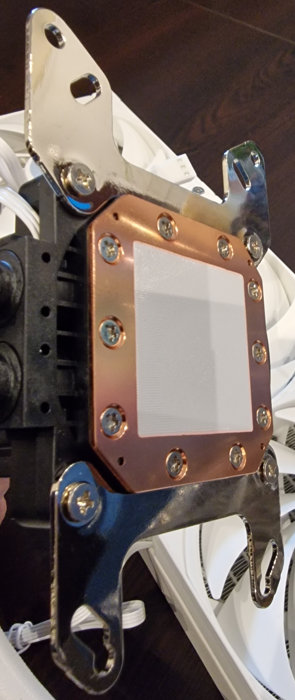
We used the built-in 3-way Y-splitter and we connected the three 120mm fans at the CPU fan header of the motherboard, while the 3-pin power for the pump was installed at the AIO Pump header. The pump ARGB (3 port) was connected to a 3-pin ARGB header at our motherboard. And here is what the final product will look like. The ARGB effect of the pump is very nice to watch.


Review Pages

1. Introduction
2. Retail Package
3. Installation
4. Tests
5. Conclusion


Pages

  • « first
  • ‹ previous
  • 1
  • 2
  • 3
  • 4
  • 5
  • next ›
  • last »

deepcool

Tags: deepcool
Previous Post
JSAUX GP0202 Magnetic Cooler
Next Post
Gelid Liquid 240 AIO Cooler

Related Posts

  • DeepCool Launches AK700 VC Cooler

  • DeepCool Reveals New Cooling Innovations at COMPUTEX 2026

  • DeepCool Launches the LT360 VISION ARGB

  • DeepCool Unveils SPARTACUS 360 AIO Liquid Cooler for High-End Performance and Customization

  • DeepCool Introduces CL6600 Case – A New Breakthrough in Performance Case Design

  • DeepCool Releases GENOME III, a Flagship Full-Tower Case for Extreme Cooling and Intelligent Monitoring

  • DeepCool Unveils New Product Lineup at COMPUTEX 2025

  • DeepCool Launches CH690 DIGITAL: The Ultimate Mid-Tower for Cooling and Compatibility

Latest Reviews

Fanxiang MP83 M.2 NVMe SSD Enclosure
Enterprise & IT

Fanxiang MP83 M.2 NVMe SSD Enclosure

Ugreen CM642 USB4.0 Enclosure
PC components

Ugreen CM642 USB4.0 Enclosure

be quiet! Dark Power 14 IO
PC components

be quiet! Dark Power 14 IO

SanDisk High Endurance 512GB microSDXC
Cameras

SanDisk High Endurance 512GB microSDXC

Samsung PRO Ultimate 512GB microSDXC
Cameras

Samsung PRO Ultimate 512GB microSDXC

Popular News

MSI’s Latest AMD X870E MAX & EVO Series Motherboards

MSI’s Latest AMD X870E MAX & EVO Series Motherboards

COLORFUL Launches iGame B850M ULTRA Series Micro-ATX Motherboards

COLORFUL Launches iGame B850M ULTRA Series Micro-ATX Motherboards

COLORFUL Presents Limited Edition Chitu MAG-60 Magnetic Keyboard Inspired by the Year of the Horse

COLORFUL Presents Limited Edition Chitu MAG-60 Magnetic Keyboard Inspired by the Year of the Horse

COLORFUL Launches iGame B850I MINI OC V14 Motherboard

COLORFUL Launches iGame B850I MINI OC V14 Motherboard

COLORFUL Presents iGame Z890 ULTRA-S W and iGame Z890M ULTRA Z Motherboards

COLORFUL Presents iGame Z890 ULTRA-S W and iGame Z890M ULTRA Z Motherboards

COLORFUL Expands B850 Motherboard Lineup with New CVN, Battle-Ax, and MEOW Models

COLORFUL Expands B850 Motherboard Lineup with New CVN, Battle-Ax, and MEOW Models

ASRock Adds Support for One Sub-Channel DRAM Module on Intel DDR5 Motherboards

ASRock Adds Support for One Sub-Channel DRAM Module on Intel DDR5 Motherboards

COLORFUL Launches the iGame X870E VULCAN W OC Motherboard

COLORFUL Launches the iGame X870E VULCAN W OC Motherboard

Main menu

  • Home
  • News
  • Reviews
  • Essays
  • About
    • Submit News

    • Contact Us
    • Privacy

    • Promotion
    • Advertise

    • RSS Feed
  • About
  • Privacy
  • Contact Us
  • Promotional Opportunities @ CdrInfo.com
  • Advertise on out site
  • Submit your News to our site
  • RSS Feed