Breaking News

Xiaomi Unveils Xiaomi 17 Ultra Firewalla App 1.67 Brings Enterprise Wi-Fi, RADIUS, and Advanced AP7 Controls to Small Businesses and Power Users Samsung To Unveil AI Vision Built With Google Gemini at CES 2026 Samsung Unveils New Odyssey Gaming Monitor Lineup COLORFUL Launches iGame GeForce RTX 50 MINI OC Series Graphics Cards for Compact PCs

logo

  • Share Us
    • Facebook
    • Twitter
  • Home
  • Home
  • News
  • Reviews
  • Essays
  • Forum
  • Legacy
  • About
    • Submit News

    • Contact Us
    • Privacy

    • Promotion
    • Advertise

    • RSS Feed
    • Site Map

Search form

Coolink Corator DS

May 10,2010 0

2. Package, installation


Review Pages

1. Features, specs
2. Package, installation
3. How we test
4. Results
5. Final words


Judging from the size of its package, the CooLink Corator DS CPU cooler should be large enough. It's retail price is about $55 - a rather high price for a CPU cooler. Although the cooler offers compatibility for all the currently sold CPU sockets from Intel and AMD, it' s cooling efficiency remains the basic factor that could make you choose it among the highly crowded market of the CPU coolers. The measurements later on will give us some answers... For now, let's have a closer look to the package and the device.

Besides the main cooler, the retail package includes two printed manuals for AMD/Intel systems, a pre-installed 120mm fan, the mounting brackets and Coolink's Chillaramic thermal compound.

It is recommended to have a quick look at the printed instructions before installing the cooler to your system. Of course, if you have already dealt with any Noctua CPU cooler in the past, the installation of the CooLink Corator DS will be very easy for you. CooLink has actually implementing Noctua's SecuFirm2 mounting system.


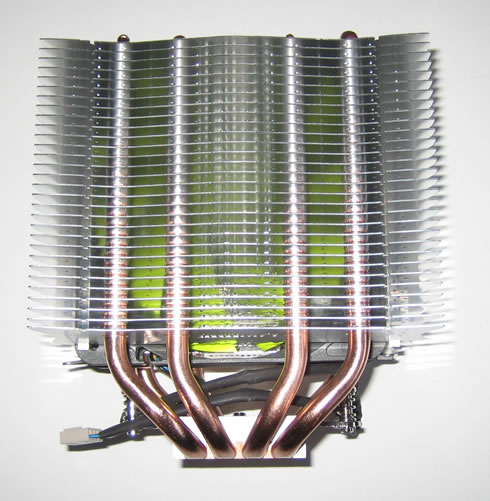
Below you can see the dimensions of the cooler. Although its height is typical for this category of coolers, its volume is large due to its dual heatsink design. The cooler uses a 120mm fan in between the heatsink towers:

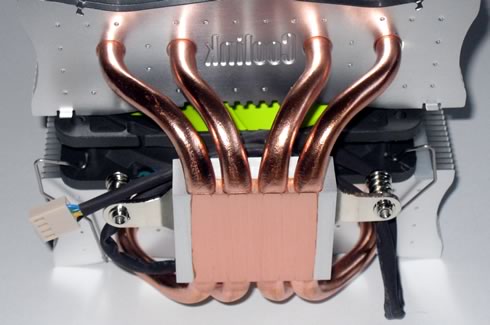
The Corator DS has a large (155mm x 140mm x 121mm) heatsink that uses two symmetrical tower fin arrays interconnected via a series of four 8mm copper heat -pipes. The heat-pipes run along the contact surface of the heatsink in what Coolink calls a 'Gapless Direct Touch technology.' Here, the gaps between the heat-pipes are filled with copper providing a single surface for a better conduction of heat:

The cooler's weight is around 1040gr. The installed green fan supports 800-1700 RPM and it is PWM controlled.
Installing this cpu cooler might take you some extra time if you are not familiar with the SecuFirm2 mounting system. The manual will make your life easier here so take some time and read it. The basic step is to place need to place the X-shaped mettallic backplate on the solder side of the motherboard with the four bolts into the correct set of holes, according to your motherboard (AMD/Intel). After that, you just need to apply thermal compound, put the cooler over the CPU and fasten both screws.

The procedure is similar to the one we followed when we tested the Noctua NH-D14 CPU cooler, so you may take a look there for detailed instructions.

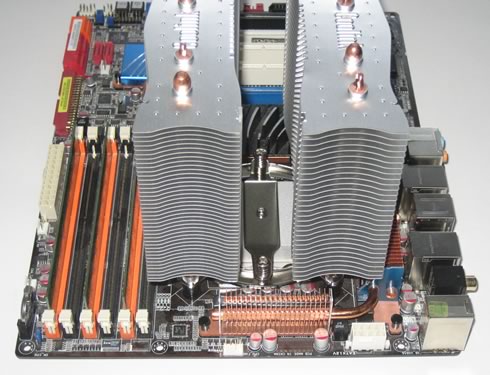
Here is how our system looks like after installation. Although the cooler is big is should fit normally, unless you have installed any high cooling system to your memory modules.

 

Review Pages

1. Features, specs
2. Package, installation
3. How we test
4. Results
5. Final words


Pages

  • « first
  • ‹ previous
  • 1
  • 2
  • 3
  • 4
  • 5
  • next ›
  • last »

Coolink

Tags: Coolink
Previous Post
Cogage True Spirit
Next Post
Gigabyte HD5670 OC

Related Posts

Latest Reviews

EnGenius ECW520 AP
Enterprise & IT

EnGenius ECW520 AP

Noctua NP-DM3 desk mat
Gaming

Noctua NP-DM3 desk mat

Crucial P510 2TB NMVE
PC components

Crucial P510 2TB NMVE

The Quiet Technology Behind the Spin
Enterprise & IT

The Quiet Technology Behind the Spin

Crucial DDR5 Pro 6400 CL32
PC components

Crucial DDR5 Pro 6400 CL32

Popular News

COLORFUL Introduces CVN B850I GAMING FROZEN Motherboard

COLORFUL Introduces CVN B850I GAMING FROZEN Motherboard

COLORFUL Presents CVN X870 ARK FROZEN Motherboard for AMD Ryzen 9000 CPUs

COLORFUL Presents CVN X870 ARK FROZEN Motherboard for AMD Ryzen 9000 CPUs

COLORFUL Presents the B860 Series Motherboards

COLORFUL Presents the B860 Series Motherboards

Intel-AMD new motherboards announced

Intel-AMD new motherboards announced

TEAMGROUP Launches EXPERT P34F Find My External SSD

TEAMGROUP Launches EXPERT P34F Find My External SSD

ASRock AM5 Motherboards Now Fully Support AMD Ryzen 9 9950X3D & 9900X3D Processors

ASRock AM5 Motherboards Now Fully Support AMD Ryzen 9 9950X3D & 9900X3D Processors

Samsung announces Galaxy Tab S11 and Galaxy S25 FE series

Samsung announces Galaxy Tab S11 and Galaxy S25 FE series

Viltrox Showcases Upcoming Lens Lineup and New TTL Flash at IBC 2025

Viltrox Showcases Upcoming Lens Lineup and New TTL Flash at IBC 2025

Main menu

  • Home
  • News
  • Reviews
  • Essays
  • Forum
  • Legacy
  • About
    • Submit News

    • Contact Us
    • Privacy

    • Promotion
    • Advertise

    • RSS Feed
    • Site Map
  • About
  • Privacy
  • Contact Us
  • Promotional Opportunities @ CdrInfo.com
  • Advertise on out site
  • Submit your News to our site
  • RSS Feed