Breaking News

ASUS Announces T1 GeForce RTX 5070 and RTX 5060 Ti Graphics Cards COLORFUL Launches iGame B850M ULTRA Series Micro-ATX Motherboards Sony Unveils 1000X THE COLLEXION Samsung Launches Next-Gen Odyssey, ViewFinity and The Movingstyle Essential Monitors LG Electronics Introduces World’s First Native 1000Hz Full HD Gaming Monitor

logo

  • Share Us
    • Facebook
    • Twitter
  • Home
  • Home
  • News
  • Reviews
  • Essays
  • Forum
  • Legacy
  • About
    • Submit News

    • Contact Us
    • Privacy

    • Promotion
    • Advertise

    • RSS Feed
    • Site Map

Search form

Cebit 2002 Show

Mar 14,2002 0

3. CloneCD v4.0 - Page 2


Review Pages

1. CeBIT Outside
2. CloneCD v4.0 - Page 1
3. CloneCD v4.0 - Page 2
4. ASUS
5. TEAC
6. YAMAHA
7. LG
8. Pegasys
9. Brainwave - Page 1
10. Brainwave - Page 2
11. Plextor
12. BenQ
13. CyberDrive
14. LiteOn
15. TDK
16. CSI
17. Artec
18. Ricoh
19. Maxtor
20. Sony
21. WAITEC
22. RITEK
23. MITSUI
24. AOpen
25. MSI
26. Maxell
27. CMC Magnetics
28. FujiFilm
29. Gigastorage
30. Prodisc
31. Seagate
32. Western Digital
33. NEC
34. M-Systems
35. CyQve
36. Hi-Space
37. Hitachi
38. HP
39. TOSHIBA
40. Mitsumi
41. Panasonic
42. Philips
43. Pioneer
44. Primera Technologies
45. Sono-Press
46. Adaptec
47. Samsung


Cebit 2002 - CloneCD v4.x

The CD Copy Authority strikes again! - Page 2

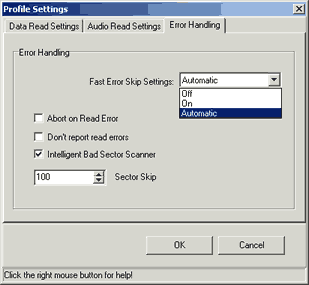
On the last tab "Error Handling", we can find another new feature of CloneCD. There is additional setting "Automatic" that contols the Fast Skip Error mode. CloneCD got smarter and now decides when the drive does has reading problems ,with bad sectors of protected CDs for example, enables the fast skip error to increase the drive's reading speed. When the drive passes the bad sectors, the "Fast Skip Error" is turned off to get the maximum reading quality. Now that is what i can call "Smart"! The "Intelligent Bad Sector Scanner" is always turned on with the default values of 100:
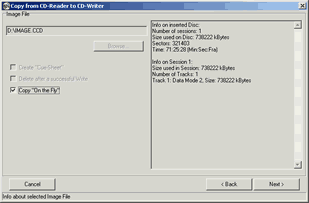
After we press ok, we press next and another graphic is displayed:

Nothing here has changed:
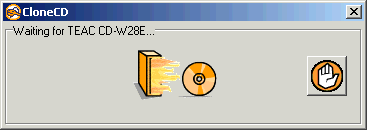
New Animation!

At the writing screen we can select our recorder and several "writing" templates, which guide user for the specific CD:

At the recorder settings, we can select the writing mode and the Buffer Underrun option:
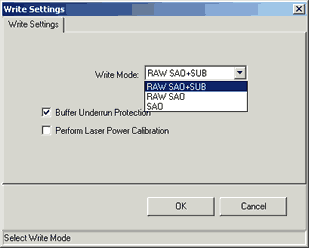
At the profile settings , we can select the writing speed, Amplify Weak Sector:

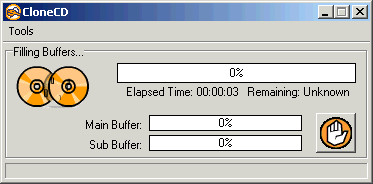
Finally recording started, and we can see a new animation (0,1 bytes moving from one CD to other):
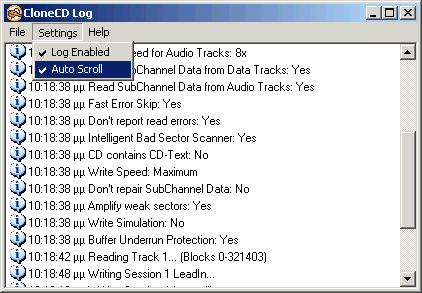
Another last improvement is at the log screen. You can now stop the scrolling (just double click upon it) and move up/down while the reading/writing process is going on:
Summary

Even the version we saw was an early 4.x build, our general impression was positive. The interface has stayed the same and now almost all the "weird" settings have been replaced with templates for both reading/writing processes. Thats good for the inexperienced users. There are several other improvements, like the Audio Extraction mode and the very good/smart "Fast Skip Error" engine. Of course, here in CeBIT we didn't had the chance to make real life testing, but shortly we will ;-)


Review Pages

1. CeBIT Outside
2. CloneCD v4.0 - Page 1
3. CloneCD v4.0 - Page 2
4. ASUS
5. TEAC
6. YAMAHA
7. LG
8. Pegasys
9. Brainwave - Page 1
10. Brainwave - Page 2
11. Plextor
12. BenQ
13. CyberDrive
14. LiteOn
15. TDK
16. CSI
17. Artec
18. Ricoh
19. Maxtor
20. Sony
21. WAITEC
22. RITEK
23. MITSUI
24. AOpen
25. MSI
26. Maxell
27. CMC Magnetics
28. FujiFilm
29. Gigastorage
30. Prodisc
31. Seagate
32. Western Digital
33. NEC
34. M-Systems
35. CyQve
36. Hi-Space
37. Hitachi
38. HP
39. TOSHIBA
40. Mitsumi
41. Panasonic
42. Philips
43. Pioneer
44. Primera Technologies
45. Sono-Press
46. Adaptec
47. Samsung

 

Pages

  • « first
  • ‹ previous
  • 1
  • 2
  • 3
  • 4
  • 5
  • 6
  • 7
  • 8
  • 9
  • …
  • next ›
  • last »

Tags:
Previous Post
40x CD-RW Roundup Vol1
Next Post
Western Digital WD1200JB

Related Posts

Latest Reviews

The Technology Stack Behind Modern Digital Gaming Platforms
Consumer Electronics

The Technology Stack Behind Modern Digital Gaming Platforms

be quiet! Dark Rock Pro 6
Cooling Systems

be quiet! Dark Rock Pro 6

How Online Casinos Use Encryption, Verification, and Risk Controls to Build User Trust
Enterprise & IT

How Online Casinos Use Encryption, Verification, and Risk Controls to Build User Trust

Why Low-Latency Infrastructure Matters More Than Raw Specs
Enterprise & IT

Why Low-Latency Infrastructure Matters More Than Raw Specs

In the Age of AI Phishing, the Best User Experience Might Be the One That Feels Safest
Enterprise & IT

In the Age of AI Phishing, the Best User Experience Might Be the One That Feels Safest

Popular News

TEAMGROUP Launches EXPERT P34F Find My External SSD

TEAMGROUP Launches EXPERT P34F Find My External SSD

CORSAIR announces Vanguard Pro 96 and Vanguard 96 Gaming Keyboards

CORSAIR announces Vanguard Pro 96 and Vanguard 96 Gaming Keyboards

Samsung announces Galaxy Tab S11 and Galaxy S25 FE series

Samsung announces Galaxy Tab S11 and Galaxy S25 FE series

Viltrox Showcases Upcoming Lens Lineup and New TTL Flash at IBC 2025

Viltrox Showcases Upcoming Lens Lineup and New TTL Flash at IBC 2025

MSI Launches FORGE GK600 TKL WIRELESS Special Edition Compact Mechanical Keyboard

MSI Launches FORGE GK600 TKL WIRELESS Special Edition Compact Mechanical Keyboard

Panasonic Introduces the First Ultra-Telephoto Zoom Lens in the LUMIX S Series

Panasonic Introduces the First Ultra-Telephoto Zoom Lens in the LUMIX S Series

MSI Launches DATAMAG 40Gbps Magnetic Portable SSD

MSI Launches DATAMAG 40Gbps Magnetic Portable SSD

Viltrox Joins the L-Mount Alliance, Expanding Creative Possibilities

Viltrox Joins the L-Mount Alliance, Expanding Creative Possibilities

Main menu

  • Home
  • News
  • Reviews
  • Essays
  • Forum
  • Legacy
  • About
    • Submit News

    • Contact Us
    • Privacy

    • Promotion
    • Advertise

    • RSS Feed
    • Site Map
  • About
  • Privacy
  • Contact Us
  • Promotional Opportunities @ CdrInfo.com
  • Advertise on out site
  • Submit your News to our site
  • RSS Feed