Box for Windows 8 Released
Box makes it easy to connect with your content, no matter what device, platform or location you're working from, with the introduction of Box for Windows 8 app.
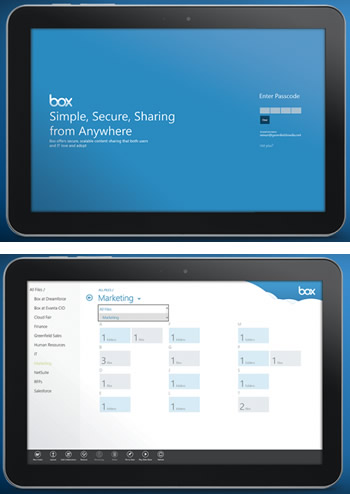
The new app lets you drill down through your folders, search your entire account and see individual file details. But Box has added something new, too: when you're inside a large folder with lots of content, a pinch-to-zoom gesture will get you a summary view that lets you jump to any letter, date or size (when sorted by name, date and size respectively) - built using the Semantic Zoom functionality on Windows 8.
 Windows 8 provides hooks for apps to act as a source for file picking and file saving, so Box for Windows 8 acts as both a file source and a file target, so all your Windows 8 apps can make use of content stored on Box without any additional work by other developers. This means that you can grab a file from Box to attach to an email OR save an attachment someone sent you directly to your Box account.
Of course, the app has also all the standard features of creating folders, uploading multiple files, moving/copying items, renaming files, downloading files to disk and more.
One more cool feature - you can actually open files from the Box app directly for editing, and any edits you make to them while outside the app will be saved back up to Box when you switch back.
You have many choices when it comes to getting your files in and out of Box on Windows 8. You can access your Box files directly from inside any app (like pulling an attachment in Mail), browse the Box app itself, and even edit a document from Box and save it right back into the cloud.
Live Tiles are a defining characteristic of Windows 8, and the new Box app wouldn?t be complete without them. The updates feed is now married that to Live Tiles to bring recent updates right to your attention on the Windows 8 Start screen.
You can also pin individual files or folders right to your start screen as Secondary Tiles. A lock screen badge is also available, so you can choose to show the number of updates you haven't seen yet right on your lock screen - next to your mail, calendar and clock.
Add collaborators via email addresses (even choosing right from the People app) and you can even set which level of permissions they'll have - upload only, or preview and download only.
Sharing via links is made even better with Windows 8 thanks to the Share Charm. Now you can share a link with any other Windows 8 app that supports receiving them: that means you can share right into an email with the Mail app, or post a public file to social networks by Sharing with the People app.
Just like the other mobile apps, Box brought SSO login support and a passcode lock feature to Box for Windows 8.
Box for Windows 8 has also built-in support for French, Italian, German, Spanish, Dutch, Portuguese, Russian and Chinese, with additional language support coming in the future.
For a limited time, Box is also giving away 25GB of storage plus Box Sync (for use in the Desktop half of Windows 8 ) on any HP Windows 8 device, and a 50GB account when you sign up for Box from the Samsung ATIV Tab.
Windows 8 provides hooks for apps to act as a source for file picking and file saving, so Box for Windows 8 acts as both a file source and a file target, so all your Windows 8 apps can make use of content stored on Box without any additional work by other developers. This means that you can grab a file from Box to attach to an email OR save an attachment someone sent you directly to your Box account.
Of course, the app has also all the standard features of creating folders, uploading multiple files, moving/copying items, renaming files, downloading files to disk and more.
One more cool feature - you can actually open files from the Box app directly for editing, and any edits you make to them while outside the app will be saved back up to Box when you switch back.
You have many choices when it comes to getting your files in and out of Box on Windows 8. You can access your Box files directly from inside any app (like pulling an attachment in Mail), browse the Box app itself, and even edit a document from Box and save it right back into the cloud.
Live Tiles are a defining characteristic of Windows 8, and the new Box app wouldn?t be complete without them. The updates feed is now married that to Live Tiles to bring recent updates right to your attention on the Windows 8 Start screen.
You can also pin individual files or folders right to your start screen as Secondary Tiles. A lock screen badge is also available, so you can choose to show the number of updates you haven't seen yet right on your lock screen - next to your mail, calendar and clock.
Add collaborators via email addresses (even choosing right from the People app) and you can even set which level of permissions they'll have - upload only, or preview and download only.
Sharing via links is made even better with Windows 8 thanks to the Share Charm. Now you can share a link with any other Windows 8 app that supports receiving them: that means you can share right into an email with the Mail app, or post a public file to social networks by Sharing with the People app.
Just like the other mobile apps, Box brought SSO login support and a passcode lock feature to Box for Windows 8.
Box for Windows 8 has also built-in support for French, Italian, German, Spanish, Dutch, Portuguese, Russian and Chinese, with additional language support coming in the future.
For a limited time, Box is also giving away 25GB of storage plus Box Sync (for use in the Desktop half of Windows 8 ) on any HP Windows 8 device, and a 50GB account when you sign up for Box from the Samsung ATIV Tab.