Breaking News

ASUS Announces T1 GeForce RTX 5070 and RTX 5060 Ti Graphics Cards COLORFUL Launches iGame B850M ULTRA Series Micro-ATX Motherboards Sony Unveils 1000X THE COLLEXION Samsung Launches Next-Gen Odyssey, ViewFinity and The Movingstyle Essential Monitors LG Electronics Introduces World’s First Native 1000Hz Full HD Gaming Monitor

logo

  • Share Us
    • Facebook
    • Twitter
  • Home
  • Home
  • News
  • Reviews
  • Essays
  • Forum
  • Legacy
  • About
    • Submit News

    • Contact Us
    • Privacy

    • Promotion
    • Advertise

    • RSS Feed
    • Site Map

Search form

Asus P5LD2 Deluxe

Sep 7,2005 0

18. BIOS - Page 2


Review Pages

1. Introduction
2. The mainboard - Packaging
3. Test System - Configuration
4. SLI Mode
5. 3DMark05
6. 3DMark03
7. Codecreatures
8. Aquamark/3DMark 2001
9. Half Life 2
10. Doom 3
11. PCMark04 & 05
12. Thief 3
13. Colin McRae 2005
14. Ground Control II
15. Performance Test v5.0
16. Overclocking
17. BIOS - Page 1
18. BIOS - Page 2
19. Software Bundled - Asus Update
20. Asus PCProbe2
21. Asus AIBooster
22. WiFi-TV set
23. Conclusion


If you want to play with the advanced settings on the Asus motherboard, of which there are plenty, you'll have to enter the Advanced screen, as shown below. In the JumprFree Configuration menu, you can change the CPU, Memory and PCI-E frequencies, select between overclocking profiles, change the voltage for the CPU, Memory etc.

Once again, the Asus P5LD2 Deluxe has an almost identical BIOS with the P5WD2 Premium. In order to highlight the differences, we used screenshots from the P5WD2 Premium review (black and white) and full colour for the P5LD2.


Advanced Main Screen
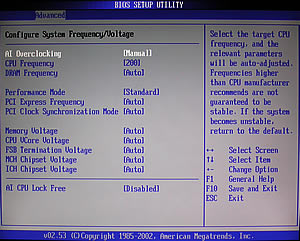

JumperFree Configuration

Different FSB and CPU Lock Free function is visible, due to the different CPU used. Otherwise the BIOS is identical for both Asus motherboards.


Overclock Profiles


Memory Frequency

The available preset values for the memory frequencies are different due to the different FSB of the two Intel processors we used.


PCI-E Frequency


Memory Voltage


CPU Voltage


CPU Configuration


Chipset Setup

From the OnBoard Devices Configuration menu, you can enable or disable the LAN, Firewire, SATA etc.


OnBoard Devices Configuration

An actual difference can be found here. The P5LD2 Deluxe has only one LAN port while the P5WD2 Premium two, so the second LAN is missing in the BIOS.


USB Configuration

Detailed information about the BIOS configuration can be found in the board's manual. We highly recommend you first read it before proceeding with any overclocking.


Review Pages

1. Introduction
2. The mainboard - Packaging
3. Test System - Configuration
4. SLI Mode
5. 3DMark05
6. 3DMark03
7. Codecreatures
8. Aquamark/3DMark 2001
9. Half Life 2
10. Doom 3
11. PCMark04 & 05
12. Thief 3
13. Colin McRae 2005
14. Ground Control II
15. Performance Test v5.0
16. Overclocking
17. BIOS - Page 1
18. BIOS - Page 2
19. Software Bundled - Asus Update
20. Asus PCProbe2
21. Asus AIBooster
22. WiFi-TV set
23. Conclusion

 

Pages

  • « first
  • ‹ previous
  • …
  • 14
  • 15
  • 16
  • 17
  • 18
  • 19
  • 20
  • 21
  • 22
  • next ›
  • last »

ASUS

Tags: ASUS
Previous Post
NTI Shadow
Next Post
Plextor PX-716AL

Related Posts

  • ASUS Announces T1 GeForce RTX 5070 and RTX 5060 Ti Graphics Cards

  • ASUS Announces ProArt GeForce RTX 5090 Graphics Card

  • ASUS Announces ProArt Display OLED PA27USD and PA32USD

  • ASUS Announces TUF Gaming Platinum Power Supply Series

  • ASUS Announces ProArt PA40SU USB4 SSD Enclosure

  • ASUS Showcases Comprehensive AI-Powered Creator Workflows at NAB Show 2026

  • ASUS Announces ProArt Router PRT-BE5000 and ProArt Switch PQG-U1080

  • ASUS Announces Intel Core Ultra 200S Plus Series Support on W880, Z890, Q870, B860 and H810 Motherboards

Latest Reviews

The Technology Stack Behind Modern Digital Gaming Platforms
Consumer Electronics

The Technology Stack Behind Modern Digital Gaming Platforms

be quiet! Dark Rock Pro 6
Cooling Systems

be quiet! Dark Rock Pro 6

How Online Casinos Use Encryption, Verification, and Risk Controls to Build User Trust
Enterprise & IT

How Online Casinos Use Encryption, Verification, and Risk Controls to Build User Trust

Why Low-Latency Infrastructure Matters More Than Raw Specs
Enterprise & IT

Why Low-Latency Infrastructure Matters More Than Raw Specs

In the Age of AI Phishing, the Best User Experience Might Be the One That Feels Safest
Enterprise & IT

In the Age of AI Phishing, the Best User Experience Might Be the One That Feels Safest

Popular News

TEAMGROUP Launches EXPERT P34F Find My External SSD

TEAMGROUP Launches EXPERT P34F Find My External SSD

CORSAIR announces Vanguard Pro 96 and Vanguard 96 Gaming Keyboards

CORSAIR announces Vanguard Pro 96 and Vanguard 96 Gaming Keyboards

Samsung announces Galaxy Tab S11 and Galaxy S25 FE series

Samsung announces Galaxy Tab S11 and Galaxy S25 FE series

Viltrox Showcases Upcoming Lens Lineup and New TTL Flash at IBC 2025

Viltrox Showcases Upcoming Lens Lineup and New TTL Flash at IBC 2025

MSI Launches FORGE GK600 TKL WIRELESS Special Edition Compact Mechanical Keyboard

MSI Launches FORGE GK600 TKL WIRELESS Special Edition Compact Mechanical Keyboard

Panasonic Introduces the First Ultra-Telephoto Zoom Lens in the LUMIX S Series

Panasonic Introduces the First Ultra-Telephoto Zoom Lens in the LUMIX S Series

MSI Launches DATAMAG 40Gbps Magnetic Portable SSD

MSI Launches DATAMAG 40Gbps Magnetic Portable SSD

Viltrox Joins the L-Mount Alliance, Expanding Creative Possibilities

Viltrox Joins the L-Mount Alliance, Expanding Creative Possibilities

Main menu

  • Home
  • News
  • Reviews
  • Essays
  • Forum
  • Legacy
  • About
    • Submit News

    • Contact Us
    • Privacy

    • Promotion
    • Advertise

    • RSS Feed
    • Site Map
  • About
  • Privacy
  • Contact Us
  • Promotional Opportunities @ CdrInfo.com
  • Advertise on out site
  • Submit your News to our site
  • RSS Feed