Breaking News

Arctic announces Senza AI 370 Under Desk PC for AI Applications CORSAIR Announces the Airflow-focused 3200D Mid Tower for Ambitious DIY PC Builds Silicon Power Launches Enterprise-Grade DDR5 RDIMM to Accelerate AI Workloads World Backup Day 2026: A Backup Doesn’t Always Need to be in the Cloud Sharkoon announces S100 ARGB AIO Cooler

logo

  • Share Us
    • Facebook
    • Twitter
  • Home
  • Home
  • News
  • Reviews
  • Essays
  • Forum
  • Legacy
  • About
    • Submit News

    • Contact Us
    • Privacy

    • Promotion
    • Advertise

    • RSS Feed
    • Site Map

Search form

Acard ARS-2033N 1-to-21 Duplicator

Sep 3,2006 0

4. Conclusion


Review Pages

1. Introduction
2. Installation
3. Copying and Testing
4. Conclusion


Acard logoDuplicators have become quite popular in the past few years, especially among those who have to produce product catalogs or company presentations on CD or DVD media. And while with most duplicators available, producing a few hundred discs was a breeze, now with the Acard ARS-2003N 1-to-21 duplicator, even thousands can be made short work of.

The Acard ARS-2003N 1-to-21 duplicator has a complete function set, controlled from a very simple front panel. The 1-to-21 burner is in fact 3 ARS-2003N boards connected together, each handling up to 7 burner drives. One controller is designated the host and it controls all functions. It can read the image to burn, from either a DVD-ROM drive or a HDD connected to the controller. We recommend using the HDD, except for very small jobs.

In our run of various tests, we met with no problems and found the controller to be very stable and reliable. We even made a run using as burners, different model drives (but from the same manufacturer), something which is not recommended by ACARD or any duplicator manufacturer. The unit however, worked without a hitch.

We burnt both CD and DVD compilations, around 500 discs in total. We had no failures or damaged discs. There were two occasions only where some discs were not written to, but the discs were simply used in the next round of writing.
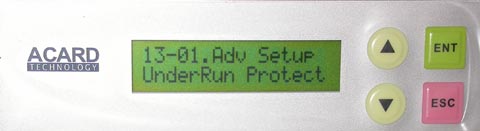
Underrun

If we have to complain about something, it would be the organisation of the menu, controlled from the front panel. There is a total of 13 main categories or functions. Some of these have sub-functions while others do not. In the case of the Setup and Advanced Setup main functions, there is a total of 38 sub-functions. We feel that this is too many and that they can be split into fewer selections under more main functions and into more logical groupings. The main functions Test, Test & Verify, Verify, and Compare, could then be grouped together under one main function to keep the number of main functions small.

Overall however, this is a very impressive duplicator. For pricing, contact one of ACARD's distributors.


 

Review Pages

1. Introduction
2. Installation
3. Copying and Testing
4. Conclusion


Pages

  • « first
  • ‹ previous
  • 1
  • 2
  • 3
  • 4

Tags:
Previous Post
Motorla Q
Next Post
Avayon DXP-1000

Related Posts

Latest Reviews

Why Streaming Live Casino Games Demands Smarter Tech
Enterprise & IT

Why Streaming Live Casino Games Demands Smarter Tech

Kioxia Exceria Plus G3 512GB microSD
Cameras

Kioxia Exceria Plus G3 512GB microSD

SoundPeats Cove Pro
Consumer Electronics

SoundPeats Cove Pro

Asustor AS5404T 4-Bay NAS System
Enterprise & IT

Asustor AS5404T 4-Bay NAS System

be quiet! Pure Power 13M 1200W
PC components

be quiet! Pure Power 13M 1200W

Popular News

COLORFUL Presents CVN X870 ARK FROZEN Motherboard for AMD Ryzen 9000 CPUs

COLORFUL Presents CVN X870 ARK FROZEN Motherboard for AMD Ryzen 9000 CPUs

TEAMGROUP Launches EXPERT P34F Find My External SSD

TEAMGROUP Launches EXPERT P34F Find My External SSD

Samsung announces Galaxy Tab S11 and Galaxy S25 FE series

Samsung announces Galaxy Tab S11 and Galaxy S25 FE series

Viltrox Showcases Upcoming Lens Lineup and New TTL Flash at IBC 2025

Viltrox Showcases Upcoming Lens Lineup and New TTL Flash at IBC 2025

CORSAIR announces Vanguard Pro 96 and Vanguard 96 Gaming Keyboards

CORSAIR announces Vanguard Pro 96 and Vanguard 96 Gaming Keyboards

Panasonic Introduces the First Ultra-Telephoto Zoom Lens in the LUMIX S Series

Panasonic Introduces the First Ultra-Telephoto Zoom Lens in the LUMIX S Series

MSI Launches DATAMAG 40Gbps Magnetic Portable SSD

MSI Launches DATAMAG 40Gbps Magnetic Portable SSD

MSI Launches FORGE GK600 TKL WIRELESS Special Edition Compact Mechanical Keyboard

MSI Launches FORGE GK600 TKL WIRELESS Special Edition Compact Mechanical Keyboard

Main menu

  • Home
  • News
  • Reviews
  • Essays
  • Forum
  • Legacy
  • About
    • Submit News

    • Contact Us
    • Privacy

    • Promotion
    • Advertise

    • RSS Feed
    • Site Map
  • About
  • Privacy
  • Contact Us
  • Promotional Opportunities @ CdrInfo.com
  • Advertise on out site
  • Submit your News to our site
  • RSS Feed