Breaking News

G.SKILL Demo New Memory Solutions for Gaming, Server, AI, Workstation Applications at Computex 2026 LIAN LI Launches HydroShift II OLED Curved 360 AIO LIAN LI Unveils O11 VISION-M CORSAIR PRO launches AI Workstations and Servers ASUS Announces T1 GeForce RTX 5070 and RTX 5060 Ti Graphics Cards

logo

  • Share Us
    • Facebook
    • Twitter
  • Home
  • Home
  • News
  • Reviews
  • Essays
  • Forum
  • Legacy
  • About
    • Submit News

    • Contact Us
    • Privacy

    • Promotion
    • Advertise

    • RSS Feed
    • Site Map

Search form

BenQ DW800A Dual Recorder (update)

Apr 26,2004 0

1. Introduction - Upgrade procedure


Review Pages

1. Introduction - Upgrade procedure
2. DVD-R recording tests


BenQ DW800A Dual Recorder - Page 1

Recently BenQ offered all BenQ DW800A users the chance to upgrade their drive(s) from single (+R/RW) to dual (±R/RW) format. BenQ charged users $10 for each drive they wanted to upgrade, mainly due to royalty fees. The initial firmware upgrade allowed 2X DVD-R and 1X DVD-RW recording, with some limitations of course... After a while, BenQ released a new firmware, increasing the DVD-R writing speed to 4X. Let's see how the drive performs at 4X with various DVD-R media.

- Upgrade procedure

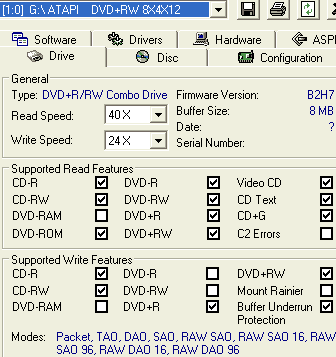
Before upgrading your drive, you must visit the BenQ website and read the instructions carefully. After paying the $10 fee, an email confirmation includes all the necessary details (download link and serial number) to complete the procedure. Let's see this step by step. The details of the DW800A drive are available below:
After downloading the -RW firmware, the updater utility prompts us to enter our serial number before flashing the drive. Note that you must be connected to the internet in order to allow the flasher to check the validation of the serial number and proceed with the update process. This way, BenQ ensures that all users will pay to upgrade their drives...

Below is the flash tool's opening window:
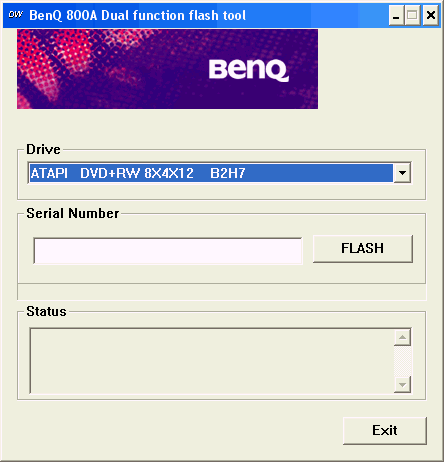
As we mentioned, an internet connection is required here. Insert your serial and press the "FLASH" button. If the serial is valid, the process begins:

Once the flashing procedure has ended, you now need to reboot your PC in order for Windows to find the recorder's new ID.

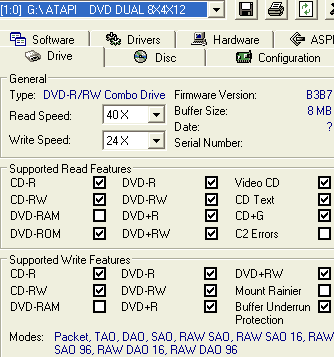
Let's now see our "new" recorder. The drive is identified as "DVD DUAL 8X4X12" and supports DVD-R/-RW writing as DVDInfoPro and CDSpeed show.
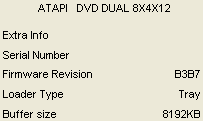
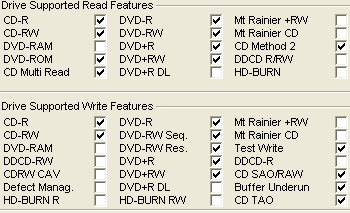
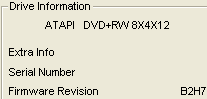
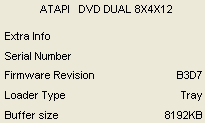
Although the drive's ID remains the same, the firmware revision changed to the B3D7, which is final since no newer firmware should be expected in the near future, according to BenQ. For unknown reasons, the B3D7 firmware was removed from the BenQ website only a couple of days after its initiall availability. For all those who are interested, you can download it here.

 

Review Pages

1. Introduction - Upgrade procedure
2. DVD-R recording tests


Pages

  • 1
  • 2
  • next ›
  • last »

Tags:
Previous Post
Optorite DD0405
Next Post
Toshiba SD-R5272

Related Posts

Latest Reviews

Swit NP-FZ100 Battery
Cameras

Swit NP-FZ100 Battery

The Technology Stack Behind Modern Digital Gaming Platforms
Consumer Electronics

The Technology Stack Behind Modern Digital Gaming Platforms

be quiet! Dark Rock Pro 6
Cooling Systems

be quiet! Dark Rock Pro 6

How Online Casinos Use Encryption, Verification, and Risk Controls to Build User Trust
Enterprise & IT

How Online Casinos Use Encryption, Verification, and Risk Controls to Build User Trust

Why Low-Latency Infrastructure Matters More Than Raw Specs
Enterprise & IT

Why Low-Latency Infrastructure Matters More Than Raw Specs

Popular News

TEAMGROUP Launches EXPERT P34F Find My External SSD

TEAMGROUP Launches EXPERT P34F Find My External SSD

CORSAIR announces Vanguard Pro 96 and Vanguard 96 Gaming Keyboards

CORSAIR announces Vanguard Pro 96 and Vanguard 96 Gaming Keyboards

Samsung announces Galaxy Tab S11 and Galaxy S25 FE series

Samsung announces Galaxy Tab S11 and Galaxy S25 FE series

Viltrox Showcases Upcoming Lens Lineup and New TTL Flash at IBC 2025

Viltrox Showcases Upcoming Lens Lineup and New TTL Flash at IBC 2025

MSI Launches FORGE GK600 TKL WIRELESS Special Edition Compact Mechanical Keyboard

MSI Launches FORGE GK600 TKL WIRELESS Special Edition Compact Mechanical Keyboard

Panasonic Introduces the First Ultra-Telephoto Zoom Lens in the LUMIX S Series

Panasonic Introduces the First Ultra-Telephoto Zoom Lens in the LUMIX S Series

MSI Launches DATAMAG 40Gbps Magnetic Portable SSD

MSI Launches DATAMAG 40Gbps Magnetic Portable SSD

Viltrox Joins the L-Mount Alliance, Expanding Creative Possibilities

Viltrox Joins the L-Mount Alliance, Expanding Creative Possibilities

Main menu

  • Home
  • News
  • Reviews
  • Essays
  • Forum
  • Legacy
  • About
    • Submit News

    • Contact Us
    • Privacy

    • Promotion
    • Advertise

    • RSS Feed
    • Site Map
  • About
  • Privacy
  • Contact Us
  • Promotional Opportunities @ CdrInfo.com
  • Advertise on out site
  • Submit your News to our site
  • RSS Feed